TIBCO® Graph Database
REST API Guide
Version 3.1
November 2021
Table of Contents
Authentication Resource Schema
Retrieve Attribute Descriptors
Retrieve Specific Attribute Descriptor
Example Message - Insert Nodes
Example Message - Insert Edges
Example Message - Updating Nodes
Example Message - Deleting Nodes
Example Message - Updating and Deleting Edges
Example Message - Putting all together
Authentication & Authorization
TIBCO Graph Database provides REST APIs for clients to connect to the database using REST architectural patterns. This document describes different REST APIs supported by the product, the basic architecture of how the REST APIs are supported from the product, and different configuration options to customize the REST server.
To use REST APIs of TIBCO Graph Database with your applications, the REST Server must be running along with TIBCO Graph Database server.
tgdb-rest [--config <config filename> [--listen <host:port>] [--dburl db_url] [--dbpoolsize size] [--name name] [--loglevel Error|Warning|Info|Debug] [--logdir log_directory_path] [--logtoconsole true|false]
The command line options are described in the following table.
Option | Description |
--config <config filename> | <config filename> is the name of the config file |
--listen <host:port> | <host:port>: the host & port for server to listen to (default: "localhost:9500") |
--dburl <db_url> | db_url: the tgdb URL to connect to a database (default: "tcp://api@localhost:8222/{dbName=demodb}" |
--dbpoolsize <size> | size: the Connection-Pool size to connect to TIBCO Graph Database (default: 25) |
--name <name> | name: the name of the tgdb-rest server instance (default: "tgdb-rest-<pid>") where pid is the process-Id. |
--loglevel <level> | level: the loglevel to set (Error|Warning|Info|Debug) (default: "Warning") |
--logdir <log_directory_path> | log_directory_path: the directory to store logs (default: Current-Working-Directory) |
--logtoconsole <value> | value: the boolean value to log messages on console (default: true) |
-h, --help | to see help detail for the REST server config options |
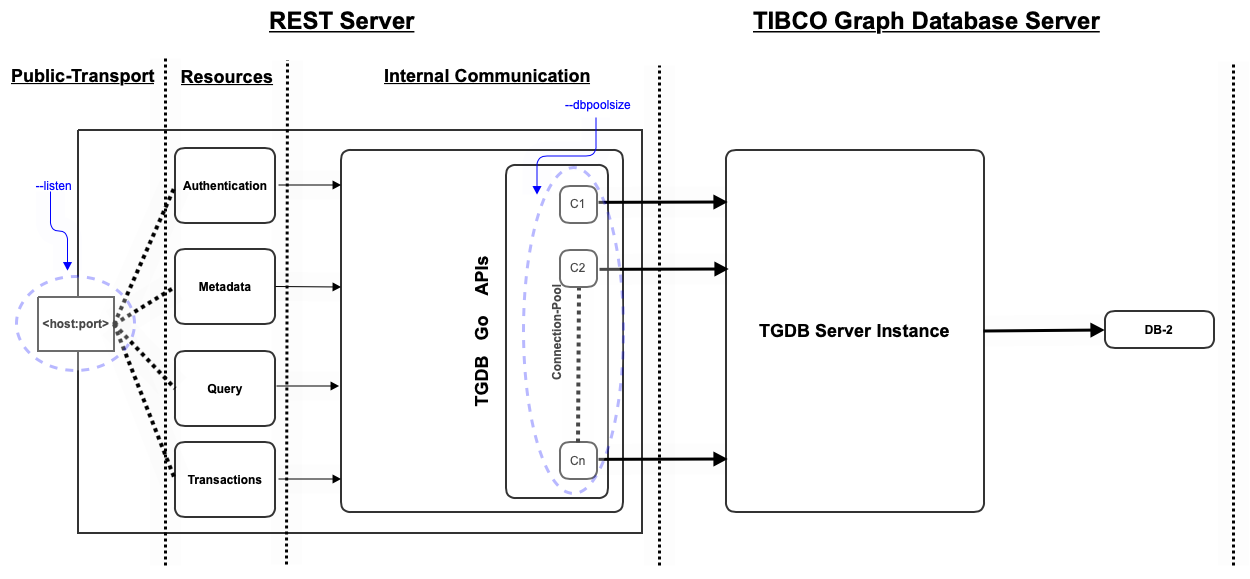
This section provides a high level architecture of the REST server. It provides the REST server components with a bird’s eye view, the interaction of various components with the Database server, and finally illustrates a sample deployment in today’s world.
The following figure shows the bird’s eye view of REST Server components, and their interaction with Graph Database Server.
The REST server exposes a set of well defined resources as REST-JSON for public consumption by any REST clients. The server exposes the underlying TGDB services as specified below:
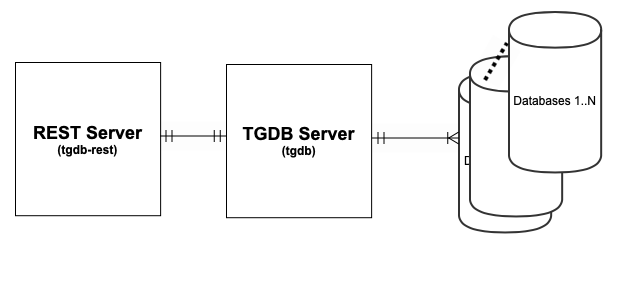
The following figure shows the relationship between the REST Server, TGDB Server and the Database. Understanding this relationship is key for deployment purposes.
The figure depicts the association between REST Server and TGDB Server as a one-to-one association, whereas the TGDB Server has one-to-many relationships with the database. This means that:
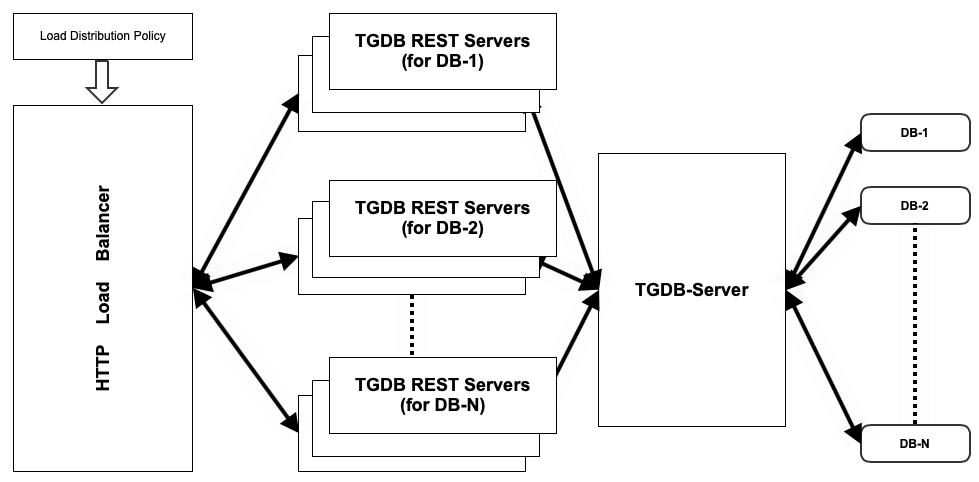
The following figure describes a sample deployment topology where you have deployed N REST servers and each REST server connects to a database hosted on TGDB Server. The components and interaction in the figure are as follows:
The TGDB REST server is a stateless server. This means it does not maintain any of the application, or session-related state. It essentially provides a gateway between client and TGDB Server on a well-known transport and protocol, for example: HTTP 1.1/REST-JSON.
It provides transformation between the native binary message and JSON message format over a HTTP protocol. The following section describes the Request and Response semantics.
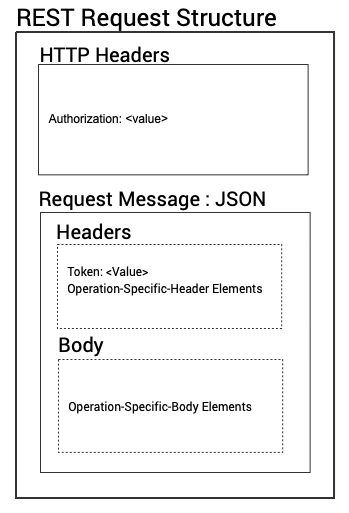
The figure below shows the general requirements for the HTTP Request. They can be GET/POST requests.
The HTTP Request consists of HTTP headers and a JSON payload.
The key fields in the structure are:.
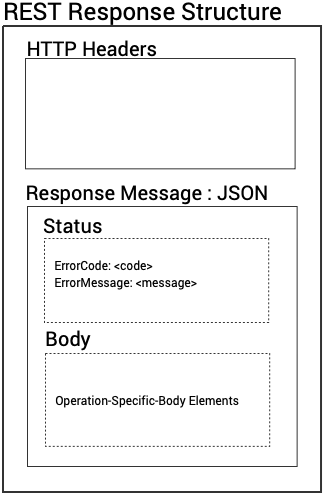
The figure below shows the general response for any request on the REST server. The response is a HTTP message with JSON payload. The HTTP headers in the response are filled in automatically by the REST server and are of little importance unless mentioned in specific Resources.
The HTTP response is JSON payload consists of the following fields:
The TGDB REST server is a stateless and a proxy server to the graph database server. This means it connects to the TGDB server using proxy privileges and does not maintain any state of the application, or session-related state. It essentially provides a gateway between the client and server on a well-known transport and protocol, for example: HTTP1.1/REST-JSON.
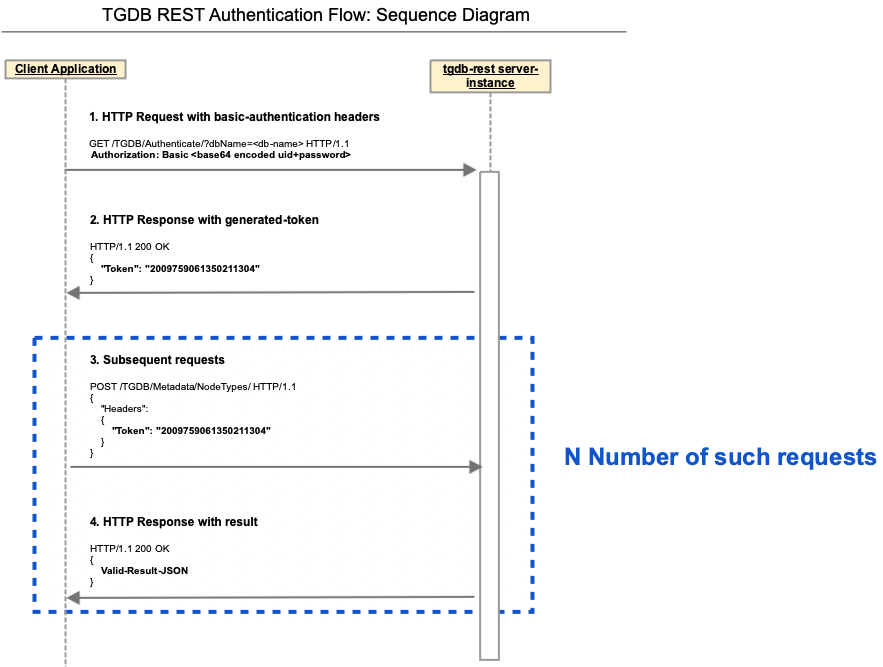
Since every service needs to have appropriate privilege to access, the REST server exposes an Authentication Service for client applications to authenticate itself to the TGDB server. The flow of data and its requirements are explained with the following sequence diagram.
The flow is described as below
User application sends an authentication request to the TGDB REST server using HTTP basic authentication scheme as specified in RFC 7617. For example, if the client application uses Aladdin as the username and open sesame as the password, then the field's value is the Base64 encoding of Aladdin:open sesame. Hence the Authorization header field will appear as: Authorization: Basic QWxhZGRpbjpvcGVuIHNlc2FtZQ== | |
The REST server authenticates the user and password with the TGDB Server on the behalf of the client app. | |
Upon successful authorization, the TGDB server creates an ACL token, encoding its permission, privileges and roles, and sends a unique token id to the REST server. | |
The REST server then packages the above token id in the Response message back to the client app. | |
The subsequent request to the REST server needs to carry the token with each request. This token is then used to determine the access rights on the TGDB. Steps 1-4 can be repeated any number of times. | |
The TGDB server manages the life cycle of the ACL token. The client needs to hold on to the token. Each token has a configurable expiry time. |
The following table provides the key requirements for an Authentication Service to be executed. An invalid userid/password combination returns a HTTP 401 message - invalid authentication attempt.
URI: /TGDB/Authenticate/?dbName=<database-name> |
HTTP Method: GET |
Input Schema: | |||
Name | Type | Required | Description |
Query Parameters | true | ||
dbName | string | true | dbName is specified as a query parameter to the URI itself |
Http Headers | |||
Authorization | string | true | HTTP Header needed for basic-authentication.See RFC 7617. |
Output Schema: | |||
Name | Type | Required | Description |
__token__ | string | true | Generated token by the server; this needs to be presented in each request on the supported resources |
Example | ||||
Request: GET /TGDB/Authenticate/?dbName=routesdb HTTP/1.1 Authorization: Basic c2NvdHQ6c2NvdHQ= Connection: keep-alive | Response: HTTP/1.1 200 OK Date: Wed, 16 Feb 2022 23:08:38 GMT Content-Length: 35 Content-Type: text/plain; charset=utf-8 { "__token__": "2009759061350211304" } | |||
The following resources are supported by the REST APIs:
The metadata resource is broken down into individual catalog elements such as NodeTypes, EdgeTypes, AttributeDescriptor. You can request for all the Types or a specific element. The following section provides the information about the REST API that you would need to successfully invoke the service.
The subsequent sections provides detailed information regarding:
This service retrieves all the NodeTypes and related information associated with it. The error is encoded within the status message structure.
URI: /TGDB/Metadata/NodeTypes/ |
HTTP Method: POST Resource Schema |
Input | |||
Name | Type | Required | Description |
__headers__ | |||
__token__ | string | true | The token received in Authenticate response |
Output | |||
Name | Type | Required | Description |
__status__ | object | true | The status of service execution |
__errorcode__ | int | true | 0 - success. Non Zero - Error code |
__errormessage__ | string | true | “Null” for success. Error message for the specific code |
__resultlist__ | list | List of all Node types | |
none | object | The object name is inside, so skipped to save some bytes. | |
__systype__ | int | A system type identifier for nodes | |
__id__ | int | A system id for the node type | |
__name__ | string | The node type specified | |
Example Message | ||||
Request: POST /TGDB/Metadata/NodeTypes/ HTTP/1.1 Content-Type: text/plain User-Agent: PostmanRuntime/7.28.4 Accept: */* Host: localhost:9600 Accept-Encoding: gzip, deflate, br Connection: keep-alive Content-Length: 73 { "__headers__": { "__token__": "2009759061350211304" } } | Response: HTTP/1.1 200 OK Access-Control-Allow-Origin: * Date: Wed, 16 Feb 2022 23:13:37 GMT Content-Length: 252 Content-Type: text/plain; charset=utf-8 { "__status__": { "__errorcode__": 0, "__errormessage__": "null" }, "__resultlist__": [ { "__systype__": 1, "__id__": 9242, "__name__": "airlineType" }, { "__systype__": 1, "__id__": 9244, "__name__": "airportType" }, { "__systype__": 1, "__id__": 9246, "__name__": "allianceType" } ] } | |||
This service retrieves the NodeType and specific information associated with it. In addition to the standard __token__ field, the Body is also filled in the input request. The error is encoded within the status message structure.
URI: /TGDB/Metadata/NodeTypes/ |
HTTP Method: POST Resource Schema |
Input | |||
Name | Type | Required | Description |
__headers__ | object | ||
__token__ | string | true | The token received in Authenticate response |
__body__ | object | ||
__name__ | string | true | Name of the required NodeType |
Output | |||
Name | Type | Required | Description |
__status__ | object | true | The status of service execution. Same as described earlier |
__errorcode__ | int | 0 - success. Non Zero - Error code | |
__errormessage__ | string | “Null” for success. Error message for the specific code | |
__resultlist__ | object | true | Node Type schema object. Note the name is still called Result list |
__systype__ | int | A system type identifier for nodes | |
__id__ | int | A system id for the node type | |
__name__ | string | The node type specified | |
Example Message | ||||
Request: POST /TGDB/Metadata/NodeTypes/ HTTP/1.1 Content-Type: text/plain User-Agent: PostmanRuntime/7.28.4 Accept: */* Host: localhost:9600 Accept-Encoding: gzip, deflate, br Connection: keep-alive Content-Length: 73 { "__headers__": { "__token__": "2009759061350211304" } "__body__": { "__name__": "airportType" } } | Response: HTTP/1.1 200 OK Access-Control-Allow-Origin: * Date: Wed, 16 Feb 2022 23:13:37 GMT Content-Length: 252 Content-Type: text/plain; charset=utf-8 { "__status__": { "__errorcode__": 0, "__errormessage__": "null" }, "__resultlist__": { "__systype__": 1, "__id__": 9244, "__name__": "airportType" } } | |||
This service retrieves all the edge types and related information associated with it. The error is encoded within the status message structure.
URI: /TGDB/Metadata/EdgeTypes/ |
HTTP Method: POST Resource Schema |
Input | |||
Name | Type | Required | Description |
__headers__ | |||
__token__ | string | true | The token received in Authenticate response |
Output | |||
Name | Type | Required | Description |
__status__ | object | true | The status of service execution |
__errorcode__ | int | 0 - success. Non Zero - Error code | |
__errormessage__ | string | “Null” for success. Error message for the specific code | |
__resultlist__ | list | true | List of all Node types |
none | object | true | The object name is anonymous, skipped to save some bytes. |
__systype__ | int | A system type identifier for nodes | |
__id__ | int | A system id for the node type | |
__name__ | string | The node type specified | |
Example Message | ||||
Request: POST /TGDB/Metadata/EdgeTypes/ HTTP/1.1 Content-Type: text/plain User-Agent: PostmanRuntime/7.28.4 Accept: */* Host: localhost:9600 Accept-Encoding: gzip, deflate, br Connection: keep-alive Content-Length: 73 { "__headers__": { "__token__": "2009759061350211304" } } | Response: HTTP/1.1 200 OK Access-Control-Allow-Origin: * Date: Wed, 16 Feb 2022 23:13:37 GMT Content-Length: 252 Content-Type: text/plain; charset=utf-8 { "__status__": { "__errorcode__": 0, "__errormessage__": "null" }, "__resultlist__": [ { "__systype__": 2, "__id__": 1041, "__name__": "routeType" }, { "__systype__": 2, "__id__": 1026, "__name__": "$def-bidirected-edge$" }, ⠇ { "__systype__": 2, "__id__": 1042, "__name__": "memberType" } ] } | |||
This service retrieves the specific edge type in question and its specific information associated with it. In addition to the standard __token__ field, the Body is also filled in the input request. The error is encoded within the status message structure.
URI: /TGDB/Metadata/EdgeTypes/ |
HTTP Method: POST Resource Schema |
Input: | |||
Name | Type | Required | Description |
__headers__ | object | ||
__token__ | string | true | The token received in Authenticate response |
__body__ | object | ||
__name__ | string | true | Name of the required edge type |
Output | |||
Name | Type | Required | Description |
__status__ | object | true | The status of service execution |
__errorcode__ | int | 0 - success. Non Zero - Error code | |
__errormessage__ | string | “Null” for success. Error message for the specific code | |
__resultlist__ | object | true | Edge Type schema object. Note the name is still called Result list |
__systype__ | int | A system type identifier for edge | |
__id__ | int | A system id for the edge type | |
__name__ | string | The edge type specified | |
Example Message | ||||
Request: POST /TGDB/Metadata/EdgeTypes/ HTTP/1.1 Content-Type: text/plain User-Agent: PostmanRuntime/7.28.4 Accept: */* Host: localhost:9600 Accept-Encoding: gzip, deflate, br Connection: keep-alive Content-Length: 73 { "__headers__": { "__token__": "2009759061350211304" } "__body__": { "__name__": "routeType" } } | Response: HTTP/1.1 200 OK Access-Control-Allow-Origin: * Date: Wed, 16 Feb 2022 23:13:37 GMT Content-Length: 252 Content-Type: text/plain; charset=utf-8 { "__status__": { "__errorcode__": 0, "__errormessage__": "null" }, "__resultlist__": { "__systype__": 2, "__id__": 1041, "__name__": "routeType" } } | |||
This service retrieves all the attribute descriptors in the database and related information associated with it. The error is encoded within the status message structure.
URI: /TGDB/Metadata/AttributeDescriptors/ |
HTTP Method: POST Resource Schema |
Input | |||
Name | Type | Required | Description |
__headers__ | |||
__token__ | string | true | The token received in Authenticate response |
Output | |||
Name | Type | Required | Description |
__status__ | object | true | The status of service execution as described in the earlier sections |
__errorcode__ | int | 0 - success. Non Zero - Error code | |
__errormessage__ | string | “Null” for success. Error message for the specific code | |
__resultlist__ | list | true | List of all Attribute descriptors types |
none | object | true | The object name is anonymous, skipped to save some bytes. |
__systype__ | int | A system type identifier for attributes - Always 0 | |
__name__ | string | The attribute descriptor name specified | |
__attrtype__ | int | The type of attribute.See the enumerations below | |
__isarray__ | boolean | Always false. For Future Use | |
__isencrypted__ | boolean | True or False indicating if the field is encrypted | |
__precision__ | int | Integer value indicating the precision for a Number type Attribute | |
__scale__ | int | Integer value indicating the scale for a Number type Attribute | |
Type Id | Type Name | Encrypt? | Index ? | Description |
0 | Invalid | 𐄂 | 𐄂 | Invalid Attribute Type |
1 | Boolean | ✓ | 𐄂 | True/False type of attribute |
2 | Byte | ✓ | ✓ | 8 bit octet |
3 | Char | ✓ | ✓ | Fixed 8-bit octet |
4 | Short | ✓ | ✓ | 16 bit integer value |
5 | Int | ✓ | ✓ | 32 bit integer value |
6 | Long | ✓ | ✓ | 64 bit integer value |
7 | Float | ✓ | ✓ | Single precision 32 bit real value represented using IEEE-754 |
8 | Double | ✓ | ✓ | Double precision 64 bit real value represented using IEEE-754 |
9 | Number | ✓ | ✓ | Number with varying precision and scale |
10 | String | ✓ | ✓ | A stream of bytes represented UTF-8 chars. Max 1000 bytes. |
11 | Date | ✓ | ✓ | Date part of the DateTime |
12 | Time | ✓ | ✓ | Time part DateTime |
13 | TimeStamp | ✓ | ✓ | 64 bit integer value representing date and time. |
14 | Clob | 𐄂 | 𐄂 | UTF-8 encoded string of large length. |
15 | Blob | 𐄂 | 𐄂 | Binary Large Object a stream of octets (unsigned bytes - 8 bit values) |
16 | Reserved | 𐄂 | 𐄂 | Reserved for Future use. |
17 | ZonedTimeStamp | ✓ | ✓ | Timestamp with souce time zone information stored |
18 | ZonedLocalTimeStamp | ✓ | ✓ | Timestamp converted to database default, but always returned in local timezone for each client |
Example Message | ||||
Request | Response | |||
POST /TGDB/Metadata/AttributeDescriptors/ HTTP/1.1 Content-Type: text/plain User-Agent: PostmanRuntime/7.28.4 Accept: */* Postman-Token: ceb58af2-d96e-4c7c-a624-7c397515fc01 Host: localhost:9600 Accept-Encoding: gzip, deflate, br Connection: keep-alive Content-Length: 89 { "__headers__": { "__token__": "2326030130163217188", "Verb": "Get" } } | HTTP/1.1 200 OK Access-Control-Allow-Origin: * Date: Wed, 16 Feb 2022 23:54:21 GMT Content-Type: text/plain; charset=utf-8 Content-Length: 2783 { "__status__": { "__errorcode__": 0, "__errormessage__": "null" }, "__resultlist__": [ { "__systype__": 0, "__name__": "premEcoFare", "__attrtype__": 5, "__isarray__": false, "__isencrypted__": false, "__precision__": 0, "__scale__": 0 }, { "__systype__": 0, "__name__": "active", "__attrtype__": 1, "__isarray__": false, "__isencrypted__": false, "__precision__": 0, "__scale__": 0 }, ⠇ { "__systype__": 0, "__name__": "airlineID", "__attrtype__": 10, "__isarray__": false, "__isencrypted__": false, "__precision__": 0, "__scale__": 0 } ] } | |||
This service retrieves the specific attribute descriptor in question and its specific information associated with it. In addition to the standard __token__ field, the Body is also filled in the input request. The error is encoded within the status message structure.
URI: /TGDB/Metadata/AttributeDescriptors/ |
HTTP Method: POST Resource Schema |
Input | |||
Name | Type | Required | Description |
__headers__ | object | ||
__token__ | string | true | The token received in Authenticate response |
__body__ | object | ||
__name__ | string | true | Name of the required edge type |
Output | |||
Name | Type | Required | Description |
__status__ | object | The status of service execution | |
__errorcode__ | int | true | 0 - success. Non Zero - Error code |
__errormessage__ | string | true | “Null” for success. Error message for the specific code |
__resultlist__ | object | true | Attribute Descriptor Type schema object. |
__systype__ | int | A system type identifier for nodes | |
__name__ | string | The name of attribute descriptor | |
__attrtype__ | int | The type of attribute.See the enumerations below | |
__isarray__ | boolean | Always false. For Future Use | |
__isencrypted__ | boolean | True or False indicating if the field is encrypted | |
__precision__ | int | Integer value indicating the precision for a Number type Attribute | |
__scale__ | int | Integer value indicating the scale for a Number type Attribute | |
Example Message | ||||
Request | Response | |||
POST /TGDB/Metadata/EdgeTypes/ HTTP/1.1 Content-Type: text/plain User-Agent: PostmanRuntime/7.28.4 Accept: */* Host: localhost:9600 Accept-Encoding: gzip, deflate, br Connection: keep-alive Content-Length: 73 { "__headers__": { "__token__": "2009759061350211304" } "__body__": { "__name__": "premEcoFare" } } | HTTP/1.1 200 OK Access-Control-Allow-Origin: * Date: Wed, 16 Feb 2022 23:13:37 GMT Content-Length: 252 Content-Type: text/plain; charset=utf-8 { "__status__": { "__errorcode__": 0, "__errormessage__": "null" }, "__resultlist__": { "__systype__": 0, "__name__": "premEcoFare", "__attrtype__": 5, "__isarray__": false, "__isencrypted__": false, "__precision__": 0, "__scale__": 0 } } | |||
The REST server exposes the TGDB GQL capabilities through this service. The service takes in the gremlin query as a string and with certain query parameters, and returns the result in a JSON format. The resultant schema is completely dependent on the input query unlike SQL which is always tabular. The resultant JSON schema can be very nested and is available via the __annot__ property of the ResultSet.
URI: /TGDB/Query/ |
HTTP Method: POST Resource Schema |
Input | |||
Name | Type | Required | Description |
__headers__ | object | ||
__token__ | string | true | The token received in Authenticate response |
__fetchsize__ | string | false | Set a limit on the number of entities returned. Use the limit step instead. |
__traversaldepth__ | string | false | Sets the additional level of traversal from the query result set. Default: 3. |
__sortorder__ | string | false | Sets the sort order (“asc”|”dsc”). Default: “asc”. |
__body__ | object | ||
__query__ | string | true | The input query. This must start with gremlin:// |
Output | |||
Name | Type | Required | Description |
__status__ | object | The status of service execution | |
__errorcode__ | int | true | 0 - success. Non Zero - Error code |
__errormessage__ | string | true | “Null” for success. Error message for the specific code |
__resultlist__ | list | true | Node Type schema object. Note the name is still called Result list |
none | object | This object definition is based on the Resultant __annot__ation. You can also infer from the JSON to Object mapping. | |
__metadata__ | object | true | The Metadata object associated with the Resultset |
__annot__ | string | true | The result set annotations. See the Query Guide Appendix for annotations |
Example Message | ||||
Request | Response | |||
POST /TGDB/Query/ HTTP/1.1 Content-Type: text/plain User-Agent: PostmanRuntime/7.28.4 Accept: */* Postman-Token: 25b00bb9-9877-4112-834d-b81ac544d8db Host: localhost:9600 Accept-Encoding: gzip, deflate, br Connection: keep-alive Content-Length: 303 { "__headers__": { "__token__": "4499535304150073438", "__batchsize__": "51", "__fetchsize__": "1001", "__traversaldepth__": "4", "__sortorder__": "asc", "__sortresultlimit__": "2002" }, "__body__": { "__query__": "gremlin://g.V().has('airlineType','country','Colombia');" } } | HTTP/1.1 200 OK Access-Control-Allow-Origin: * Date: Thu, 17 Feb 2022 00:11:50 GMT Content-Length: 2855 Content-Type: text/plain; charset=utf-8 { "__status__": { "__errorcode__": 0, "__errormessage__": "null" }, "__resultlist__": [{ "__id__": 2147485335, "__type__": "airlineType", "__vers__": 1, "name": "Coronado Aerolineas", "icaoCode": "CRA", "active": false, "iataCode": "null", "airlineID": "AIRLINE1895", "category": "null", "alliance": "null", "country": "Colombia" }, { "__id__": 2147483823, "__type__": "airlineType", "__vers__": 1, "active": false, "iataCode": "null", "airlineID": "AIRLINE4314", "category": "null", "alliance": "null", "country": "Colombia", "name": "SAM Colombia", "icaoCode": "SAM" }, ⠇ { "__id__": 2147487333, "__type__": "airlineType", "__vers__": 1, "country": "Colombia", "name": "Transporte del Caribe", "icaoCode": "TCB", "active": false, "iataCode": "null", "airlineID": "AIRLINE4885", "category": "null", "alliance": "null" }], "__metadata__": { "__annot__": "[V]" } } | |||
TGDB supports transactions to atomically create, update and delete database entities. The REST server exposes this transaction as a service for applications to consume. The input to the service is a transaction change list which is a list of items that are to be inserted, updated and deleted. Each operation is contained in its own list. Items in each list are mutually exclusive. An entity cannot be present in an insert list and a delete list, and all other possible combinations. Upon successful invocation, the transaction will either commit to the database or be rejected and the reasons for failure will be available in the resultant status object.
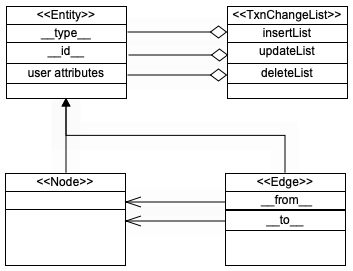
For the purpose of REST service API, the entity-relation diagram for data model is shown below.
A node is an entity and has a set of attribute name and value pair. The JSON representation flattens it out for simplicity as it can be mapped as a Map object or as a structure with specific field names. Every entity that needs to be operated on has to specify the typename.
The following table describes the JSON representation of the entity.
Name | Type | Req? | Description |
__type__ | string | Y | The type name of the Node. |
__id__ | long | N | A transient id for the entity. ReadOnly. Typically returned as result of the query. |
attr1 | string | N | A string representation value of attr1. Attr1 must be defined in the database |
attr2 | string | N | Same as above |
⠇ | |||
attrN | string | N | Same as above |
An Entity consists of a readonly 64-bit long id (__id__). These IDs are for internal purposes, but are exposed for certain use cases, where they can provide performance benefits in a secure, coherent and consistent basis.
The following rules and constraints are in place and should be followed at all times:
A Composite Key (__compkey__) is a set of keys that can uniquely identify an entity or an arbitrary set of entities based on its completeness. The composite key is a subset of an entity’s representation. It contains the typename through which the entity’s metadata can be inferred and the entity's subset key by which the node instance(s) can be identified. For an edge creation, it is typical to use the node’s primary key. Refer to the Constraint section for more details. The representation is as follows:
Name | Type | Req? | Description |
__type__ | string | Y | The type name of the Edge. It can be a NodeType or an EdgeType |
key1 | string | Y | Primary Key 1 of the node |
⠇ | |||
keyN | string | Y | Primary key N |
Each edge is an entity and connects two nodes. The __from__ is the starting node and __to__ is the endpoint. The JSONrepresentation for edge is described in the following table.
Name | Type | Req? | Description |
__type__ | string | Y | The type name of the Edge. It can be a NodeType or an EdgeType |
__id__ | long | N | A transient id for the entity. ReadOnly. Typically returned as result of the query. |
attr1 | string | N | A string representation value of attr1. Attr1 must be defined in the database |
attr2 | string | N | Same as above |
⠇ | |||
attrN | string | N | Same as above |
__from__ | __compkey__ | Y | An instance of an existing node whose primary key is provided. Not the full node. |
__to__ | __compkey__ | Y | An instance of an existing node whose primary key is provided. Not the full node. |
The following constraints should be adhered to for the operations to be successful.
URI: /TGDB/Transaction/ |
HTTP Method: POST Resource Schema |
Input | |||
Name | Type | Req? | Description |
__headers__ | object | ||
__token__ | string | true | The token received in Authenticate response |
__body__ | object | At least one list must be provided. An Empty Transaction is invalid. | |
__insertlist__ | list<entity> | N | A list of entities to be inserted. It can be Node or an Edge. For an Edge, 2 attributes __from__ and __to__ must be of the Composite Key Type. |
__updatelis_t_ | list<entity> | N | A list of entities to be updated. Note for Node, the Composite key must be supplied. |
__deletelis_t_ | list<compkey> | N | A list of entities with their primary keys. Node’s deletion invalidates the edges. |
Output | |||
Name | Type | Required | Description |
__status__ | object | The status of service execution | |
__errorcode__ | int | true | 0 - success. Non Zero - Error code |
__errormessage__ | string | true | “Null” for success. Error message for the specific code |
The following section shows various examples of Transaction:
Example Message - Insert NodesThis example shows a transaction inserting multiple nodes of different types. | ||||
Request | Response | |||
POST /TGDB/Transaction/ HTTP/1.1 Content-Type: text/plain User-Agent: PostmanRuntime/7.28.4 Accept: */* Postman-Token: 25b00bb9-9877-4112-834d-b81ac544d8db Host: localhost:9600 Accept-Encoding: gzip, deflate, br Connection: keep-alive Content-Length: 303 { "__headers__": { "__token__": "1892514230251092075" }, "__body__": { "__insertlist__": [{ "__type__": "airlineType", "active": "true", "airlineID": "AIRLINE5209", "country": "USA", "iataCode": "UA", "icaoCode": "UAL", "name": "United Airlines" }, ⠇ { "__type__": "airportType", "airportID": "AIRPORT3469", "name": "San Francisco International Airport", "city": "San Frankisco", "country": "USA", "iataCode": "SFO", "lat": "37.61899948120117", "lon": "-122.375", "elevation": "13", "utc": "8", "tzname": "America/Los_Angeles", “airportID”: }] } } Note: The city’s name is purposefully set to the wrong spelling, and it will be corrected in the Update example. | HTTP/1.1 200 OK Access-Control-Allow-Origin: * Date: Thu, 17 Feb 2022 00:11:50 GMT Content-Length: 2855 Content-Type: text/plain; charset=utf-8 { "__status__": { "__errorcode__": 0, "__errormessage__": "null" }, } | |||
Example Message - Insert EdgesThis example shows transaction inserting multiple United Airlines flights between any two airports as edges. Note the primary key for the AirportType is the airportID. | ||||
Request | Response | |||
POST /TGDB/Transaction/ HTTP/1.1 Content-Type: text/plain User-Agent: PostmanRuntime/7.28.4 Accept: */* Postman-Token: 25b00bb9-9877-4112-834d-b81ac544d8db Host: localhost:9600 Accept-Encoding: gzip, deflate, br Connection: keep-alive Content-Length: 303 { "__headers__": { "__token__": "1892514230251092075" }, "__body__": { "__insertlist__": [{ "__type__": "routeType", "name": "United Airlines", "iataCode": "UA", "distance": "1005", "1stClsFare": "2185", "bizClsFare": "761", "premEcoFare": "437", "ecoFare": "430", "__from__": { "__type__": "airportType", "airportID": "AIRPORT1840" }, "__to__": { "__type__": "airportType", "airportID": "AIRPORT3550" } } ⠇ { "__type__": "routeType", "name": "United Airlines", "iataCode": "UA", "distance": "1612", "1stClsFare": "3587", "bizClsFare": "1295", "premEcoFare": "438", "ecoFare": "423", "__from__": { "__type__": "airportType", "airportID": "AIRPORT2890" }, "__to__": { "__type__": "airportType", "airportID": "AIRPORT3494" } } ], } } | HTTP/1.1 200 OK Access-Control-Allow-Origin: * Date: Thu, 17 Feb 2022 00:11:50 GMT Content-Length: 2855 Content-Type: text/plain; charset=utf-8 { "__status__": { "__errorcode__": 0, "__errormessage__": "null" }, } | |||
Example Message - Updating NodesThis example shows a transaction updating multiple edges. We are updating the United Airlines node identified by “AIRLINE5209” with alliance and category attributes. In this case we are adding the attributes. Similarly, in the same transaction, for the airport San Francisco identified by “AIRPORT3469”, the city’s name is corrected and the icaoCode is also specified. See the Insert nodes example to compare the data. | ||||
Request | Response | |||
POST /TGDB/Transaction/ HTTP/1.1 Content-Type: text/plain User-Agent: PostmanRuntime/7.28.4 Accept: */* Postman-Token: 25b00bb9-9877-4112-834d-b81ac544d8db Host: localhost:9600 Accept-Encoding: gzip, deflate, br Connection: keep-alive Content-Length: 303 { "__headers__": { "__token__": "1892514230251092075" }, "__body__": { "__updatelist__": [{ "__compkey__": { "__type__": "airlineType", "airlineID": "AIRLINE5209", }, "alliance": "SA", "category": "fullservice" }, ⠇ { "__compkey__": { "__type__": "airportType", "airlineID": "AIRPORT3469", }, "city": "San Francisco", "icaoCode": "KSFO" }] } } | HTTP/1.1 200 OK Access-Control-Allow-Origin: * Date: Thu, 17 Feb 2022 00:11:50 GMT Content-Length: 2855 Content-Type: text/plain; charset=utf-8 { "__status__": { "__errorcode__": 0, "__errormessage__": "null" }, } | |||
Example Message - Deleting NodesThis example shows a transaction deleting multiple nodes. The first entry in the list deletes all airlineType instances whose “active” status is false. The second one deletes a specific instance airport identified by the primary key “AIRPORT5000” | ||||
Request | Response | |||
POST /TGDB/Transaction/ HTTP/1.1 Content-Type: text/plain User-Agent: PostmanRuntime/7.28.4 Accept: */* Postman-Token: 25b00bb9-9877-4112-834d-b81ac544d8db Host: localhost:9600 Accept-Encoding: gzip, deflate, br Connection: keep-alive Content-Length: 303 { "__headers__": { "__token__": "1892514230251092075" }, "__body__": { "__deletelist__": [{ "__compkey__": { "__type__": "airlineType", "active": "false", } }, ⠇ { "__compkey__" : { "__type__": "airportType", "airportID": "AIRPORT5000" } }], } } | HTTP/1.1 200 OK Access-Control-Allow-Origin: * Date: Thu, 17 Feb 2022 00:11:50 GMT Content-Length: 2855 Content-Type: text/plain; charset=utf-8 { "__status__": { "__errorcode__": 0, "__errormessage__": "null" }, } | |||
Example Message - Updating and Deleting EdgesThis example shows a transaction how to update and delete multiple edges. To update and delete the edges, a query must be run to get Edges’ reference ID, and that reference ID should be used to update and delete. | ||||
Request | Response | |||
POST /TGDB/Query/ HTTP/1.1 Content-Type: text/plain User-Agent: PostmanRuntime/7.28.4 Accept: */* Postman-Token: 25b00bb9-9877-4112-834d-b81ac544d8db Host: localhost:9600 Accept-Encoding: gzip, deflate, br Connection: keep-alive Content-Length: 303 { "__headers__": { "__token__": "1892514230251092075" }, "__body__": { "__updatelist__": [{ "__compkey__": { "__type__": "routeType", "__id__": "85431289" } "premEcoFare": "337", "ecoFare": "330" }, ⠇ "__deletelist__": [{ { "__compkey__": { "__type__": "routeType", "__id__": "85431000" } }], } } | HTTP/1.1 200 OK Access-Control-Allow-Origin: * Date: Thu, 17 Feb 2022 00:11:50 GMT Content-Length: 2855 Content-Type: text/plain; charset=utf-8 { "__status__": { "__errorcode__": 0, "__errormessage__": "null" }, } | |||
Example Message - Putting all togetherThis example shows a transaction inserting multiple edges. Inserting United Airlines flight between any two airports. | ||||
Request | Response | |||
POST /TGDB/Transaction/ HTTP/1.1 Content-Type: text/plain User-Agent: PostmanRuntime/7.28.4 Accept: */* Postman-Token: 25b00bb9-9877-4112-834d-b81ac544d8db Host: localhost:9600 Accept-Encoding: gzip, deflate, br Connection: keep-alive Content-Length: 303 { "__headers__": { "__token__": "1892514230251092075" }, "__body__": { "__insertlist__": [{ "__type__": "airlineType", "active": "true", "airlineID": "AIRLINE_002", "alliance": "None", "category": "budget", "country": "USA", "icaoCode": "KMCU", "name": "New Airline 2" }], "__deletelist__": [{ "__compkey__" : { "__type__": "airportType", "airportID": "AIRPORT5000" } }], "__updatelist__": [{ "__compkey__": { "__type__": "airlineType", "airlineID": "AIRLINE5209", }, "alliance": "SA", "category": "fullservice" }, ⠇ { "__compkey__": { "__type__": "airportType", "airlineID": "AIRPORT3469", }, "city": "San Francisco", "icaoCode": "KSFO" }] } } | HTTP/1.1 200 OK Access-Control-Allow-Origin: * Date: Thu, 17 Feb 2022 00:11:50 GMT Content-Length: 2855 Content-Type: text/plain; charset=utf-8 { "__status__": { "__errorcode__": 0, "__errormessage__": "null" }, } | |||
The security of the solution involving TGDB, needs to consider the following areas:
The current communication between application and the TGDB REST server uses:
HTTP is unsecured and JSON is a clear text sent over a physical network.
HTTPs is supported on TLS1.2+ versions and only a set of CipherSuites. The Cipher Suites are listed below.
TGDB REST server provides a built-in self signed certificate mechanism for clients to use.
The current scheme of authentication is Basic Authentication as described in RFC 7617. It is simple and easy to implement, however comes with its own set of security challenges.
TGDB REST server itself is a proxy to the database, and requires every client to authenticate using their username+password combination.
Since the current communication protocol is JSON, clear text is being sent over the physical network, and the Authentication scheme being Basic Authentication, username+password is never encrypted. This raises significant security concerns using HTTP as a transport of production choice.
Authorization defines access rights on database entities. TGDB provides comprehensive roles, permissions and privileges on database entities. Ensure that the user has the necessary and sufficient permissions and privileges to perform operations
TGDB supports field level encryption, and access control at NodeType, EdgeType. This feature is at the database level, and the native API (Java, GO, and Python) supports field level encryption. However REST server is a stateless communication protocol between client and itself, and there is no mechanism to exchange encryption keys, the communication either requires
For instance, point ‘c’ merely states that encrypted fields on a database are on its own NodeType as opposed to being part of nodetype’s attribute. This design can have its own merit/demerit in terms of performance, simplicity, and storage capacity.
Security and System Performance dictate deployment choices. At times there could be tradeoffs done to achieve. System Performance is an overarching umbrella that could consider:
Security guidelines can provide the best and efficient ways to secure transport, data, and at the same time be performant. It would be easy to dictate everything to run on HTTPs transport, but it has to pay the cost of encryption/decryption for every request and that may not be necessarily ideal.
Here are some deployment choices that can be useful.
Follow your company’s security guidelines, and ensure the deployment has considered all aspects of the business needs to run in secured environments with optimum performance.
The table shows the list of words that are reserved for internal use. They can be used as attribute names, collection names, header names etc. In general any sequence of characters that begin in “__” and end in “__” are considered to be reserved by the TGDB namespace.
__annot__ | __errormessage__ | __isarray__ | __resultlist__ | __to__ |
__attrtype__ | __fetchsize__ | __isencrypted__ | __scale__ | __token__ |
__batchsize__ | __from__ | __metadata__ | __sortorder__ | __traversaldepth__ |
__body__ | __headers__ | __name__ | __sortresultlimit__ | __type__ |
__deletelist__ | __id__ | __precision__ | __status__ | __updatelist__ |
__errorcode__ | __insertlist__ | __query__ | __systype__ | __vers__ |