TIBCO® Graph Database Stored Procedure Guide
Version 3.1
November 2021
TIBCO Graph Database Stored Procedure
Protection from SQL-like injection attacks
Life Cycle Management of Stored Procedures
Function Return type Annotations
Configuration and Administration
Single Source/All Pairs Shortest Path
Return values Conversion/Coercion
Scalar Conversion/Coercion with Annotation Matrix
Non-Scalar Conversion/Coercion
Blocklisted packages and libraries
TIBCO Documentation and Support Services
How to Access TIBCO Documentation
Product-Specific Documentation
TIBCO© Graph Database (TGDB) supports user-defined functions or subroutines written in Python3 called stored procedures. Stored procedures (also termed as sp, sproc, storedproc, SP) consolidate and centralize logic that was originally implemented in applications. They are executed within the database engine and can be nested with other stored procedures.
The common uses of Stored procedures but not limited to are:
TGDB provides both Gremlin Query language and Stored Procedures written in Python3 for the benefit of application developers. The Gremlin Query Language invokes the Stored Procedure via the “execsp” step and within the stored procedure, it can execute a Gremlin query. In order to ensure efficient and secured execution of application code, TIBCO believes that the combination of Gremlin queries and stored procedures help the developer to maximize the usage and performance of the application to its fullest potential.
The benefits of Stored Procedures are, but not limited to:
TGDB stored procedures are expressed in the Python3 language that is known to a widespread community of high school students to computer science students with deep computer and math knowledge. The benefits of Python are very well documented. It can run on a common CPU and also execute code in modern GPU architectures. As it is a procedural language compared to Gremlin’s functional programming model, certain aspects of flow control, and usage of data structure to build user-defined graph algorithms makes it a perfect choice. TGDB also supports executing Gremlin queries with stored procedures, which in turn, can call other stored procedures, making it very powerful.
As stored procedures are written in Python, they are compiled and cached at the time of server loading and stored directly in the server’s working memory. This removes all or part of the compiling overhead that is typically needed in situations where software applications send inline (dynamic) Gremlin queries to a database. These query statements add to the complexity of creating an optimal execution plan because not all arguments of the SQL statement are supplied at compile time. Depending on the specific query and configuration, mixed performance results are seen from stored procedures versus generic queries.
A major advantage of stored procedures is that they can run directly within the database engine. In a production system, this typically means that the procedures run entirely on a specialized database server, which has direct access to the data being accessed. The benefit here is that network communication costs can be avoided completely. This becomes more important for complex series of Gremlin query statements and result set processing.
Stored procedures allow programmers to embed business logic as an API in the database, which can simplify data management and reduce the need to encode the logic elsewhere in client programs. This can result in a lesser likelihood of data corruption by faulty client programs. The database system can ensure data integrity and consistency with the help of stored procedures.
Stored procedures can be granted access rights to the database that users who execute those procedures do not directly have access to.
Stored procedures can be used to protect against injection attacks. Stored procedure parameters are treated as data even if an attacker inserts Gremlin query commands. However, a stored procedure that in turn generates dynamic Gremlin queries using the input is still vulnerable to injections unless you take proper precautions.
Stored procedures when used in Transaction Management, or accessing sensitive data can produce auditing records for later analysis.
This section explains the rules and procedures for defining Stored Procedures that can be executed inside the database environment.
TGDB Stored procedures are written as Python 3 functions. Following are stored procedure definition requirements:
The "@tgsp.tgstoredproc" function decorator flags the function as a stored procedure on the server. This decorator also accepts keyword arguments to supply additional information about the functions. Following keyword arguments are accepted:
Keyword | Expected Value Type | Purpose | Example |
alias | str | Alias can be used instead of the fully qualified function name to invoke an SP via gremlin query, or describe the SP via the admin “describe” command | @tgsp.tgstoredproc(alias=”nickname”) |
barrier | bool | This flags the SP as a “barrier step”, meaning that upon invocation, the query machinery will first aggregate results from previous steps before calling the SP. | @tgsp.tgstoredproc(barrier=true) |
Parameter ordering and syntax for stored procedures follows Python 3 function definition syntax with restrictions as given below:
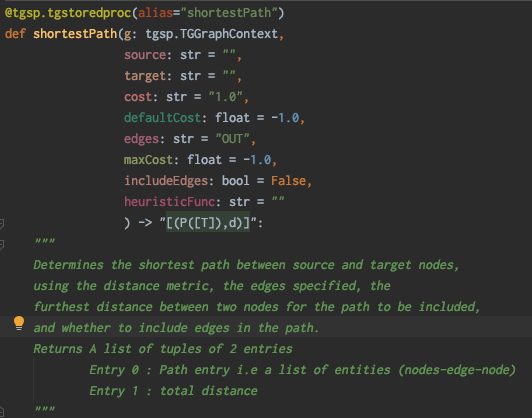
Python 3 function definition does not require any return type to be defined as it is a dynamic type programming language. However, every stored procedure needs to have return type annotation so that it can be appropriately converted to the correct “C” type or to the Result-Set. An application developer can then build the logic around it.
For example, a rich analytical UI tool would be interested in understanding how to interpret the return values and based on a specific type or value can present it in a user friendly way. The return type annotation is also required when the stored procedure execution is one of the many steps in a Gremlin query. In that scenario, the query engine needs to process its output in a reasonable manner, transform from Python types to appropriate “C” and proceed to the next step. The annotation provides the definition and rigor of the transformation.
Here are few more reasons for return type annotations:
An example of a complete function decorator for stored procedures written in Python 3.7.x is shown on the right.
Stored procedures are invoked via Gremlin query with the execsp step in the gremlin query step sequence. For example, on the admin console, you can execute the built-in stored procedure ‘peerpressure’ using the following invocation:
admin@localhost:8233>g.execsp(‘peerpressure’, ‘edges=BOTH’); |
In the example above, ‘execsp’ is the starting step. The execsp can also follow these steps. Please check the Query Guide for restrictions.
admin@localhost:8233>g.E().execsp(‘peerpressure’, ‘edges=BOTH’); |
admin@localhost:8233>g.V().has(‘airportType’, ‘iataCode’, ‘SFO’).execsp(‘peerpressure’, ‘edges=BOTH’); |
admin@localhost:8233>g.V().hasLabel(‘airportType’).execsp(‘peerpressure’, ‘edges=BOTH’); |
Note - since the default Terminating step is toList when not specified, do not confuse ‘execsp’ being the terminating step as in the above example. The meaning of this is: The resultant structure as defined by the execsp’s annotation is wrapped inside a list container.
A stored procedure is always invoked by the database engine while executing a Gremlin query. It creates a GraphContext object based on the current state of the query execution.
This running stored procedure can then internally invoke other stored procedures and provide the Graph Context it was supplied with. See more of the Graph Context in the execution model.
TGDB also supports invocation of stored procedures in Java, Python and Go API. It also supports invocation in Spotfire Analytics. Refer to the appropriate Guides for the same.
Since the stored procedures are written in Python 3, you may be tempted to call these Python functions within a Python script, and while it is technically possible, this does not work as the Graph Context, as the first parameter is filled by the database engine and passed while invoking the procedure. There is no user-defined way to create such a context.
There are a few obvious differences in invocation syntax to make note of when invoking an SP from gremlin query:
The function can only be invoked with an execsp step
TGDB Stored procedures are Python files on the file-system that is accessible to the TGDB server. It is your responsibility to manage the life cycle of these Python files using standard source code control systems such as Git, SVN, and Perforce.
Stored procedures have their own configuration section storedproc in the database configuration file. The stored procedures are scanned from the directory and compiled and loaded into the server’s memory. See the following table:
storedproc | ||
Property Name | Default Value | Description |
pythonpath | String. <Empty> | Additional Python library path for any third party packages. The path must be accessible by the server process. |
dir | String. <Empty> | The root directory where the stored procedures are located. It can contain subfolders where the python package is available. This directory is scanned, compiled and loaded as python objects. |
autorefresh | Boolean. <false> | Boolean, which indicates if the stored procedure directory should be automatically refreshed. This flag is typically set to ‘true’ during the development, integration & qa process. For production, it gives fine-grained control to Admin as to when to load the new procedures. Admins can use reload procedures command to refresh the SP directory and recompile the objects |
refreshinterval | Int. <60> | The auto refresh rate in seconds |
[storedproc] pythonpath = . dir = /Users/john/Projects/GQT/3.1/storedproc autorefresh = false refreshinterval = 60 | ||
TGDB administrator console (tgdb-admin) provides a set of administrative commands to manage the life cycle of the stored procedures.
A stored procedure is a Python program that can be executed as a function by the server in the server’s process. This gives the Python program incredible access to server memory, data, network and other resources. To ensure proper and secured usage, security considerations are in order.
Stored procedures are Python functions found in Python .py files. They are regular files on the operating system that are accessible to the tgdb server process. The following are requirements for packaging and deployment.
A TGDB stored procedure is a Python function with a function decorator. This function is compiled and cached at startup. The stored procedure is executed as a query step using the execSP step with the python function name or the alias as specified in the function decorator. You, as a developer writing the stored procedure. would need access to the following:
The Python function with a function decorator and a signature whose first parameter is a GraphContext ‘g’ serves as a contract between the Server and invoked python function. TGDB provides an API model to enable you to write efficient and optimized code.
Subsequent sections talk about the API model, the memory management, the threading management, security management and the debugging abilities of the stored procedure.
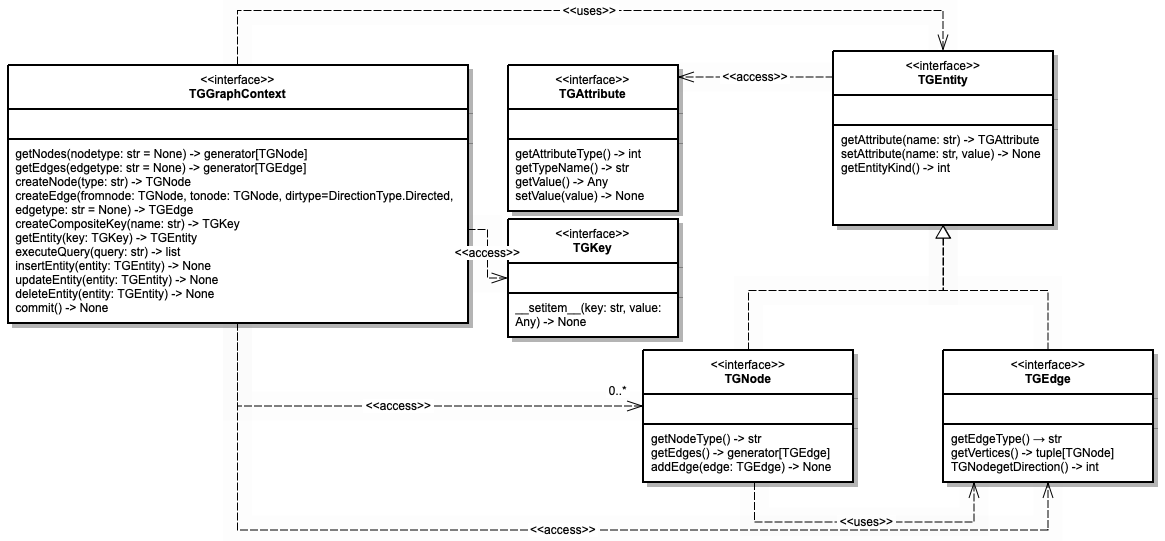
TGDB provides a data model and API model for clients written in Java, Go, Python, and Rest. This API model helps to access the underlying graph data in terms of nodes and edges. The same data and API model is available with additional constraints for the Stored Procedure. The figure below shows the simplified Class diagram. See the Python API reference guide for more information.
The TGGraphContext acts as an interface between the stored procedure and the graph database server.
It provides Transactional CRUD (getEntity, insertEntity, deleteEntity, updateEntity, and commit) support for TGDB within the stored procedure. It provides a way to execute complex queries using the executeQuery method. Additionally, it acts like an EntityFactory provider for constructing entities. TGGraphContext is an amalgamation of TGConnection and TGGraphObjectFactory without the overhead of the Network. It is a wrapper ‘C’ object from the server side.Finally the getNodes and getEdges methods have no explicit analogy across the database, and retrieve the nodes or edges respectively, at this point in the traversal.
The scope of the GraphContext ‘g’ is only for that ‘execSP’ call and follows the standard python scope for variables. Each ‘execSP’ called via the executeQuery inside the stored procedure creates its own GraphContext.
Note: TGDB does not support nested transactions. Since each GraphContext ‘g’ has its own Transaction Context, any changes on the entity or new entities needs to be committed before the stored procedure returns, else the entities are discarded and garbage collected.
Every entity is a wrapped object, and only a subset of the methods described in the Python API are accessible. These are listed in the diagram above. The instances passed into Python stored procedures, while they will support the methods described above, are not guaranteed to be of the type specified in the Python API. Therefore the isinstance function will return False when comparing the type that is specified via the Python API with the instance that the stored procedure is given. TGNode and TGEdge are instances of the TGEntity.
The scope of TGEntities follows the standard Python scope for variables. TGEntities are Python objects that wrap the ‘C’ heap pointer for TGEntities. The ‘C’ side heap pointers are refcounted. They are incremented when a Python object wraps the ‘C’ pointer and passed to the Stored Procedure. Python objects are garbage collected, and upon garbage collection, the ‘C’ side decrements the reference object.
Each Python Object is maintained in the default Python memory manager, which is not factored into the TIBCO Graph Database’s memory limit. TIBCO Graph Database objects and entities that are wrapped by Python objects are factored into the memory limit for the database. All entities (on both the C and Stored Procedure) are reference counted. Exiting scope before execution completes on child threads will cause entities to be freed, which may cause errors and loss of data. All entities (on both the C and Stored Procedure) are reference counted. Exiting scope before execution completes on child threads will cause entities to be freed, which may cause errors and loss of data.
Each stored procedure execution occurs on a query processor thread. See the Query Guide on Execution Data Flow. All objects created, referred to are available within the scope of the python function.
It is not advisable for Stored procedures to create their own threads, though certain scenarios might require them to do so for better CPU utilization purposes.
The developer, should the need arise to create his own threads, then these threads should only be used for computational purposes and should not try to access any of GraphContext methods. Care must be taken by the developer to ensure proper data locking, consistency, and integrity.
Exiting the scope of the call before any of the child threads completed is not advisable as the Python Engine can call the garbage collector to free all the objects, and this can cause errors, or potentially crash the server.
Logging via print statements is not supported. To work around this limitation, write log messages to a file. There is currently no known way to attach a graphical debugger.
TGDB provides a reference implementation of standard Graph Algorithms as a set of stored procedures for Graph Analytics. They can be executed via the admin console, Java API or Spotfire for Visual Analytics. These algorithms are classified as below:
Node Metrics is a collection of graph algorithms that provide metrics for Node/Edges based on certain constraints. These algorithms are as below:
Determines the importance of a node based on the number of shortest paths the node is an element of. This is useful for determining nodes that act as brokers between disparate groups of nodes. This can improve the reliability of distribution by removing these brokers.
Alias Name | betweennessCentrality | ||
Argument Name | Req | Default Value | Comments |
source | N | All nodes in step | Should be a Gremlin query if specified |
target | N | All nodes in step | Should be a Gremlin query if specified |
distance | N | 1 | Edge’s attribute name of a numerical type to determine shortest path |
defaultDistance | N | Infinity | The distance to use when the edge does not have the attribute specified by the distance argument |
edges | N | OUT | A Gremlin query or a string of OUT, IN, or BOTH |
Return | |||
Annotation | [(V,d)] | List of Tuple of Vertices and Betweenness Centrality Score | |
Complexities | |||
Runtime | O(V3) | ||
Space | O(LV2) L - number of nodes on longest path, V - number of nodes, E - number of edges | ||
Example | |||
Determines importance of a node based on the average length of the shortest path to every other node. Useful for determining hubs.
Alias Name | closenessCentrality | ||
Argument Name | Req | Default Value | Comments |
source | N | All nodes in step | Should be a Gremlin query if specified. |
target | N | All nodes in step | Should be a Gremlin query if specified. |
distance | N | 1 | Edge’s attribute name of a numerical type to determine shortest path. |
defaultDistance | N | Infinity | The distance to use when the edge does not have the attribute specified by the distance argument |
edges | N | OUT | A Gremlin query or a string of OUT, IN, or BOTH |
Return | |||
Annotation | [(V,d)] | List of Tuple of Vertices and Closeness Centrality Score | |
Complexities | |||
Runtime | O(V3) | ||
Space | O(LV2) L - number of nodes on longest path, V - number of nodes, E - number of edges | ||
Example | |||
Determines importance of a node based on the importance of the nodes linking to that node. Useful for determining the overall importance of a node and rank among the nodes.
Alias Name | pageRank | ||
Argument Name | Req | Default Value | Comments |
source | N | All nodes in step | Should be a Gremlin query if specified |
weight | N | 1 | Edge’s attribute name of a numerical type to determine the weight of the edge. |
defaultWeight | N | 0 | The weight to use when the edge does not have the attribute specified by the weight argument |
dampingFactor | N | 0.85 | Probability that a visitor of a node goes to one of the node’s adjacent nodes instead of a random jump |
epsilon | N | 0.00001 | If maximum difference is less than this, do not continue iterating |
maxIterations | N | 20 | The maximum number of iterations to run. Will stop after this number is reached. |
edges | N | OUT | A Gremlin query or a string of OUT, IN, or BOTH |
Return | |||
Annotation | [(V,d)] | List of Tuple of Vertices and PageRank Score | |
Complexities | |||
Runtime | O(V2log(V)) | ||
Space | O(V2) L - number of nodes on longest path, V - number of nodes, E - number of edges | ||
Example | g.V().hasLabel(‘airportType’).execsp(‘pageRank’) | ||
Determines the triangle count (number of 3-node complete sub-graphs). Useful for determining how clustered a node is. A large triangle count indicates very clustered, and a small triangle count indicates very unclustered.
Alias | triangleCount | ||
Argument Name | Req | Default Value | Comments |
source | N | All nodes in step | Should be a Gremlin query if specified. |
edges | N | OUT | A Gremlin query or a string of OUT, IN, or BOTH |
Return | |||
Annotation | [(V,l)] | List of Tuple of Vertices and Triangles this node is a member of | |
Complexities | |||
Runtime | O(V3)* | ||
Space | O(V+E)* | ||
Examples | |||
Partitioning a graph can be extremely useful for certain algorithms whose runtime scales with the number of vertices or edges in the graph without requiring an extraordinary amount of time to complete or for reducing a graph for better visualization. Partitioning involves separating the vertices of a graph into two or more groups. The below algorithms partition a graph’s vertices into groups based on different criteria.
Determines which groups of nodes are connected. Useful for determining groups of nodes which can then be used for other algorithms.
Alias | connectedComponents. | ||
Argument Name | Req | Default Value | Comments |
source | N | All nodes in step | Should be a Gremlin query if specified. |
edges | N | BOTH | A Gremlin query or a string of OUT, IN, or BOTH |
Return | |||
Annotation | [(V,l)] | List of Tuple of Vertices and Component Identifier | |
Complexities | |||
Runtime | O(E)* | ||
Space | O(V)* | ||
Example | |||
Determines the cluster of a node based on the cluster assignment of the nodes around it. Useful for finding clusters of nodes that have relatively few connections between clusters
Alias | peerPressure | ||
Argument Name | Req | Default Value | Comments |
source | N | All nodes in step | Should be a Gremlin query if specified |
weight | N | 1 | Edge’s attribute name of a numerical type to determine the weight of the edge. |
defaultWeight | N | 0 | The weight to use when the edge does not have the attribute specified by the weight argument |
maxIterations | N | 20 | The maximum number of iterations to run. Will stop after this number is reached. |
edges | N | OUT | A Gremlin query or a string of OUT, IN, or BOTH |
Return | |||
Annotation | [(V,l)] | List of Tuple of Vertices and their Cluster Identifier | |
Complexities | |||
Runtime | O(VElog(V))* | ||
Space | O(V+E)* | ||
Examples | |||
Determines the shortest path from a given node to all reachable nodes. Uses Single Source Shortest Path when source has exactly 1 node. Useful for determining the shortest path from one node to all other nodes. When the source query returns multiple nodes, then it uses the All Pairs Shortest Path function.
Alias | shortestPath. | ||
Argument Name | Req | Default Value | Comments |
source | N | All nodes in step | Should be a Gremlin query if specified. |
target | N | All nodes in step | Should be a Gremlin query if specified. |
distance | N | 1 | Edge’s attribute name of a numerical type to determine shortest path. |
defaultDistance | N | Infinity | The distance to use when the edge does not have the attribute specified by the distance argument |
edges | N | OUT | A Gremlin query or a string of OUT, IN, or BOTH |
Return | |||
Annotation | [P] | List of Paths, which is a list of nodes | |
Complexities | |||
Runtime | O(E)* | ||
Space | O(LV)* | ||
Example | |||
The following two tables show the Scalar conversion matrix between the C-Side types and Python types with Annotation mapping.
TGDB C Side⬇ | Python Types | ||||||||
str | bytes | bool | int | float | Decimal | time | date | datetime | |
char | ☑ [c] | x | x | x | x | x | x | x | x |
Signed byte | x | ☑ [b]1 | x | x | x | x | x | x | x |
boolean | x | x | ☑ [?] | x | x | x | x | x | x |
short | x | x | x | ☑ [h]2 | x | x | x | x | x |
int | x | x | x | ☑ [i]3 | x | x | x | x | x |
long | x | x | x | ☑ [l]4 | x | x | x | x | x |
float | x | x | x | ☑ [f]5 | ☑ [f]5 | x | x | x | x |
double | x | x | x | ☑ [d]5 | ☑ [d]5 | x | x | x | x |
string | ☑ [s] | x | x | x | x | x | x | x | x |
number | x | x | x | x | x | ☑ [N] | x | x | x |
date | x | x | x | x | x | x | x | ☑ [D] | ☑ [D] |
time | x | x | x | x | x | x | ☑ [m] | x | x |
datetime | x | x | x | x | x | x | x | x | ☑ [M] |
Footnotes:
1 | If more than one byte is sent, the stored procedure will error. |
2 | Overflow is truncated. If the stored procedure returns something greater than 32775 or less than -32776, then the result will be the least significant 2 bytes of the binary representation of the number. |
3 | Overflow is truncated. If the stored procedure returns something greater than 2147483647 or less than -2147483648, then the result will be the least significant 4 bytes of the binary representation of the number. |
4 | Overflow is truncated. If the stored procedure returns something greater than 9223372036854775807 or less than -9223372036854775808, then the result will be the least significant 8 bytes of the binary representation of the number. |
5 | Overflow will result in the returned value being positive infinity, and underflow being negative infinity. |
Python Type | TGDB Annotation | TGDB Type | Example | Notes |
TGNode | V | vertex | def rNode(g) -> “V”: | Must be a node retrieved via the getNodes, executeQuery, getEntity, or createNode. |
TGEdge | E | edge | def rEdge(g) -> “E”: | Must be an edge retrieved via the getEdges, executeQuery, getEntity, or createEdge. |
list | P(...) | path | def rPath(g) -> “P([V])”: | A path may be annotated as a generic path: "P" Alternatively, path elements may be defined explicitly:
Path elements are restricted to scalar types, nodes, edges, and entities. The list elements are limited to nodes, edges, entities, and scalar values. It may not include tuples, or otherwise nested objects - this is just for annotation purposes. |
list | [.] | list | def rListNode(g) -> “[V]”: | Must have a single type specified within the braces. This can be a complex type, i.e. [P(d, [s])] would be a list of paths with the first element as a double and a variable number of strings after the double for each path. |
tuple | (...) | tuple | def rTup(g) -> “(V,E,d)”: | An ordered set of finite values. Finite set, count known at compile or pre-execution time. The values can be specified as any annotation symbol from the table including itself. |
dict | {K,V} | map | def rMap(g) -> “{i,s}”: | Where K is the key for the map and V is the value. The key must be a scalar value. |
Annotation Codes that can be returned as a Sequence of characters as result of Query string or from an execution of a Stored Procedure.
Annotation Symbol | Annotation Type (Server-side) | Python Type | Description |
"" | void | -- | def rVoid(g,...) -> "": pass |
c | Char | str | def rChar(g,..) → "c" : |
b | signed byte | bytes |
|
B * | unsigned byte |
|
|
? | Boolean | bool |
|
h | short. | int | Optionally specify the width using the ":" and size |
H * | unsigned short |
|
|
i | int | int |
|
I * | unsigned int |
|
|
l | long | int |
|
L * | unsigned long |
|
|
f | float | float |
|
d | Double | float |
|
s | string | str |
|
n:size_t * | number with precision |
|
|
q * | long long (64 bit) |
|
|
Q * | unsigned long long (64) |
|
|
p * | Pointer (64 bit) |
|
|
G * | Graph |
|
|
P | Path | list | A path may be annotated as a generic path: "P". The list elements are limited to nodes, edges, entities, and scalar values. It may not include tuples, or otherwise nested objects - this is just for annotation purposes. If the path has a fixed number of elements it can be expressed as e.g. "P(V,E,V,V,E,V)" or "P(V,d,d,s,E,i)". Alternatively, path elements may be defined explicitly: If the path has a fixed number of elements it can be expressed as e.g. "P(V,E,V,V,E,V)" or "P(V,d,d,s,E,i)". For variable size paths, list annotation may be used, e.g. "P([s])" - any number of strings. P(d,[(s,V)]) means a path starts with a double and then with zero or more tuples of string and vertex combination. It means P(d,s,V) and P(d,s,V,s,V) are both represented by P(d,[(s,V)]). Path elements are restricted to scalar types, nodes, edges, and entities. |
O * | Generic object |
|
|
S * | Scalar. |
| Primitive types and string |
A * | Attribute |
| Any Generic TGDB Attribute |
A:name * | Named Attribute |
| A valid TGDB attribute of the specified name def rAttributeAge(g:, ...) → "A:age" |
T * | Node or Edge entity |
| This annotation previously included attribute as well - may need to revert in the future |
V | Any Node Type | TGNode |
|
V:name * | Named Node Type |
| A Node of a specific type |
E | Any Edge | TGEdge |
|
E:name * | Named Edge Type |
| A Edge of specific type |
[ ] | A List of values. | list | The values can be any of types. It is an indefinite set and the count is only known at runtime. To specify a type use any of annotation symbol including "[]" for itself Examples: def rGenericList(g:, ...) → "[]"* def rListofNames(g:, ...) → "[ s ]" def rListofPeoples(g:, ...) → "[V:people]" |
() | Declares a Tuple. | tuple | An ordered set of finite values. Finite set, count known at compile or pre-execution time. The values can be specified as any annotation symbol from the table including itself. def rTuple(g:, ...) → "(A:name, A:age, d:8)" |
{K,V} | Set of unique (key, value) pairs | dict | A map of key and values. Key is one of the scalar or primitive types. i.e not a list, set, or a map |
The following table provides the blocklisted packages from Python 3.7.2.
curses | dbm | distutils | ensurepip | idlelib | lib2to3 |
pydoc_data | site-packages | sqlite3 | test | tkinter | turtledemo |
wsgiref |
Documentation for TIBCO products is available on the TIBCO Product Documentation website, mainly in HTML and PDF formats.
The TIBCO Product Documentation website is updated frequently and is more current than any other documentation included with the product. To access the latest documentation, visit https://docs.tibco.com.
Documentation for TIBCO Graph Database is available on https://docs.tibco.com/products/tibco-graph- database-enterprise-edition-3-1-0 page.
This feature is available to both Enterprise edition and Community. The guidelines specified for Clustering are applicable only to Enterprise edition.
The following documents form the documentation set:
You can contact TIBCO Support in the following ways:
TIBCO Community is the official channel for TIBCO customers, partners, and employee subject matter experts to share and access their collective experience. TIBCO Community offers access to Q&A forums, product wikis, and best practices. It also offers access to extensions, adapters, solution accelerators, and tools that extend and enable customers to gain full value from TIBCO products. In addition, users can submit and vote on feature requests from within the TIBCO Ideas Portal. For a free registration, go to https://community.tibco.com.