REGEX: Matching a String to a Regular Expression
The REGEX function matches a string to a regular expression and returns true (1) if it matches and false (0) if it does not match.
A regular expression is a sequence of special characters and literal characters that you can combine to form a search pattern.
Many references for regular expressions exist on the web.
For a basic summary, see the section Summary of Regular Expressions in Chapter 2, Security, of the ibi™ WebFOCUS® Reporting Server Administration manual.
Match a String to a Regular Expression
REGEX(string, regular_expression)
where:
Alphanumeric
Is the character string to match.
Alphanumeric
Is a regular expression, enclosed in single quotation marks, constructed using literals and meta-characters. The following meta-characters are supported
- . represents any single character
- * represents zero or more occurrences
- + represents one or more occurrences
- ? represents zero or one occurrence
- ^ represents beginning of line
- $ represents end of line
- [] represents any one character in the set listed within the brackets
- [^] represents any one character not in the set listed within the brackets
- | represents the Or operator
- \ is the Escape Special Character
- () contains a character sequence
For example, the regular expression '^Ste(v|ph)en$' matches values starting with Ste followed by either ph or v, and ending with en.
Note: The output value is numeric.
Matching a String Against a Regular Expression
The following request matches the FIRSTNAME field against the regular expression 'PATRIC[(I?)K]', which matches PATRICIA or PATRICK:
DEFINE FILE VIDEOTRK

PNAME/I5=REGEX(FIRSTNAME,'PATRIC[(I?)K]');

END

TABLE FILE VIDEOTRK

PRINT FIRSTNAME PNAME

BY LASTNAME

WHERE LASTNAME GE 'M'

ON TABLE SET PAGE NOLEAD

ON TABLE SET STYLE *

GRID=OFF,$

ENDSTYLE

END
The output is shown in the following image.
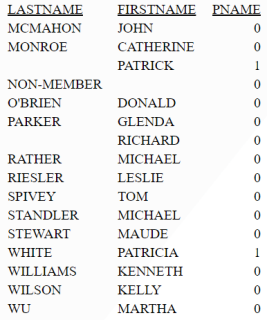
The following version of the request runs on z/OS. The variable ®1 contains the regular expression string with the circumflex character (^) inserted as CHAR(95), the left bracket character ([) inserted as CHAR(173), and the right bracket character (]) inserted as CHAR(189). The other meta-characters are interpreted correctly.
-SET ®1 = CHAR(95) || 'PATRIC' || CHAR(173) || - '(I?)K' || CHAR(189); DEFINE FILE VIDEOTRK PNAME/I5 = REGEX(FIRSTNAME,'®1') ; END TABLE FILE VIDEOTRK PRINT FIRSTNAME PNAME BY LASTNAME WHERE LASTNAME GE 'M' ON TABLE SET PAGE NOLEAD END
The output follows.
  LASTNAME         FIRSTNAME   PNAME

  --------         ---------   -----

  MCMAHON          JOHN            0

  MONROE           CATHERINE       0

                   PATRICK         1

  NON-MEMBER                       0

  O'BRIEN          DONALD          0

  PARKER           GLENDA          0

                   RICHARD         0

  RATHER           MICHAEL         0

  RIESLER          LESLIE          0

  SPIVEY           TOM             0

  STANDLER         MICHAEL         0

  STEWART          MAUDE           0

  WHITE            PATRICIA        1

  WILLIAMS         KENNETH         0

  WILSON           KELLY           0

  WU               MARTHA          0
REGEX matches the FIRSTNAME field against the regular expression '^Sara(h?)$', which matches Sara or Sarah:
REGEX(FIRSTNAME,'^Sara(h?)$')
For Sara, the result is 1.
For Amber, the result is 0.