SPACE: Returning a String With a Given Number of Spaces
Given an integer count, SPACE returns a string consisting of that number of spaces.
Note: To retain the spaces in HTML report output, the SHOWBLANKS parameter must be set to ON.
Return a String With a Given Number of Spaces
SPACE(count)
where:
Numeric
Is the number of spaces to return.
Returning a String With a Given Number of Spaces
The following request inserts 20 spaces between the DOLLARS and UNITS values converted to alphanumeric values. The font used is Courier because it is monospaced and shows the 20 blanks without making them proportional.
SET SHOWBLANKS = ON

TABLE FILE GGSALES

SUM DOLLARS NOPRINT  UNITS  NOPRINT AND

COMPUTE ALPHADOLL/A8 = EDIT(DOLLARS); NOPRINT

COMPUTE ALPHAUNIT/A8 = EDIT(UNITS); NOPRINT

COMPUTE Dollars_And_Units_With_Spaces/A60 = ALPHADOLL | SPACE(20) | ALPHAUNIT;

BY CATEGORY

ON TABLE SET PAGE NOLEAD

ON TABLE PCHOLD FORMAT PDF

ON TABLE SET STYLE *

GRID=OFF, FONT=COURIER,$

ENDSTYLE

END
The output is shown in the following image.
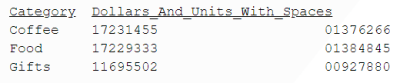
SPACE adds 20 blank spaces between the words 'Dollars' and 'Units' using the monospaced Courier font.
SET SHOWBLANKS = ON

SQL

SELECT

('Dollars' || SPACE(20) || 'Units') AS LINE_WITH_SPACES ;

TABLE

ON TABLE SET PAGE NOLEAD

ON TABLE SET STYLE *

GRID=OFF, FONT=COURIER,$

ENDSTYLE

END
The output is shown in the following image.
