RSERVE: Running an R Script
You can use the RSERVE function in a COMPUTE command to run an R script that returns vector output. This requires that you have a configured Adapter for Rserve.
Run an R Script
RSERVE(rserve_mf, input_field1, ...input_fieldn, output)
where:
Is the synonym for the R script.
Are the independent variables used by the R script.
Is the dependent variable returned by the R script. It must be a single column (vector) of output.
Using RSERVE to Run an R Script
The R script named wine_run_model.R predicts Bordeaux wine prices based on the average growing season temperature, the amount of rain during the harvest season, the amount of rain during the winter, and the age of the wine.
Using a configured connection (named MyRserve) for the Adapter for Rserve, and a sample data file named wine_input_sample.csv, you create the following synonym for the R script, as described in the ibi™ WebFOCUS® Adapter Administration manual.
Master File
FILENAME=WINE_RUN_MODEL, SUFFIX=RSERVE  , $

  SEGMENT=INPUT_DATA, SEGTYPE=S0, $

    FIELDNAME=AGST, ALIAS=AGST, USAGE=D9.4, ACTUAL=STRING,

      MISSING=ON,

      TITLE='AGST', $

    FIELDNAME=HARVESTRAIN, ALIAS=HarvestRain, USAGE=I11, ACTUAL=STRING,

      MISSING=ON,

      TITLE='HarvestRain', $

    FIELDNAME=WINTERRAIN, ALIAS=WinterRain, USAGE=I11, ACTUAL=STRING,

      MISSING=ON,

      TITLE='WinterRain', $

    FIELDNAME=AGE, ALIAS=Age, USAGE=I11, ACTUAL=STRING,

      MISSING=ON,

      TITLE='Age', $

  SEGMENT=OUTPUT_DATA, SEGTYPE=U, PARENT=INPUT_DATA, $

    FIELDNAME=PRICE, ALIAS=Price, USAGE=D18.14, ACTUAL=STRING,

      MISSING=ON,

      TITLE='Price', $
Access File
SEGNAME=INPUT_DATA,

  CONNECTION=MyRserve,

  R_SCRIPT=/prediction/wine_run_model.r,

  R_SCRIPT_LOCATION=WFRS,

  R_INPUT_SAMPLE_DAT=prediction/wine_input_sample.csv, $
Now that the synonym has been created for the model, the model will be used to run against the following data file named wine_forecast.csv.
Year,Price,WinterRain,AGST,HarvestRain,Age,FrancePop

1952,7.495,600,17.1167,160,31,43183.569

1953,8.0393,690,16.7333,80,30,43495.03

1955,7.6858,502,17.15,130,28,44217.857

1957,6.9845,420,16.1333,110,26,45152.252

1958,6.7772,582,16.4167,187,25,45653.805

1959,8.0757,485,17.4833,187,24,46128.638

1960,6.5188,763,16.4167,290,23,46583.995

1961,8.4937,830,17.3333,38,22,47128.005

1962,7.388,697,16.3,52,21,48088.673

1963,6.7127,608,15.7167,155,20,48798.99

1964,7.3094,402,17.2667,96,19,49356.943

1965,6.2518,602,15.3667,267,18,49801.821

1966,7.7443,819,16.5333,86,17,50254.966

1967,6.8398,714,16.2333,118,16,50650.406

1968,6.2435,610,16.2,292,15,51034.413

1969,6.3459,575,16.55,244,14,51470.276

1970,7.5883,622,16.6667,89,13,51918.389

1971,7.1934,551,16.7667,112,12,52431.647

1972,6.2049,536,14.9833,158,11,52894.183

1973,6.6367,376,17.0667,123,10,53332.805

1974,6.2941,574,16.3,184,9,53689.61

1975,7.292,572,16.95,171,8,53955.042

1976,7.1211,418,17.65,247,7,54159.049

1977,6.2587,821,15.5833,87,6,54378.362

1978,7.186,763,15.8167,51,5,54602.193
The data file can be any type of file that R can read. In this case it is another .csv file. This file needs a synonym in order to be used in a report request. You create the synonym for this file using the Adapter for Delimited Files.
The following is the generated Master File, wine_forecast.mas.
FILENAME=WINE_FORECAST, SUFFIX=DFIX    , CODEPAGE=1252,

   DATASET=prediction/wine_forecast.csv, $

SEGMENT=WINE_FORECAST, SEGTYPE=S0, $

    FIELDNAME=YEAR1, ALIAS=Year, USAGE=I6, ACTUAL=A5V,

      MISSING=ON,      TITLE='Year', $

    FIELDNAME=PRICE, ALIAS=Price, USAGE=D8.4, ACTUAL=A7V,

      MISSING=ON,      TITLE='Price', $

    FIELDNAME=WINTERRAIN, ALIAS=WinterRain, USAGE=I5, ACTUAL=A3V,

      MISSING=ON,      TITLE='WinterRain', $

    FIELDNAME=AGST, ALIAS=AGST, USAGE=D9.4, ACTUAL=A8V,

      MISSING=ON,      TITLE='AGST', $

    FIELDNAME=HARVESTRAIN, ALIAS=HarvestRain, USAGE=I5, ACTUAL=A3V,

      MISSING=ON,      TITLE='HarvestRain', $

    FIELDNAME=AGE, ALIAS=Age, USAGE=I4, ACTUAL=A2V,      MISSING=ON,      TITLE='Age', $

    FIELDNAME=FRANCEPOP, ALIAS=FrancePop, USAGE=D11.3, ACTUAL=A11V,

      MISSING=ON,      TITLE='FrancePop', $
The following is the generated Access File, wine_forecast.acx.
SEGNAME=WINE_FORECAST, DELIMITER=',', ENCLOSURE=", HEADER=YES, CDN=COMMAS_DOT, CONNECTION=<local>, $
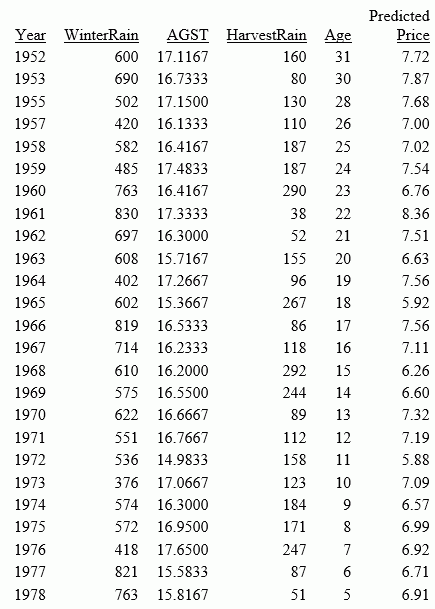
The following request, wine_forecast_price_report.fex, uses the RSERVE built-in function to run the script and return a report.
-*wine_forecast_price_report.fex

TABLE FILE PREDICTION/WINE_FORECAST

PRINT

  YEAR

  WINTERRAIN

  AGST

  HARVESTRAIN

  AGE


  COMPUTE PREDICTED_PRICE/D18.2 MISSING ON ALL=

    RSERVE(prediction/wine_run_model, AGST, HARVESTRAIN, WINTERRAIN, AGE, Price);  AS 'Predicted,Price'


ON TABLE SET PAGE NOLEAD

ON TABLE SET STYLE *

GRID=OFF,$

ENDSTYLE

END
The output is shown in the following image.