Using Automatic Passthru
Automatic Passthru (APT) is the ability of the Server WebFOCUS Reporting Server to pass or hand-off an intact SQL command to a remote server or RDBMS subsystem. In effect, it enables a user to speed up ibi Data Migrator. If a request does not meet the requirements for APT, the Server WebFOCUS Reporting Serverneeds to do additional work. SQL commands must be translated into a format (Data Manipulation Language) that is understood by the underlying (typically non-relational) file system(s), forcing the need for a special work file to be created on the Server platform. ibi Data Migrator waits for this temporary work file to be written, and then continues processing by loading the RDBMS table.
If a request meets the requirements for APT, ibi Data Migrator uses its streaming or pipeline methodology. This means that no intermediate files are written by ibi Data Migrator. Rows are fetched directly from the source (effectively off the wire for communication scenarios) and are then written to the target. Whether ibi Data Migrator is writing a local fixed format file, or sending dynamic SQL to an RDBMS table, an SQL request that runs in APT mode guarantees the best default performance.
The following environmental and request-based factors most often result in requests failing the requirements of APT:
- Non-relational file structures accessed directly at the server.
- DEFINE commands in a SUFFIX=EDA synonym.
- Cross-platform joins.
For more information on passthru functionality, see the ibi™ WebFOCUS® Adapter Administration guide.
Avoiding Non-Automatic Passthru
If non-APT processing is critical to your extraction process, but is determined to be a bottleneck, it may help to add a secondary server to your configuration. The critical definition for ibi Data Migrator (and its need to use a HOLD file) is the definition of APT at the server where ibi Data Migrator is installed. For example, if you are reading from a C-ISAM file on UNIX (non-relational), describe the file to a second server configured expressly to avoid a non-APT condition. Server-to-server shipment of rows may outperform the disk I/O resulting from a HOLD file. This is illustrated in the following image:
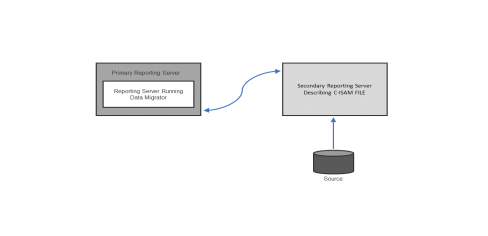
This technique requires that the additional server has access to a synonym describing the C-ISAM structure, and that the primary server is configured correctly for communicating with the secondary server. A synonym must be created to point to the correct destination. ibi Data Migrator uses this new synonym for the SQL request, instead of the original C-ISAM Master definition (see the server manual for your platform for more information on configuring a hub and remote servers). Once again, the configuration work needed to avoid non-APT may be over-engineering in a situation where row volume, disk I/O, or processing power is not an issue.
Another way to avoid non-APT processing is to place your transformations in the synonym of the remote server. This is accomplished by entering a DEFINE in the synonym to ensure that calculating and processing work is done directly on the platform where the data resides.
Determining the Use of Automatic Passthru
You can tell if a flow is processed using APT or non-APT by looking at the ibi Data Migrator ETL Log. A message appears towards the top of the output for every flow, indicating its capacity for passthru processing.
Using Real Numbers With Direct Passthru
Real or floating-point numbers, also referred to as approximate numeric, are numbers stored in scientific notation.
When numeric data is retrieved, it is converted to an intermediate display format. For fixed format files, FOCUS/FDS files, and relational data sources, the display format is that found in the synonym. However, when direct passthru is used, for example in a DBMS SQL flow, then ibi Data Migrator does not use the synonym. In this case, ibi Data Migrator uses a default format of 20.2 (that is, 20 digits with two places to the right of the decimal). This format may not be appropriate for data warehousing needs.
You can change the format with an SQL command. You can include this command in the profile on the remote server (where the data source resides). If you do so, all real numbers are rounded to four digits.
If different tables in different data sources have different precisions, set the precisions for each process flow with a pre-extract procedure. If the data source resides at the server, create a pre-extract procedure with this command.
Change the Format of Real Numbers for Direct Passthru
ENGINE database SET CONVERSION {FLOAT|REAL} PRECISION nn [mm]
where:
Is the type of data source to which you are connected.
Is the precision. This number must be greater than 1 and less than 20.
Is the scale (the number of places to the right of the decimal).
Changing the Format of Real Numbers
For example, if your data source is Db2, and you want to set the number of digits to the right of the decimal to 4, issue the following command:
ENGINE DB2 SET CONVERSION FLOAT PRECISION 20 4
Direct Load Flows
Normally for fixed format file sources, ibi Data Migrator extracts data from the files and creates an intermediate fixed format file. Then it invokes the load program to load from the fixed format file to target.
However, when the source for the ibi Data Migrator flow is a single file, it is possible to load directly from that file using what is called a Direct Load Flow. This type of flow has no SQL object (there are no filters, sorts, or aggregations). There is a direct connection from source to target. Since there is no intermediate file created, this reduces disk space requirements, and can also reduce the time for the load.
Note that you cannot reference any DEFINEd columns in the synonym for the source. Also, each column in the source synonym must have an ALIAS.
The target table must be an existing table, and you can use Target Transformations.