Improving Lookup Performance
The function DB_LOOKUP provides an alternative to a SQL JOIN to look up a value in one (or more) columns of a table. When matching values are found, the value of another column is returned.
For example, a lookup table may contain a list of state codes and names. If you look up the state code NY, you get back the state name New York.
This process can be expedited. By loading the pairs of values into memory (called a cache), you can reduce the number of file or database read operations.
There are two types of cache, depending on the type of the lookup table.
- Static. For a fixed format file, all the lookup values are loaded into the cache.
- Dynamic. For a relational database table, the lookup values and results are added into the cache as they are used.
If each input value is only looked up once, there is no advantage to using a cache. If the same input values are looked up multiple times, throughput can be improved because the return value is read from the cache instead of from the database.
For database lookup tables, a system setting controls whether the values in the lookup table are loaded into the cache.
Enable the Lookup Cache
ENGINE INT CACHE {SET {ON [LIMIT nn] | OFF} | STAT}
where:
Enables caching.
Limit the number of rows added from the cache to nn.
Disables caching.
Displays statistics for cache.
Using the Lookup Cache
To enable the lookup cache for a data flow, create a stored procedure with the following line:
ENGINE INT CACHE SET ON
From the Process Flow tab for the flow, drag the stored procedure into the workspace. Connect the Start object to the stored procedure, and connect that to the data flow.
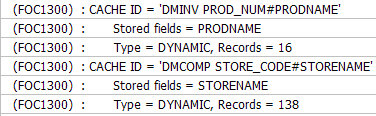
To see how the cache was used, create another stored procedure with the following line:
ENGINE INT CACHE STAT
Drag it onto the process flow after the data flow. When you submit the flow, you see lines, (like those shown in the following image), confirming that the cache was used.