Creating Metadata for the Adapter for ElasticSearch
Create Synonym for the ElasticSearch Adapter creates the metadata used for sending ElasticSearch API requests and displaying the data returned.
Create Metadata for the Adapter for ElasticSearch
- Procedure
- From the WebFOCUS Reporting Server browser interface Applications page, click Get Data.
- Right-click the configured connection for the Adapter for
ElasticSearch (for
example, CON01) and click Show DBMS Objects from the context
menu.
The Create Synonym for ElasticSearch page opens, as shown in the following image.
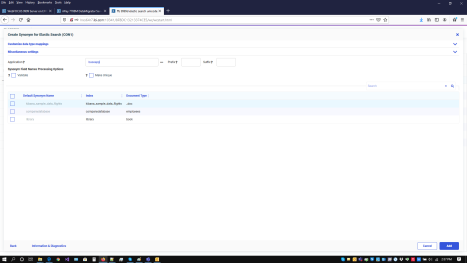
- Enter a specific application in the Application field, or click the ellipsis button to the right of the field to select an application in which to store the metadata.
- Select the Validate checkbox if you wish to convert all special characters to underscores and perform a name check to prevent the use of reserved names. (This is accomplished by adding numbers to the names.)
This parameter ensures that names adhere to specifications. For more information, see Validation for Special Characters and Reserved Words. When the Validate option is unchecked, only the following characters are converted to underscores: '-'; ' '; ' \'; '/'; ','; '$'. No checking is performed for names.
- Select the Make unique checkbox if you want to set the scope for field and group names to the entire synonym. This ensures that no duplicate names are used, even in different segments of the synonym. When this option is unchecked, the scope is the segment.
- Click Customize data type mappings to select whether to decompose date formats, assign geographic roles automatically, set the date order, and select the data type mappings for numeric decimal and alphanumeric columns.
- Select the Validate checkbox if you wish to convert all special characters to underscores and perform a name check to prevent the use of reserved names. (This is accomplished by adding numbers to the names.)
- Select the checkbox next to one or more objects for which metadata is to be created.
To change the Default Synonym Name, check the box next to it, which enables typing a new name over the default name.
- Click Add.
The synonyms are created in the specified application. The suffix is ELASTIC. For example, the following synonym was generated for companydatabase.
FILENAME=M6ILO, SUFFIX=ELASTIC , $
  SEGMENT=COMPANYDATABASE, SEGTYPE=S0, $
    FIELDNAME=COMPANYDATABASE, ALIAS=hits, USAGE=A1, ACTUAL=A1,
      ACCESS_PROPERTY=(INTERNAL), $
    FIELDNAME=DOCINDEX, ALIAS=index, USAGE=A100,
      ACTUAL=A100, REFERENCE=COMPANYDATABASE, $
    FIELDNAME=DOCTYPE, ALIAS=_type, USAGE=A100,
      ACTUAL=A100, REFERENCE=COMPANYDATABASE, $
    FIELDNAME=ADDRESS, ALIAS=Address, USAGE=A256,
      ACTUAL=A256, MISSING=ON,
      REFERENCE=COMPANYDATABASE, $
    FIELDNAME=AGE, ALIAS=Age, USAGE=I11,
      ACTUAL=A11, MISSING=ON,
      REFERENCE=COMPANYDATABASE, $
    FIELDNAME=DATEOFJOINING, ALIAS=DateOfJoining, USAGE=YYMD,
      ACTUAL=A10, MISSING=ON,
      REFERENCE=COMPANYDATABASE, $
    FIELDNAME=DESIGNATION, ALIAS=Designation, USAGE=A256,
      ACTUAL=A256, MISSING=ON,
      REFERENCE=COMPANYDATABASE, $
    FIELDNAME=FIRSTNAME, ALIAS=FirstName, USAGE=A256,
      ACTUAL=A256, MISSING=ON,
      REFERENCE=COMPANYDATABASE, $
    FIELDNAME=GENDER, ALIAS=Gender, USAGE=A256,
      ACTUAL=A256, MISSING=ON,
      REFERENCE=COMPANYDATABASE, $
    FIELDNAME=INTERESTS, ALIAS=Interests, USAGE=A256,
      ACTUAL=A256, MISSING=ON,
      REFERENCE=COMPANYDATABASE, $
    FIELDNAME=LASTNAME, ALIAS=LastName, USAGE=A256,
      ACTUAL=A256, MISSING=ON,
      REFERENCE=COMPANYDATABASE, $
    FIELDNAME=MARITALSTATUS, ALIAS=MaritalStatus, USAGE=A256,
      ACTUAL=A256, MISSING=ON,
      REFERENCE=COMPANYDATABASE, $
    FIELDNAME=SALARY, ALIAS=Salary, USAGE=I11,
      ACTUAL=A11, MISSING=ON,
      REFERENCE=COMPANYDATABASE, $
DEFINE DATEOFJOINING_YEAR/I4 MISSING ON ALL= DTPART(DATEOFJOINING, YEAR); TITLE='DATEOFJOINING,Year', $ DEFINE DATEOFJOINING_QUARTER/I1 MISSING ON ALL= DTPART(DATEOFJOINING, QUARTER); TITLE='DATEOFJOINING,Quarter', $ DEFINE DATEOFJOINING_MONTH/I2 MISSING ON ALL= DTPART(DATEOFJOINING, MONTH); TITLE='DATEOFJOINING,Month', $ DEFINE DATEOFJOINING_DAY/I2 MISSING ON ALL= DTPART(DATEOFJOINING, DAY); TITLE='DATEOFJOINING,Day', $ DEFINE DATEOFJOINING_YEAR_Y/YYMDy MISSING ON ALL= DTRUNC(DATEOFJOINING, YEAR); TITLE='DATEOFJOINING,Y', $ DEFINE DATEOFJOINING_YEAR_Q/YYMDq MISSING ON ALL= DTRUNC(DATEOFJOINING, QUARTER); TITLE='DATEOFJOINING,Y-Q', $ DEFINE DATEOFJOINING_YEAR_M/YYMDm MISSING ON ALL= DTRUNC(DATEOFJOINING, MONTH); TITLE='DATEOFJOINING,Y-M', $ DEFINE DATEOFJOINING_YEAR_D/YYMD MISSING ON ALL= DTRUNC(DATEOFJOINING, DAY); TITLE='DATEOFJOINING,Y-M-D', $