Dialogue Manager Command Processing in a Procedure
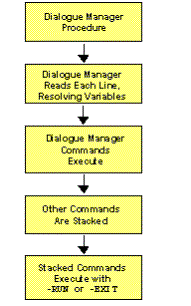
A procedure processes as follows:
- Dialogue Manager reads each line of the procedure, one by one. Values are substituted for variables encountered in any line.
- All Dialogue Manager commands (commands that start with a "-") run as they are encountered.
- Other commands are temporarily stored (stacked) for subsequent execution and are referred to as stacked commands.
- The Dialogue Manager commands -RUN and -EXIT force the execution of any stacked commands.
Issuing an EXEC (or EX) Call
The following is an example of running a procedure (SLRPT), with an explanation of the way it processes.
To run this procedure, the requesting application issues an EXEC (or EX) with the procedure name and supplies values for the required parameters. For example:
EX SLRPT COUNTRY=ENGLAND,CAR=JAGUAR
The following procedure has been enumerated into sections, and its behavior explained (the numbers on the left are not part of the actual procedure, but are simply supplied as reference points for the explanations):
1. -IF &COUNTRY EQ 'DONE' THEN GOTO GETOUT;

2. SQL

   SELECT COUNTRY,CAR,MODEL,BODY

   FROM CAR

   WHERE COUNTRY='&COUNTRY' AND CAR='&CAR'

   ORDER BY CAR;

3. TABLE

   ON TABLE PCHOLD

   END

4. -RUN

5. -EXIT


   -GETOUT

   -TYPE NO PROCESSING DONE: EXITING SP
The procedure processes as follows:
- Values for
the variables &COUNTRY and &CAR are passed to the procedure
before the first line runs. Dialogue Manager substitutes the
value ENGLAND for the variable &COUNTRY in the first line and
tests for the value DONE. The test fails, so Dialogue Manager proceeds
to the next line.
If the value were DONE instead of ENGLAND, control would pass to the label -GETOUT, and the message NO PROCESSING DONE: EXITING SP would be sent to the client application. (Dialogue Manager would skip the intervening lines of code.)
- The next five lines are SQL. Dialogue Manager scans each for the presence of variables, substituting the value ENGLAND for &COUNTRY and the value JAGUAR for &CAR (remember, those values were passed by EDARPC). As each line is processed, it is placed on a stack to be run later by the server.
- The command ON TABLE PCHOLD sends the answer set to the client
application.
The command END delimits ON TABLE PCHOLD.
After Dialogue Manager processes the command END, the stacked commands look like this:
SQL

SELECT COUNTRY,CAR,MODEL,BODY

FROM CAR

WHERE COUNTRY='ENGLAND' AND CAR='JAGUAR'

ORDER BY CAR;

TABLE

ON TABLE PCHOLD

END
The next line is then processed by the Dialogue Manager.
- The Dialogue Manager command -RUN forces the stacked commands to run.
- The Dialogue Manager command -EXIT terminates the procedure.