Impact Analysis Reports On Synonyms, Procedures and Columns
Impact Analysis reports on procedures, synonyms, and columns provide information on the flows and stored procedures available on a particular server, and the synonyms and columns they use. They allow you to evaluate changes before they are made by showing which components will be affected. Impact Analysis reports provide quick analysis of synonym and column usage, and allow you to get procedure information without opening them individually. These reports are drill-down reports, which allow you to double-click entries to open the procedures in the workspace. Impact Analysis reports are also available for individual synonyms and columns.
The following types of reports are available:
- Synonyms by Procedure report. Lists your procedures and the synonyms that they use. This list is sorted by procedure. The report includes whether the synonym is used as a source, a target, or iterator, the adapter type, the table name and description, load type and prior to load options, and directory locations.
- Procedures by Synonym report. Lists your synonyms and the procedures that use them. This list is sorted by synonym. The report includes whether the synonym is used as a source, a target, or iterator, the adapter type, the table name and description, load type and prior to load options, and directory locations.
- Columns by Procedure report. Lists the columns used in your procedures and their synonyms. This list is sorted by data flow. The report includes how the column is used, as well as directory locations.
- Procedures by Column report. Lists your procedures and their synonyms. This list is sorted by column. The report includes how the column is used, as well as directory locations.
- Synonyms by Procedure - Enterprise report. Includes the same information as a Synonyms by Procedure report, but for the server and all its subservers in a hub or subserver environment. This report does not appear if the server you are reporting on does not have any remote servers configured.
- Procedures by Synonym - Enterprise report. Includes the same information as a Procedures by Synonym report, but for the server and all its subservers in a hub or subserver environment. This report does not appear if the server you are reporting on does not have any remote servers configured.
- Flow Report. Provides a summary of the attributes of the flow. The Summary flow report contains information about all of the flows in the server path or in a specific application directory. It includes the flow type, application directory, description, modify date, and creator. A Detailed flow report displays general properties like name, description, ibi Data Migrator release, creator, and modify date. It also provides specifics on SQL Select Statements, target information, load options, target transformations, and execution properties.
Run an Impact Analysis Report On Synonyms, Procedures, and Columns
Impact Analysis reports provide information on the procedures, synonyms, and columns available on a particular server. They allow you to evaluate changes before they are made, by showing which components will be affected. The reports can be sorted by procedure, by synonym, or by column. The results can be exported to Microsoft Excel, copied as text, or printed. For details, see Working With a Report.
- Procedure
- In the navigation pane, right-click a specific application directory, and point to Impact Analysis.
- From
the shortcut menu, click Synonyms by Procedure,Synonyms by Procedure for Enterprise,Procedures
by Synonym,Procedures
by Synonym for Enterprise,Columns by Procedure,
or Procedures by Column. You can also point to Flow Report and click a Summary or Detailed report.
The report opens in the workspace.
These reports include the procedure and synonym directories, columns and column types, synonym usage (source or target), adapter type, table name, description, and prior to load and load type options. These reports are drill-down reports, which allow you to double-click the procedure name entries to open the flows or stored procedures in the workspace.
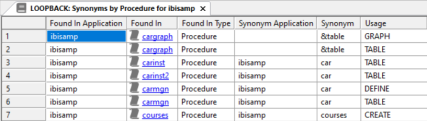
The Synonyms by Procedure report shown in the following image lists each procedure and the synonyms it uses. The Synonyms by Procedure for Enterprise report shows the same report for the application directory and its subdirectories.
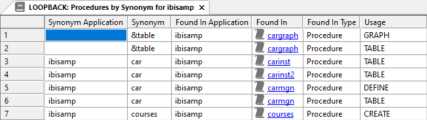
The Procedures by Synonym report shown in the following image lists each synonym and the procedures that use it. The Procedures by Synonym for Enterprise report shows the same report for the application directory and its subdirectories.
The Columns by Procedure report shown in the following image lists each procedure and the synonyms and columns it uses.

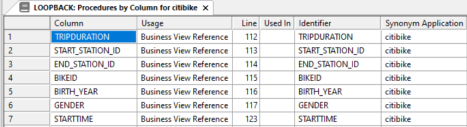
The Procedures by Column report shown in the following image lists each column by synonym and by the procedures that use it.
Run an Impact Analysis Report On a Particular Synonym
An Impact Analysis report on a particular synonym provides information on the procedures and reports that use it and how it is used. It allows you to evaluate changes to synonyms before they are made, by showing which components will be affected. The results can be exported to Microsoft Excel, copied as text, or printed.
These reports are drill-down reports, which allow you to double-click entries to open procedures in the workspace to make the necessary changes.
- Procedure
- Right-click
a synonym in the navigation pane, select Analysis Reports, and then click Impact Analysis.
The Impact Analysis report opens in the workspace.
- Double-click a procedure name to open it in the workspace.
Run an Impact Analysis Report On a Particular Column
An Impact Analysis report on a particular column provides information on the procedures and reports that use it and how it is used. It allows you to evaluate changes to the column before they are made, by showing which components will be affected. The results can be exported to Microsoft Excel, copied as text, or printed.
These reports are drill-down reports, which allow you to double-click entries to open procedures in the workspace to make the necessary changes.
- Procedure
- Double-click a synonym in the navigation pane to open it in the Synonym Editor.
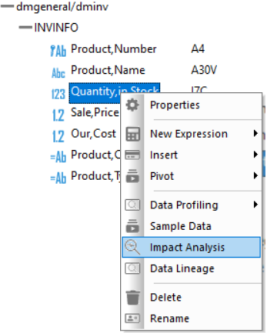
- Right-click
a column in the Synonym Editor and click Impact
Analysis, as shown in the following image.
The Impact Analysis report opens in the workspace.
- Double-click a procedure name to open it in the workspace.
Run an Impact Analysis Report On a Particular Procedure
An Impact Analysis report on a particular procedure provides information on that procedure, reports that use it, and how it is used. It allows you to evaluate changes to the procedure before they are made, by showing which components will be affected. The results can be exported to Microsoft Excel, copied as text, or printed.
These reports are drill-down reports, which allow you to double-click entries to open procedures in the workspace to make the necessary changes.
- Procedure
- Right-click
a procedure in the navigation pane, point to Analysis Reports, and then click Impact Analysis.
The Impact Analysis report opens.
- Double-click
a procedure name to open it in the workspace.
Note: The Analysis Reports folder also gives you access to the Dependency Analysis and Data Lineage reports.
Synonym, Data Flow, and Column Impact Analysis Report Columns
Synonym, Procedure, and Column reports provide the information listed and described in the following table:
|
Column |
Format |
Function |
|---|---|---|
|
Found In Application |
Alpha 18 |
Flow or stored procedure application directory. |
|
Found In |
Alpha 32 |
Flow or stored procedure name. |
|
Found In Type |
|
Indicates if the object was found in a stored procedure or flow. |
|
Synonym Application |
Alpha 64 |
Synonym application directory. Note: This
value will only appear if you are using application directories.
|
|
Synonym |
Alpha 64 |
Synonym name. |
|
Usage |
Alpha 36 |
How the synonym or column is used, for example, the source, target, or transformation. |
|
Line |
Alpha 8 |
Line number where the item appears. |
|
Adapter |
Alpha 64 |
Synonym format. |
|
Table Name or Dataset |
Alpha 133 |
Data target table name. |
|
Synonym Remarks |
Alpha 78 |
Synonym description. |
|
Prior to Load |
Alpha 13 |
Prior to load option for targets. |
|
Load Type |
Alpha 35 |
Load type for targets. |
|
Procedure Description |
Alpha 150 |
Flow or stored procedure description. |
|
Column |
Alpha 66 |
Column name. |
|
Used In |
Alpha 100 |
Expression that uses a particular column. |
|
Identifier |
Alpha 66 |
Expression unique identifier. |