Create a Git Repository
It is recommended that users work on their user's home directory, in homeapps. The homeapps applications are visible and available only to the connected users and server administrators. For more information on how a user creates a home directory, see Create and Configure User Home Directory.
You can start working on your local repository by performing either Init or Clone operations.
- For this procedure, your application directory must be empty.
- File and application directory names on the server must be lowercase, and all file names must include an extension.
- Procedure
- To create a local Git repository by cloning an existing remote repository, right-click the application directory, point to Git, and then click Clone.
- Select the connection and enter the value for the Repository URL/Name field.
The image below illustrates an example of the Clone operation with the default <local> connection. The repository is accessed by Git using the local protocol.
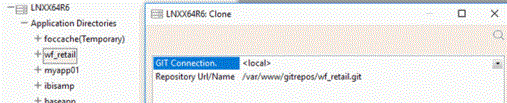
The image below illustrates another example of Clone operation. In this example, the connection, added by a user, is set for the repository that is accessed by Git using the HTTP protocol.
