Creating a WebFOCUS StyleSheet
You can create a StyleSheet: StyleSheets" /> StyleSheets" />
- Within a report request, as an inline StyleSheet. This is useful when you need to apply a StyleSheet to only one report. For details, see Creating a WebFOCUS StyleSheet.
- Outside of a report request, as a separate file. This enables you to apply one StyleSheet to multiple reports. For details, see Creating and Applying a WebFOCUS StyleSheet File.
Note: You can also include a StyleSheet file in another StyleSheet. This enables you to apply the styles in the included StyleSheet file, but override specific attributes. For information, see Include a StyleSheet File in Another StyleSheet.
Creating a WebFOCUS StyleSheet Within a Report Request
You can create a StyleSheet within a report request. This enables you to create and maintain the formatting for your report directly in the report request. This type of StyleSheet is known as an inline StyleSheet. StyleSheets" /> StyleSheets" />
Create a WebFOCUS StyleSheet Within a Report Request
ON TABLE SET STYLE[SHEET] *
declaration
[declaration]
.
.
.
[ENDSTYLE]
where:
Creating a WebFOCUS StyleSheet Within a Report Request
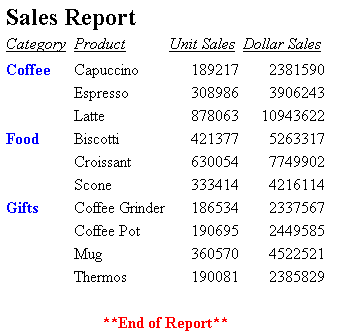
The following illustrates an inline StyleSheet. The StyleSheet is highlighted in the request.
TABLE FILE GGSALES
SUM UNITS DOLLARS BY CATEGORY BY PRODUCT
HEADING
"Sales Report"
FOOTING CENTER
"**End of Report**"
ON TABLE SET PAGE-NUM OFF
ON TABLE SET STYLE *
TYPE=REPORT, GRID=OFF, $
TYPE=HEADING, FONT=ARIAL, SIZE=12, STYLE=BOLD, $
TYPE=TITLE, STYLE=ITALIC, $
TYPE=DATA, COLUMN=N1, STYLE=BOLD, COLOR=BLUE, $
TYPE=FOOTING, COLOR=RED, STYLE=BOLD, $
ENDSTYLE
END
The output is:
Include a StyleSheet File in Another StyleSheet
INCLUDE = stysheet,$
where:
Is the StyleSheet file to include.
StyleSheet declarations are applied in the order in which they are found in the StyleSheet. Therefore, if you want to include a StyleSheet file and then override some of the attributes within it, place the INCLUDE statement first, then the declarations that override specific attributes below it.
Including a StyleSheet File in Another StyleSheet
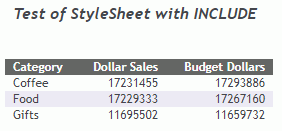
The following request includes one of the distributed WebFOCUS StyleSheet Sin the inline report StyleSheet and overrides the heading style to be bold and italic.
HEADING CENTER
"Test of Stylesheet with Include"
" "
SUM DOLLARS BUDDOLLARS
BY CATEGORY
ON TABLE HOLD AS STYLE2 FORMAT HTML
ON TABLE SET STYLE *
INCLUDE=IBFS:/FILE/IBI_HTML_DIR/javaassist/intl/EN/ENIADefault_combine.sty,$
TYPE=HEADING, STYLE = BOLD+ITALIC,$
END
The output is shown in the following image.
Creating and Applying a WebFOCUS StyleSheet File
You can create a StyleSheet as a separate file and apply it to as many reports as you wish. A StyleSheet file contains only declarations and optional comments. Unlike an inline StyleSheet, a StyleSheet file does not contain the ON TABLE SET STYLESHEET and ENDSTYLE commands. You can apply a StyleSheet file to a report using the SET STYLESHEET command, as described in Creating a WebFOCUS StyleSheet. For information about StyleSheet declarations, see General WebFOCUS StyleSheet Syntax. StyleSheet files" />
As an alternative to creating a new StyleSheet file, you can use one of the sample StyleSheet files provided with WebFOCUS as a template.
Whether you create a StyleSheet file, or copy and customize an existing one, you need to store it in the correct location, as described in Creating a WebFOCUS StyleSheet.
Naming and Storing a WebFOCUS StyleSheet File
When you create a StyleSheet file to be used in:
- WebFOCUS, upload
the file to the WebFOCUS repository to a folder in which you are
permitted to create content, and that users running procedures that reference
the StyleSheet are permitted to read.
If you create a StyleSheet for a self-service application, you can deploy your StyleSheet file to the apps\baseapp directory where it can be shared by multiple applications. You can also deploy the StyleSheet file to the same location as the report procedure it works with if you are only applying the file to that particular procedure. StyleSheet files" /> StyleSheet files" />
You should name a StyleSheet file filename.sty, where filename can include letters, numbers, and underscores (_), and otherwise must be valid for the operating environments on which it resides.
Apply a WebFOCUS StyleSheet File to a Report
To apply your StyleSheet file at the beginning of your report request, use StyleSheet files" />
SET STYLE[SHEET] = stylesheet
To apply your StyleSheet file within your report request use
ON TABLE SET STYLE[SHEET] stylesheet
where: