Applying Font Attributes to a Heading, Footing, Title, or Label
You can specify font family, size, color, and style for any report element you can identify in a StyleSheet:
- Row and column titles. Styling is applied to either the default title or a customized title.
- Headings and footings, and elements within them, including specific lines in a multi-line heading or footing, items in a line, text strings, and embedded fields. Note that you can also specify background color for individual elements.
- Labels for subtotals, grand totals, subtotal calculations, and row totals. Styling applies to default or customized names.
- Page numbers in a heading or footing.
- Underlines and skipped lines (not supported in HTML reports).
For detailed syntax, see Identifying a Report Component in a WebFOCUS StyleSheet. For details on font options, including size, color, and style, see Formatting Report Data.
Applying Font Characteristics to a Report Heading and Column Titles
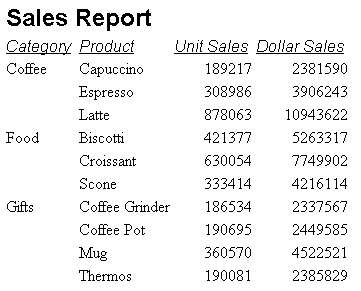
This request uses a StyleSheet to select 12-point Arial bold for the report heading (Sales Report), and 10-point Arial italic for the default column titles (Category, Product, Unit Sales, Dollar Sales), based on the HTML point scale, which differs from standard point sizes. See Formatting Report Data.
For an HTML report, the font name must be enclosed in single quotation marks. The StyleSheet attribute TYPE = TABHEADING identifies the report heading, and the attribute TYPE = TITLE identifies the column titles.
TABLE FILE GGSALES
SUM UNITS DOLLARS
BY CATEGORY BY PRODUCT
ON TABLE SUBHEAD
"Sales Report"
ON TABLE SET PAGE-NUM OFF
ON TABLE SET ONLINE-FMT HTML
ON TABLE SET STYLESHEET *
TYPE = REPORT, GRID=OFF, $
TYPE = TABHEADING, FONT = 'ARIAL', SIZE = 12, STYLE = BOLD, $
TYPE = TITLE, FONT = 'ARIAL', SIZE = 10, STYLE = ITALIC, $
ENDSTYLE
END
The output is:
Setting Font Size for a Report Heading Using an Internal Cascading Style Sheet
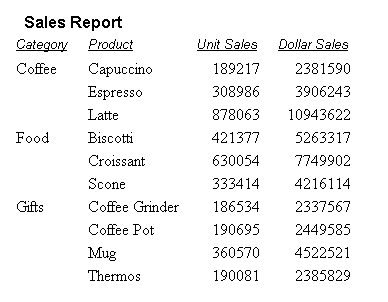
An internal cascading style sheet enables you to specify an absolute size, measured in points, rather than the corresponding HTML point scale, thereby providing greater control over the appearance of fonts in a report. See Formatting Report Data and Controlling Report Formatting.
This request generates an internal cascading style sheet and specifies font characteristics for the report heading.
TABLE FILE GGSALES
SUM UNITS DOLLARS
BY CATEGORY BY PRODUCT
ON TABLE SUBHEAD
"Sales Report"
ON TABLE SET PAGE-NUM OFF
ON TABLE SET ONLINE-FMT HTML
ON TABLE SET HTMLCSS ON
ON TABLE SET STYLESHEET *
TYPE = REPORT, GRID=OFF, $
TYPE = TABHEADING, FONT = 'ARIAL', SIZE = 12, STYLE = BOLD, $
TYPE = TITLE, FONT = 'ARIAL', SIZE = 10, STYLE = ITALIC, $
ENDSTYLE
END
The output is:
Applying Font Styles to a System Variable in a Report Heading
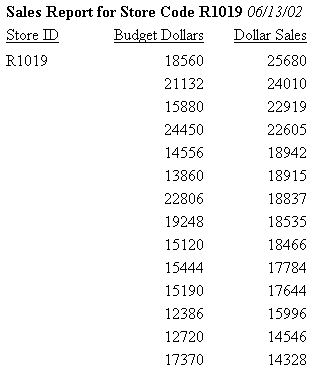
This request includes the system variable &DATE in the heading. Styling is italic to distinguish it from the rest of the heading text, which is bold. The spot marker <+0> creates two items in the heading so that each one can be formatted separately.
TABLE FILE GGSALES
PRINT BUDDOLLARS DOLLARS
BY STCD
WHERE STCD EQ 'R1019'
ON TABLE SUBHEAD
"Sales Report for Store Code R1019 <+0>&DATE"
ON TABLE SET PAGE-NUM OFF
ON TABLE SET ONLINE-FMT HTML
ON TABLE SET STYLESHEET *
TYPE=REPORT, GRID=OFF,$
TYPE=TABHEADING, FONT='TIMES', SIZE=10, STYLE=BOLD,$
TYPE=TABHEADING, ITEM=2, STYLE=ITALIC,$
ENDSTYLE
END
The partial output is: