Reusing ibi WebFOCUS StyleSheet Declarations With Macros
If you frequently use a group of attributes within a StyleSheet declaration, you can create a StyleSheet macro that groups the sequence of attributes together, enabling you to apply them repeatedly throughout the StyleSheet without recoding them. StyleSheets macros" /> StyleSheet declarations" />
Defining an ibi WebFOCUS StyleSheet Macro
A StyleSheet macro must be defined in the StyleSheet that references it and the macro definition must precede its use in the StyleSheet.
To define a macro, use the DEFMACRO attribute followed by the desired styling attributes. macros StyleSheets" />
Define an ibi WebFOCUS StyleSheet Macro
DEFMACRO = macroname, attribute1 = value1, [attribute2 = value2,]... $
Applying an ibi WebFOCUS StyleSheet Macro
A StyleSheet macro applies all the formatting defined in the macro to the report component specified in the declaration. To apply a macro, use the MACRO attribute. You can apply one macro per declaration.
When applying a StyleSheet macro to a report component, you can override any attribute defined in the macro by specifying the same attribute with the new value in that declaration, following the MACRO attribute.
Apply an ibi WebFOCUS StyleSheet Macro
TYPE=type, [subtype,] MACRO=macroname, [condition,] $
Is the report component you wish to affect. You can specify any report component.
Are any additional attributes, such as COLUMN, ACROSS, or ITEM, that are needed to identify the report component to which you are applying the macro. For information about how to specify different types of report components, see Identifying a Report Component in an ibi WebFOCUS StyleSheet.
Is the name of the macro to apply to the specified report component. The macro must be defined in the same StyleSheet.
Is an optional WHEN attribute that you can specify if you wish to make this declaration conditional. For information about conditional declarations, see Controlling Report Formatting.
Defining, Applying, and Overriding an ibi WebFOCUS StyleSheet Macro
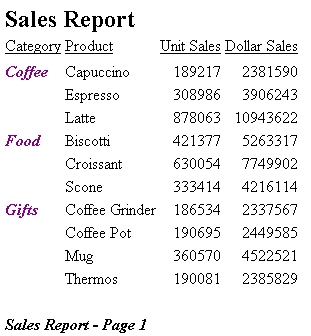
The following annotated example illustrates how to define, apply, and override macros in your StyleSheet:
   TABLE FILE GGSALES
    SUM UNITS DOLLARS
    BY CATEGORY BY PRODUCT
    HEADING
    "Sales Report"
    FOOTING
    "Sales Report - Page <TABPAGENO"
    ON TABLE SET STYLE *
    TYPE=REPORT, GRID=OFF,$
1.  DEFMACRO=A, STYLE=BOLD, SIZE=12, $
2.  DEFMACRO=BI, STYLE=BOLD+ITALIC, COLOR=PURPLE, $
3.  TYPE=HEADING, MACRO=A, $
4.  TYPE=FOOTING, MACRO=BI, COLOR=BLACK, $
5.  TYPE=DATA, COLUMN=N1, MACRO=BI, $
   ENDSTYLE
   END
- Defines the A macro.
- Defines the BI macro.
- Illustrates how the A macro is applied to the heading.
- Illustrates how the BI macro is applied to the footing and is partially overridden by the attribute value pair COLOR=BLACK.
- Illustrates how the BI macro is applied to the data in the BY sort field CATEGORY (specified by TYPE=DATA, COLUMN=N1).
The output is: