Displaying Missing Data Values in a Graph
You can display missing data values (in a bar graph, line graph, area graph, or any variation of these graph types) in one of the following formats:
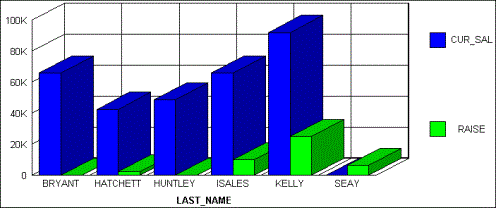
- Graph as zero. In bar graphs, a bar appears on the zero line. In line graphs, a solid line connects the missing value with the succeeding value. In area graphs, the area appears on the zero line.
- Graph as gap. In all graph types (bar, line, or area), missing values appear as a gap in the graph.
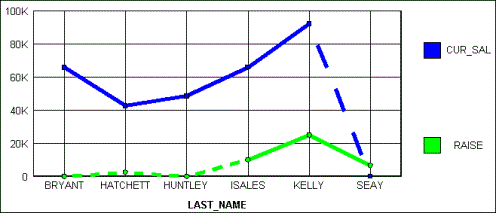
- Dotted line to zero. In line graphs, a dotted line connects the missing value with the succeeding value. In 3D bar graphs, solid lines outline the flat bar corresponding to the missing value. In 2D bar graphs, a gap appears in the graph. In area graphs, a transparent area extends down to the zero line and then up to the succeeding value.
- Interpolated dotted line. In
a line graph, missing values appear as an interpolated dotted line
that connects the plot points immediately preceding and succeeding
the missing value. In bar and area graphs, missing values display
as an interpolated (transparent) bar or area.
Note: You can specify a default value (other than the default value of zero) to represent missing data. To do this use a DEFINE command. For details, see Handling Records With Missing Field Values.
Display Missing Values in a Graph
GRAPH FILE filename
.
.
.
SET VZERO={ON|OFF}
ON GRAPH SET STYLE *
*GRAPH_SCRIPT
API call
*END
ENDSTYLE
END
Displays missing values as zero. An API call is not necessary when VZERO is set to ON. Alternatively, you can add ON GRAPH SET VZERO ON.
Displays missing values as a gap, a dotted line to zero, or, an interpolated dotted line, depending on the API call that is added. Alternatively, you can add ON GRAPH SET VZERO OFF.
Determines how missing values display in the graph when VZERO is set to OFF. Possible values are:
setFillMissingData(0); displays
missing values as a gap.
setFillMissingData(1); displays
missing values as a dotted line to zero.
setFillMissingData(2); displays
missing values as an interpolated dotted line.
Displaying Missing Values as Zero In a Graph
The following illustrates how missing values are represented in a bar graph when designated to appear as zero. The CURR_SAL value for Seay is missing, as well as the RAISE value for Bryant and Huntley.
SET LOOKGRAPH=BAR
SET GRAPHEDIT=SERVER
SET GRID=ON
SET VZERO=ON
GRAPH FILE MSFATIA
SUM CUR_SAL
RAISE
ACROSS LAST_NAME
ON GRAPH SET STYLE *
*GRAPH_SCRIPT
setTextRotation(getO1Label(),0);
*END
ENDSTYLE
END
The output is:
Displaying Missing Values as a Gap
The following illustrates how missing values are represented in a bar graph when designated to appear as a gap. The CURR_SAL value for Seay is missing, as well as the RAISE value for Bryant and Huntley.
SET LOOKGRAPH=BAR
SET GRAPHEDIT=SERVER
SET GRID=ON
SET VZERO=OFF
GRAPH FILE MSFATIA
SUM CUR_SAL
RAISE
ACROSS LAST_NAME
ON GRAPH SET STYLE *
*GRAPH_SCRIPT
setFillMissingData(0);
setTextRotation(getO1Label(),0);
*END
ENDSTYLE
END
The output is:

Displaying Missing Values as a Dotted Line to Zero
The following illustrates how missing values are represented in a line graph when designated to appear as a dotted line to zero. The CURR_SAL value for Seay is missing, as well as the RAISE value for Bryant and Huntley.
SET LOOKGRAPH=LINE
SET GRAPHEDIT=SERVER
SET GRID=ON
SET VZERO=OFF
GRAPH FILE MSFATIA
SUM CUR_SAL
RAISE
ACROSS LAST_NAME
ON GRAPH SET STYLE *
*GRAPH_SCRIPT
setFillMissingData(1);
setTextRotation(getO1Label(),0);
*END
ENDSTYLE
END
The output is:
Displaying Missing Values as an Interpolated Dotted Line
The following illustrates how missing values are represented in a line graph when designated to appear as an interpolated dotted line. The CURR_SAL value for Seay is missing, as well as the RAISE value for Bryant and Huntley.
SET LOOKGRAPH=LINE
SET GRAPHEDIT=SERVER
SET GRID=ON
SET VZERO=OFF
GRAPH FILE MSFATIA
SUM CUR_SAL
RAISE
ACROSS LAST_NAME
ON GRAPH SET STYLE *
*GRAPH_SCRIPT
setFillMissingData(2);
setTextRotation(getO1Label(),0);
*END
ENDSTYLE
END
The output is:
