How to Specify Formatting in a Report
You can specify your report formatting using a style sheet. A style sheet is a set of declarations that defines the appearance of a report. For some types of formatting, you may need to supplement style sheets with other features, such as SET parameters and TABLE commands. In each case, this manual describes everything required to achieve a given kind of formatting.
Benefits of using style sheets. For some types of formatting you can choose between using a style sheet or a different feature. Style sheets are usually preferred because they enable you to centralize and reuse formatting logic. This provides you with several advantages:
- Productivity. By using just a few lines of code (a single style sheet), you can format dozens of reports, reducing the development time of each report.
- Easy maintenance. You can change formatting for dozens of reports at one time by editing a single style sheet.
- Consistent appearance. Your enterprise can guarantee a consistent look for its reports by assigning the same style sheet(s) to them.
- Rapid reformatting. You can change the appearance of a report quickly and easily by switching the style sheet assigned to it.
- Prioritizing. You can focus on your first priority (report content), because you can quickly address report presentation by applying an existing style sheet.
There are different kinds of style sheets that you can use to format a report. You can learn about them and how to choose between them in How to Choose a Type of Style Sheet.
Specifying Formatting for the Order Revenue Report
This report displays the order number, order date, and total order revenue for Century Corporation for the third quarter of 2000:
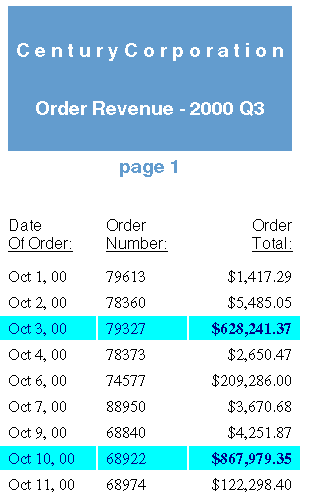
The report is formatted by a WebFOCUS StyleSheet and by formatting commands in the report procedure itself. The procedure, Revenue.fex, is shown below, followed by the StyleSheet file, OrderRev.sty:
Revenue.fex
   TABLE FILE CENTORD
1.HEADING
1. " "
1. "C e n t u r y C o r p o r a t i o n"
1. " "
1. "Order Revenue - 2000 Q3"
1. " "
1. "page <TABPAGENO"
1. " "
2. SUM ORDER_DATE/MtDY ORDER_NUM LINEPRICE AS 'Order,Total:'
   BY LOWEST 9 ORDER_DATE NOPRINT
   WHERE (ORDER_DATE GE '2000/10/01') AND (ORDER_DATE LE '2000/12/31');
   ON TABLE SET ONLINE-FMT PDF
3. ON TABLE SET SQUEEZE ON
4. ON TABLE SET STYLESHEET OrderRev
   END
OrderRev.sty
5. TYPE=Report, GRID=Off, UNITS=Inches, TOPGAP=0.06, BOTTOMGAP=0.06, $
6. TYPE=Data, FONT='Times', $
7. TYPE=Data, BACKCOLOR=Aqua, COLOR=Navy,
7.      WHEN=LinePrice GT 500000, $
7. TYPE=Data, COLUMN=LINEPRICE, BACKCOLOR=Aqua, COLOR=Navy, STYLE=Bold,
7.      WHEN=LinePrice GT 500000, $
8. TYPE=Title, FONT='Helvetica', $
9. TYPE=Heading, FONT='Helvetica', STYLE=Bold, SIZE=14, JUSTIFY=Center,
9.                       BACKCOLOR=Dark Turquoise, COLOR=White, $
9. TYPE=Heading, LINE=6, BACKCOLOR=White, COLOR=Dark Turquoise, $
9. TYPE=Heading, LINE=7, BACKCOLOR=White, $
- Adds a page heading to the report.
- Reformats the order date from (for example) 2000/10/07 to Oct. 7, 00.
- Aligns the heading with the report margins instead of the page margins.
- Identifies a StyleSheet file to format the report.
- Increases spacing between report lines.
- Uses a proportional serif font for the report data.
- Highlights each order that totals more than $500,000 by applying a navy font and an aqua background, and by bolding the order total.
- Uses a proportional sans serif font for the report column titles.
- Formats the report heading by centering it, applying a larger sans serif font, coloring most of it with a dark turquoise background and white lettering, and applying the inverse coloring to the page number (the sixth line of the heading).
This is only a summary of what these formatting instructions do. You can find complete explanations in the topics that describe each formatting feature.
The formatting logic that you apply to your own reports may be briefer or more extensive than this example, depending on the report and on what formatting you choose to apply.
How to Choose a Type of Style Sheet
You can choose between two types of style sheets to format a report: StyleSheets" />
- WebFOCUS StyleSheets (often
abbreviated to "StyleSheets"), the native WebFOCUS style sheet language.
These provide you with the flexibility to format reports in many
display formats, including HTML, PDF, Excel 2000, and PostScript.
You can choose between saving the StyleSheet as a separate file,
which you can assign to multiple reports, or saving it within one
report request.
If you are generating a report in HTML format, you can boost its performance, and increase the number of formatting options available to it, by having the WebFOCUS StyleSheet dynamically generate an "internal" cascading style sheet (CSS). (CSS is the standard style sheet language designed for HTML documents. The internal CSS generated by WebFOCUS is internal to the report output, instead of being saved as a separate file.) For more information about generating an internal cascading style sheet, see Generating an Internal Cascading Style Sheet for HTML Reports.
- External cascading style sheets, the standard style sheet language designed for HTML documents. You can apply an external cascading style sheet to any WebFOCUS report in HTML format. (An external cascading style sheet is one that is saved as a separate file, instead of within the document it formats, and so is "external" to the document.)
How do you choose between the two types of style sheets? Consider choosing:
- A WebFOCUS StyleSheet if:
You want to display a report in different display formats, such as PDF and Excel 2000. WebFOCUS StyleSheets are supported for many kinds of display formats, but cascading style sheets work for reports in HTML format only.
- An external cascading style sheet for
any of the following reasons:
Your enterprise already uses cascading style sheets to format HTML documents, and it wants reports to conform to these same presentation guidelines.
You want to apply the same formatting to other kinds of HTML documents in your enterprise.