Controlling the Display of Empty Reports
If a report request returns no records (for example, because no records satisfy its selection criteria, or because the data source has no records), you can choose to display or print:
- An empty report,
that is, the report without data but including column titles, a
report heading (if one was specified in the report request), and
a page heading (if one was specified).
To do this, set the EMPTYREPORT parameter to ON.
- A message stating that there
is no report output.
This is the default. You can return to the default by setting the EMPTYREPORT parameter to OFF.
This applies to tabular reports, not to free-form reports and graphs.
SET EMPTYREPORT = OFF is not supported with DOC format.
If you have created a report that contains a WHERE TOTAL statement and the test yields zero records, an empty report will display.
Control the Display of an Empty Report
You can control what is displayed (or printed) when a report request returns no records, using the EMPTYREPORT parameter. To issue the SET command:
Outside of a report request, use the syntax
SET EMPTYREPORT = {ANSI|ON|OFF}
Within a report request, use the syntax
ON TABLE SET EMPTYREPORT {ANSI|ON|OFF}
where:
Produces a single-line report and displays the missing data character or a zero if a COUNT is requested. In each case, &RECORDS will be 0, and &LINES will be 1.
If the SQL Translator is invoked, ANSI automatically replaces OFF as the default setting for EMPTYREPORT.
Specifies that the report will be displayed without data but with column titles, a report heading (if one was specified in the report request), and a page heading (if one was specified).
Specifies that a message will be displayed indicating that there is no report output. OFF is the default value.
Controlling the Display of Empty Reports
The following request does not retrieve any records and sets the EMPTYREPORT parameter to OFF.
SET EMPTYREPORT=OFF
TABLE FILE WF_RETAIL_LITE
HEADING
"This is the heading"
SUM COGS_US REVENUE_US COLUMN-TOTAL ROW-TOTAL
BY COUNTRY_NAME
WHERE COUNTRY_NAME EQ 'Louisiana'
FOOTING
"This is the footing"
ON TABLE SET STYLE *
GRID=OFF,$
END
The following output is produced.
0 NUMBER OF RECORDS IN TABLE= 0 LINES= 0
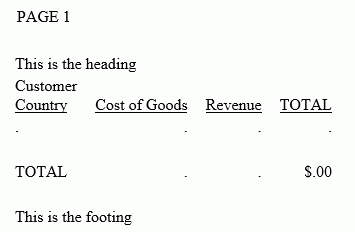
Changing the EMPTYREPORT setting to ON produces the output shown in the following image.
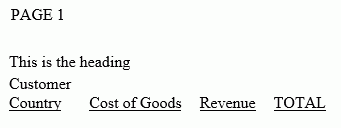
Changing the EMPTYREPORT setting to ANSI produces the output shown in the following image.