Identifying a Page Number, Underline, or Skipped Line
In a report you can identify and format page numbers, underlines, and skipped lines using the PAGENUM, SKIPLINE, and UNDERLINE attributes.
Note that although you can insert skipped lines and underlines in an HTML report, formatting is not supported.
The following code and output examples illustrate where the PAGENUM, UNDERLINE, and SKIPLINE components appear in a report, and which TYPE values you use to identify them.
SET ONLINE-FMT=PDF
TABLE FILE CENTORD
HEADING
"Sales By Plant"
SUM QUANTITY
BY PLANT BY YEAR
WHERE PLANT EQ 'BOS' OR 'DAL'
ON YEAR UNDER-LINE
ON PLANT SKIP-LINE
END
The following output goes with the previous code example.
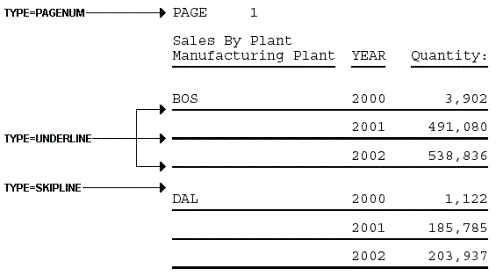
Note: Since this request simply illustrates where the components appear in a report, it omits a StyleSheet.
Identify a Page Number, Underline, or Skipped Line
TYPE=type
Identifies the report component. Select from:
PAGENUM which
identifies page numbers.
SKIPLINE which
denotes skipped lines generated by ON field SKIP-LINE. This
is not supported for reports in HTML format.
UNDERLINE which
identifies underlines generated by ON field UNDER-LINE, or
by BAR in a Financial Modeling Language (FML) report. This is not
supported for reports in HTML format.
Identifying Underlines and Page Numbers
The following illustrates how to identify underlines and page numbers in a report request. The relevant StyleSheet declarations appear in boldface in the request.
Note that this report is formatted in PDF since formatting is not supported for underlines in an HTML report.
SET ONLINE-FMT=PDF
TABLE FILE CENTORD
HEADING
"Sales By Plant"
SUM QUANTITY
BY PLANT BY YEAR
WHERE PLANT EQ 'BOS' OR 'DAL' OR 'LA'
ON PLANT UNDER-LINE SKIP-LINE
ON TABLE SET STYLE *
TYPE=REPORT, GRID=OFF, $
TYPE=HEADING, OBJECT=TEXT, COLOR=BLUE, FONT=ARIAL,$
TYPE=PAGENUM, STYLE=ITALIC, SIZE=8,$
TYPE=UNDERLINE, COLOR=RED,$
ENDSTYLE
END
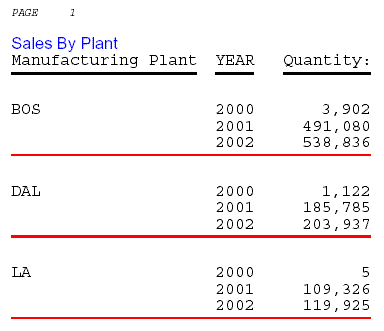
The output is:
Identifying Skipped Lines
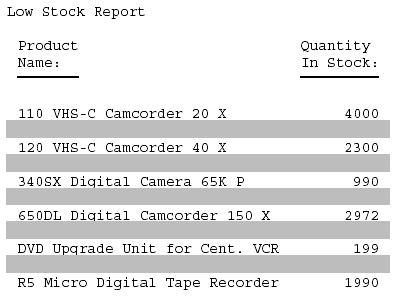
The following illustrates how to identify skipped lines in a report. The relevant StyleSheet declaration is highlighted in the request.
SET ONLINE-FMT=PDF
TABLE FILE CENTINV
HEADING
"Low Stock Report"
" "
SUM QTY_IN_STOCK
WHERE QTY_IN_STOCK LT 5000
BY PRODNAME
ON PRODNAME SKIP-LINE
ON TABLE SET PAGE-NUM OFF
ON TABLE SET STYLE *
TYPE=SKIPLINE, BACKCOLOR=SILVER, $
ENDSTYLE
END
The output is: