Removing Blank Lines From a Report
The DROPBLNKLINE parameter controls whether blank lines display in a WebFOCUS report. With the options provided, you can affect blank lines that are automatically generated in different locations within a report. You can choose to drop the blank lines around subtotals, subheadings and subfootings, as well as certain data lines that may be blank and appear as blank lines on the report output. Additionally, when using borders, you can select to remove blank lines inserted around the headings and footings. You can eliminate these blank lines from the report output using the SET DROPBLNKLINE options.
Control Automatic Blank Lines on Report Output
SET DROPBLNKLINE={OFF|ON|BODY|HEADING|ALL}
or
ON TABLE SET DROPBLNKLINE {OFF|ON|BODY|HEADING|ALL}
where:
Inserts system-generated blank lines as well as empty data lines. OFF is the default value.
Removes system-generated blank lines within the body of the report (for example, before and after subheads). In addition, certain data lines that may be blank and appear as blank lines on the report output will be removed from the output. BODY is a synonym for ON.
Removes the blank lines between headings and titles and between the report body and the footing. Works in positioned formats (PDF, PS, DHTML, PPT, and PPTX) when a request has a border or backcolor StyleSheet attribute anywhere in the report.
Provides both the ON and HEADING behaviors.
Usage Notes for SET DROPBLNKLINE=HEADING
- In the positioned
report formats (PDF, PS, DHTML, PPT, and PPTX) with borders or backcolor,
the system automatically generates a blank line below the heading
and above the footing. This is done by design to make bordered lines work
together. Generally, the rule is that each line is responsible for
the border setting for its top and left border. Therefore, the bottom
border of the heading is set by the top border of the row beneath
it. To ensure that the bottom of the heading border is complete
and does not interfere with the top of the column titles border,
a blank filler line is automatically inserted. This filler line
contains the defined bottom border of the heading as its top border.
The same is true between the bottom of the data and the top of the
footing.
DROPBLNKLINE=HEADING removes the filler blank line by defining the height of the filler line to zero. This causes the bottom border of the heading to become the top border of the column titles. When backcolor is used without borders, this works well to close any blank gaps in color. However, WebFOCUS processing will not remediate between line styles, so using different border styles between different report elements may create some contention between the border styling definitions. To ensure that you have consistent border line styling between different report elements, use a single line style between the elements that present together in the report.
- DROPBLNKLINE=HEADING
is not supported with:
- Different border styles between the heading and the column titles or the data and the footing.
- Reports that use the ACROSS sort phrase.
- Usage Considerations:
- In some reports, FOOTING BOTTOM requires the space added by the system-generated blank line between the data and the footing in order to present the correct distance between the sections. In these instances, the top of the FOOTING BOTTOM may slightly overlap the bottom of the data grid. You can resolve this by adding a blank line to the top of your footing.
- Applying borders for the entire report (TYPE=REPORT) is recommended to avoid certain known issues that arise when bordering report elements individually. In some reports that define backcolor and borders on only select elements, the backcolor applied to the heading is presenting with a different width than the backcolor applied to the column titles. This difference causes a ragged right edge to present between the headings and the titles. Additionally, if you can define the color of the border (BORDER-COLOR) for elements with backcolor to match the backcolor, the borders will blend into the backcolor and not be visible.
Comparing DROPBLNKLINE Parameter Settings
The following request against the GGSALES data source has a heading, a footing, and a subtotal. Initially, DROPBLNKLINE is set to OFF.
TABLE FILE GGSALES
HEADING CENTER
"Gotham Grinds Sales By Region"
FOOTING CENTER
"Generated on: &DATETMDYY"
SUM DOLLARS UNITS
BY REGION SUBTOTAL
BY CATEGORY
BY PRODUCT
WHERE REGION EQ 'Northeast' OR 'West'
ON TABLE PCHOLD FORMAT PDF
ON TABLE SET DROPBLNKLINE OFF
ON TABLE SET PAGE NOPAGE
ON TABLE SET STYLE *
SQUEEZE = ON,
FONT = ARIAL,
TYPE=HEADING, BORDER=LIGHT,
$
ENDSTYLE
END
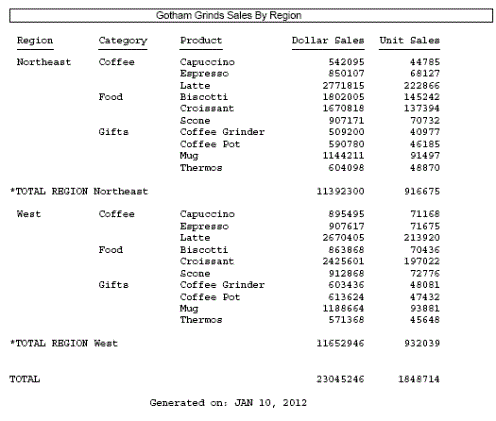
The output has a blank line below the heading, above the footing, and above and below the subtotal lines and the grand total line.
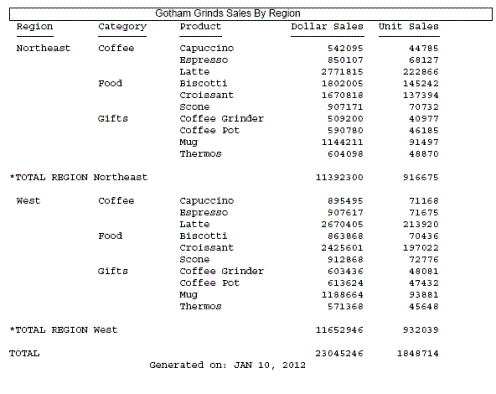
Changing the DROPBLNKLINE setting to HEADING produces the following output. The blank line below the heading and the blank line above the footing have been removed. The blank lines above and below the subtotal and grand total lines are still inserted.
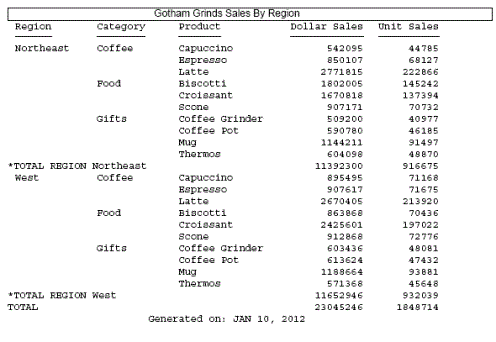
Changing the DROPBLNKLINE setting to ON (or BODY) produces the following output in which the blank lines above and below the subtotal and grand total lines have been removed, but the blank lines below the heading and above the footing are still inserted.
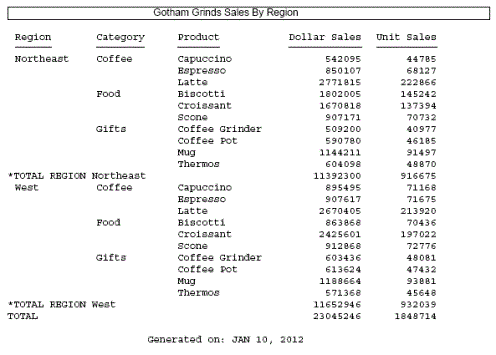
Changing the DROPBLNKLINE setting to ALL produces the following output in which the blank lines around the subtotal and grandtotal lines as well as the blank lines below the heading and above the footing have been removed.