Setting the Number of Data Rows For Each Page in an AHTML Report Request
You can use the LINES-PER-PAGE StyleSheet attribute in an AHTML report request to set the number of data rows to display on each page in the report output.
Set the Number of Data Rows For Each Page in an AHTML Report Request
To control the number of data rows to display on each page in the report output, use the following StyleSheet syntax:
TYPE=REPORT, LINES-PER-PAGE={n|UNLIMITED},$
where:
Specifies the number of data rows to display on each page. The default value is 57 rows.
Specifies that you want to show all the results on one page.
- In an AHTML report request, using the following SET command, you will see the same number of data rows as the LINES-PER-PAGE StyleSheet option:
ON TABLE SET LINES {n|UNLIMITED} - In an HTML report request, using either the LINES-PER-PAGE StyleSheet option or the SET LINES command, you will see the number of lines, as opposed to the number of data rows.
Setting the Number of Data Rows For Each Report Page
The following example uses the default WebFOCUS StyleSheet and displays 20 data rows on each page of the report output.
TABLE FILE GGSALES
HEADING
"Sales Report"
SUM UNITS DOLLARS
BY CATEGORY BY PRODUCT BY DATE NOPRINT
WHERE DATE GE 19960101 AND DATE LE 19960401
ON TABLE PCHOLD FORMAT AHTML
ON TABLE SET STYLE *
INCLUDE=IBFS:/FILE/IBI_HTML_DIR/ibi_themes/Warm.sty,$
TYPE=REPORT, GRID=OFF, LINES-PER-PAGE = 20, $
ENDSTYLE
END
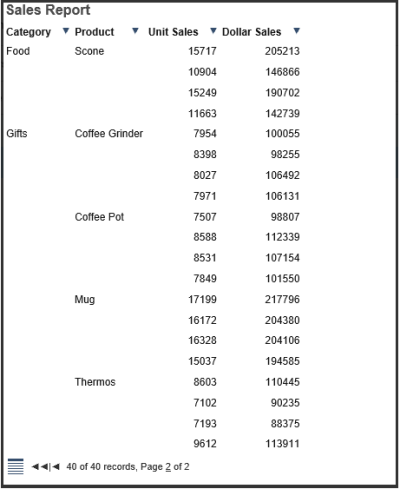
The following image shows the output for the first page.
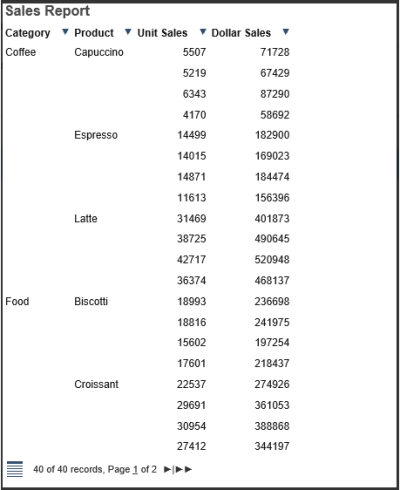
The following image shows the output for the second page.