DIGITS: Converting a Number to a Character String
Given a number, DIGITS converts it to a character string of the specified length. The format of the field that contains the number must be Integer.
Convert a Number to a Character String
DIGITS(number,length)
where:
Integer
Is the number to be converted, stored in a field with the data type Integer.
Integer between 1 and 10
Is the length of the returned character string. If the length is longer than the number of digits in the number being converted, the returned value is padded on the left with zeros. If the length is shorter than the number of digits in the number being converted, the returned value is truncated on the left.
Converting a Number to a Character String
The following request against the WF_RETAIL_LITE data source converts -123.45 and ID_PRODUCT to character strings:
DEFINE FILE WF_RETAIL_LITE
MEAS1/I8=-123.45;
DIG1/A6=DIGITS(MEAS1,6) ;
DIG2/A6=DIGITS(ID_PRODUCT,6) ;
END
TABLE FILE WF_RETAIL_LITE
PRINT MEAS1 DIG1
ID_PRODUCT DIG2
BY PRODUCT_SUBCATEG
WHERE PRODUCT_SUBCATEG EQ 'Flat Panel TV'
ON TABLE SET PAGE NOPAGE
END
The output is:
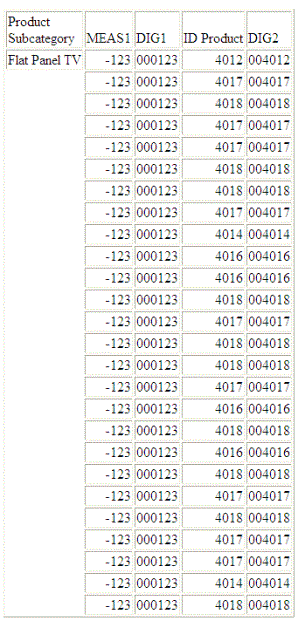
DIGITS converts the integer expression ID_PRODUCT+1 to a six-character string:
DIGITS(ID_PRODUCT,6)
For the number 1106, the result is the character string '001106'.
Usage Notes for DIGITS
- Only I format numbers will be converted. D, P, and F formats generate error messages and should be converted to I before using the DIGITS function. The limit for the number that can be converted is 2 GB.
- Negative integers are turned into positive integers.
- Integer formats with decimal places are truncated.
- DIGITS is not supported in Dialogue Manager.