HEXBYT: Converting a Decimal Integer to a Character
Available Languages: reporting, Maintain
The HEXBYT function obtains the ASCII, EBCDIC, or Unicode character equivalent of a decimal integer, depending on your configuration and operating environment. The decimal value you specify must be the value associated with the character on the configured code page. HEXBYT returns a single alphanumeric character in the ASCII, EBCDIC, or Unicode character set. You can use this function to produce characters that are not on your keyboard, similar to the CTRAN function.
In Unicode configurations, this function uses values in the range:
- 0 to 255 for 1-byte characters.
- 256 to 65535 for 2-byte characters.
- 65536 to 16777215 for 3-byte characters.
- 16777216 to 4294967295 for 4-byte characters (primarily for EBCDIC).
The display of special characters depends on your software and hardware; not all special characters may appear. For printable ASCII and EBCDIC characters and their integer equivalents see the Character Chart for ASCII and EBCDIC.
Convert a Decimal Integer to a Character
HEXBYT(decimal_value, output)
Integer
Is the decimal integer to be converted to a single character. In non-Unicode environments, a value greater than 255 is treated as the remainder of decimal_value divided by 256. The decimal value you specify must be the value associated with the character on the configured code page.
Alphanumeric
Is the name of the field that contains the result, or the format of the output value enclosed in single quotation marks (').
Converting a Decimal Integer to a Character in ASCII and Unicode
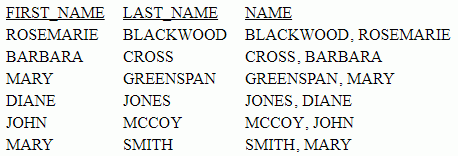
The following request uses HEXBYT to convert the decimal integer value 130 to the comma character on ASCII code page 1252. The comma is then concatenated between LAST_NAME and FIRST_NAME to create the NAME field:
TABLE FILE EMPLOYEE
PRINT LAST_NAME AND
COMPUTE COMMA1/A1 = HEXBYT(130, COMMA1); NOPRINT
COMPUTE NAME/A40 = LAST_NAME || COMMA1| ' '| FIRST_NAME;
BY LAST_NAME NOPRINT
BY FIRST_NAME
WHERE DEPARTMENT EQ 'MIS';
ON TABLE SET PAGE NOLEAD
ON TABLE SET STYLE *
GRID=OFF,$
ENDSTYLE
END
The output is shown in the following image.
To produce the same output in a Unicode environment configured for code page 65001, replace the COMPUTE command for the field COMMA1 with the following syntax, in which the call to HEXBYT converts the integer value 14844058 to the comma character:
COMPUTE COMMA1/A1 = HEXBYT(14844058, COMMA1); NOPRINT
Converting a Decimal Integer to a Character
HEXBYT converts LAST_INIT_CODE to its character equivalent and stores the result in a column with the format A1.
HEXBYT(LAST_INIT_CODE, 'A1')
On an ASCII platform, for 83, the result is S.
On the ASCII platform, for 74, the result is J.
HEXBYT converts LAST_INIT_CODE to its character equivalent and stores the result in LAST_INIT:
TABLE FILE EMPLOYEE
PRINT LAST_NAME AND
COMPUTE LAST_INIT_CODE/I3 = BYTVAL(LAST_NAME, 'I3');
COMPUTE LAST_INIT/A1 = HEXBYT(LAST_INIT_CODE, LAST_INIT);
WHERE DEPARTMENT EQ 'MIS';
END
The output for an ASCII platform is:
LAST_NAME LAST_INIT_CODE LAST_INIT
--------- -------------- ---------
SMITH                 83 S
JONES                 74 J
MCCOY                 77 M
BLACKWOOD             66 B
GREENSPAN             71 G
CROSS                 67 C
The output for an EBCDIC platform is:
LAST_NAME LAST_INIT_CODE LAST_INIT
--------- -------------- ---------
SMITH                226 S
JONES                209 J
MCCOY                212 M
BLACKWOOD            194 B
GREENSPAN            199 G
CROSS                195 C