TSTOPACK: Converting an MSSQL or Sybase Timestamp Column to Packed Decimal
This function applies to the Microsoft SQL Server and Sybase adapters only.
Microsoft SQL Server and Sybase have a data type called TIMESTAMP. Rather than containing an actual timestamp, columns with this data type contain a number that is incremented for each record inserted or updated in the data source. This timestamp comes from a common area, so no two tables in the database have the same timestamp column value. The value is stored in Binary(8) or Varbinary(8) format in the table, but is returned as a double wide alphanumeric column (A16). You can use the TSTOPACK function to convert the timestamp value to a packed decimal.
Convert an MSSQL or Sybase Timestamp Column to Packed Decimal
TSTOPACK(tscol, output);
where:
A16
Is the timestamp column to be converted.
P21
Is the name of the field that contains the result, or the format of the output value enclosed in single quotation marks (‘).
Converting a Microsoft SQL Server Timestamp Column to Packed Decimal
The following CREATE TABLE command creates a SQL Server table name TSTEST that contains an integer counter column named I and a timestamp column named TS:
SQL SQLMSS
  CREATE TABLE TSTEST (I INT, TS timestamp) ;
END
The Master File for the TSTEST data source follows. The field TS represents the TIMESTAMP column:
FILENAME=TSTEST, SUFFIX=SQLMSS  , $
  SEGMENT=TSTEST, SEGTYPE=S0, $
    FIELDNAME=I, ALIAS=I, USAGE=I11, ACTUAL=I4,
      MISSING=ON, $
    FIELDNAME=TS, ALIAS=TS, USAGE=A16, ACTUAL=A16, FIELDTYPE=R, $
TSTOPACK converts the timestamp column TS to packed decimal:
DEFINE FILE TSTEST
TSNUM/P21=TSTOPACK(TS,'P21');
END
TABLE FILE TEST64
PRINT I TS TSNUM
END
TSNUM/P21=TSTOPACK(TS,'P21');
The output is:
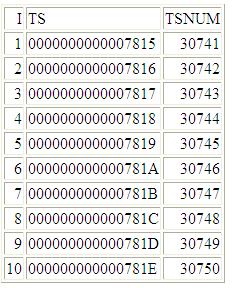
For 0000000000007815, the result is 30741.
For 0000000000007816, the result is 30742.