Understanding Audit Logs
Audit logs capture records of system administration activities, including records of system configuration events, changes to roles, rules, and content ownership, user administration activities, and sign-in and sign-out events. For security purposes, audit logs are always enabled.
The audit log file is located in the drive:\ibi\WebFOCUS82\logs directory, and all events captured by the loggers assigned to it are logged to this single file.
The list of loggers that contribute records of events to the audit file appears next to the audit log name entry at the top of the Log Files page of the Administration Console Diagnostics tab, as shown in the following image. Specialized loggers that contribute events to this log, such as com.ibi.uoa.roles, capture routine events at the INFO level. The main logger com.ibi.uoa captures other non-specialized events at the ERROR level.
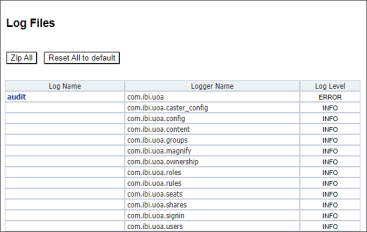
The log4j2.xml file, which is located at drive:\ibi\WebFOCUS_WFI\WebFOCUS\webapps\webfocus\WEB-INF\classes, contains the default configuration of loggers and appenders that define the format and scope of log records captured for each log. The display of log names and loggers on the Log File page is based on the configuration in this file.
Audit logs remain available for the number of days defined in the Days Until Logs Are Deleted (IBI_LOG_RETAIN_DAYS) setting on the Application Directories page of the Administration Console Configuration tab. By default, audit logs are saved for ten days. You can customize the amount of time that logs are saved by changing the number of days defined in this setting. Keep in mind, however, that any changes you make to this setting will affect the number of days that all logs, not just the Audit log, remain available.
Access the Audit Log
To view the audit log, you must sign in as an administrative user with access to the Administration Console.
- Procedure
- In the Administration Console, click the Diagnostics tab.
- Under the Diagnostics folder, click Log Files.
- On the Log
Files page, in the Log Name column, click the
audit link.
The audit.log page opens.
Entries are listed in order of the time of their occurrence, earliest to most recent.
- Scroll down to review log event entries that occurred later in the day.
- Click Bottom to go directly to the most recent entry.
- Click New trace lines to display entries of system log events that occurred after you opened the log file for review.
- To review
the audit log from a previous day, click it in the drop-down list of recent
audit log files at the top of the page.
Older logs appear with the date appended to their file name in the form audit.log_YYYY_MM_DD.log. By default, logs are kept for ten days. This duration is determined by the value assigned to the Days Until Logs Are Deleted (IBI_Log_Retain_Days) setting located on the Application Directories page of the Configuration tab.
Customizing the Audit Log Configuration
The default configuration of log files defined in the log4j2.xml file is designed to support most product installations. Administrators can change this configuration to redirect events captured by one or more of the audit file loggers to a separate log file or database table not defined in the default configuration to conform to the requirements of their organization.
For example, you might want to redirect sign-in events and user security events to a separate database table, by capturing the following information:
- Sign-in attempts and sign-out attempts.
- User creation, modification, and deletion.
- User assignments to or removals from groups.
Note that any changes made to the log4j2.xml file itself will clear the configuration of log file names and their associated loggers displayed on the Log File page in the Administration Console. Therefore, we strongly recommend that you make a backup copy of the log4j2.xml file before you make any changes to the file so that you can restore this display when necessary. For more information, see Create a Copy of the log4j2.xml File.
Once you establish this backup copy, you can redirect records of sign-in events to a separate log file by adding a dedicated appender and logger to a copy of the log 4j2.xml configuration file. For more information, see Redirect Audit Log Events to a Separate Log File.
If you want to redirect records to a database table, you must create a dedicated table to capture them within the targeted database along with the addition of a dedicated appender and logger to the copy of the log4j2.xml file. For more information, see Redirect Audit Log Events to a Separate Database Table.
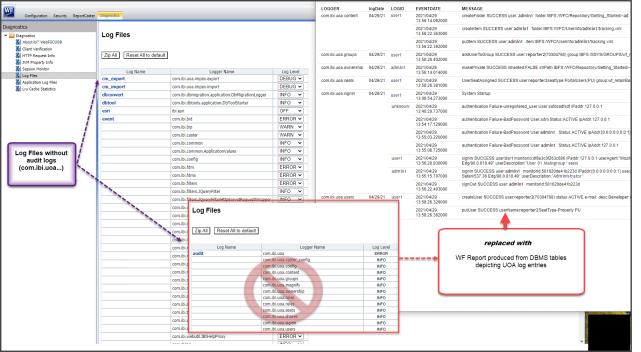
As an alternative to the display of loggers on the Log Files page, you can develop database reports to replace the display and connect directly to the log files stored in the drive:\ibi\WebFOCUS_WFI\WebFOCUS\logs directory, as shown in the following image.
Create a Copy of the log4j2.xml File
If you must make changes to the log file configuration, we recommend that you first create a backup copy of the log4j2.xml file as described in this procedure.
- Procedure
- In your file system, navigate to drive:\ibi\WebFOCUS\webapps\webfocus\WEB-INF\classes.
- Copy the log4j2.xml file and paste it into the same directory.
Note:
- Be careful to preserve the xml extension on the new copy.
- During product installation, the log4j2.xml.backup file is also added to this directory as a failsafe. Do not alter or delete this file.
- Assign a new name to the copy of the log4j2.xml file.
Identify the Audit Log Events to Include in a Separate Log File
- Procedure
- Review the loggers identified in the table that appears in the topic, Understanding Audit Logs, and identify those loggers that capture the log messages you want to divert to a separate file.
For example, the com.ibi.uoa.signin logger captures records of sign-in, sign-out, and session expiration events. This is the logger you need to update if you wish to save sign-in events in a separate log file or database table.
Note: If you want to direct events from multiple loggers to the same file, include them in your selection. For example, to divert log records of sign-in and user maintenance events in the same file, you need to include the com.ibi.uoa.signin logger and the com.ibi.uoa.users logger.
Redirect Audit Log Events to a Separate Log File
- Procedure
- Navigate to drive:/ibi/WebFOCUS82/webapps/webfocus/WEB-INF/classes/.
- Open the log4j2.xml file, and go to the <RollingFile name="LOGuoa"> block in the <Appenders> section.
- Beneath the closing tag for the LOGuoa block, insert a new RollingFile appender, based on the following code sample, that saves the audit log events you wish to divert to a separate file identified in the appender.
<RollingFile name="appendername">

  <FileName>C:/ibi/WebFOCUS_WFI/WebFOCUS/logs/logfilename.log</FileName>

  <FilePattern>C:/ibi/WebFOCUS_WFI/WebFOCUS/logs/messagepattern-%d{yyyy-MM-dd}-%i.log</FilePattern>

    <PatternLayout>

      <Pattern>[%d] %-5p %-16.16c{1} %-16.16X{monitorID} %X{userId} %m%n</Pattern>

    </PatternLayout>

    <Policies>

      <TimeBasedTriggeringPolicy />

      <SizeBasedTriggeringPolicy size="20 MB" />

    </Policies>

</RollingFile>
Where:
appendernameIs the name of the new appender. Use a name that identifies the types of log messages diverted to the new file. For example, signinout.log for messages captured by the sign-in logger.
logfilenameIs the name of the new log file containing the diverted log messages.
messagepatternIs the pattern of log messages captured by the logger that is using this appender.
In the following code example, events captured by the com.ibi.uoa.signin logger are redirected to a separate log file named signinout.log.
<RollingFile name="LOGuoaSignInOut">

  <FileName>C:/ibi/WebFOCUS_WFI/WebFOCUS/logs/signinout.log</FileName>

  <FilePattern>C:/ibi/WebFOCUS_WFI/WebFOCUS/logs/signinout-%d{yyyy-MM-dd}-%i.log</FilePattern>

    <PatternLayout>

      <Pattern>[%d] %-5p %-16.16c{1} %-16.16X{monitorID} %X{userId} %m%n</Pattern>

    </PatternLayout>

    <Policies>

      <TimeBasedTriggeringPolicy />

      <SizeBasedTriggeringPolicy size="20 MB" />

    </Policies>

</RollingFile>
- Search for the name of each logger that captures the log messages you wish to redirect.
- Replace the value in the ref attribute of the AppenderRef tag with the name of the new appender to identify the new appender block you created for them as the target of the appender reference, as shown in the following example.
<logger name="logger" level value="info” additivity="false">

  <AppenderRef ref="appender"/>

</logger>
Where:
loggerIs the name of the logger that captures messages typically assigned to the audit log. For example, com.ibi.uoa.signin.appenderIs the name of the new appender that will redirect messages from the selected logger to the new log file.In the following example the name="com.ibi.uoa.signin" logger identifies the new LOGuoaSignInOut appender block as the target of the appender reference.
<logger name="com.ibi.uoa.signin" level value="info” additivity="false">

  <AppenderRef ref="LOGuoaSignInOut"/>

</logger>
- Save the file.
Log events are now recorded in the log file you identify in the new appender. For example, sign-in events are now recorded in the signinout.log file, which will appear in the All Clients list of traces.
Redirect Audit Log Events to a Separate Database Table
- Procedure
- Create the database table that will be used to store the audit log information. The table must contain appropriate columns for the information captured by the log.
For example, you can create a table that captures the user IDs, date and time stamps, logger names, and audit events for sign-in, sign-out, and session termination events, with the following code prepared for a PostgreSQL © database.
CREATE TABLE public.wf_log ( eventdate timestamp with time zone, logger character varying(128) COLLATE pg_catalog."default", level character varying(12) COLLATE pg_catalog."default", logid character varying(128) COLLATE pg_catalog."default", message character varying(255) COLLATE pg_catalog."default", exception text COLLATE pg_catalog."default" GRANT UPDATE, INSERT, SELECT ON TABLE public.wf_log TO webfocus; - Navigate to drive:/ibi/WebFOCUS93/webapps/webfocus/WEB-INF/classes/.
- Open the log4j2.xml file, and go to the <RollingFile name="LOGuoa"> block in the <Appenders> section.
- Add the JDBC Appender to the log4j2.xml file using one of the following code snippets.
- If you want to transfer control of the connection to the external database, include a description of the ConnectionFactory class, as shown in the second line of the following example.
<JDBC name="LOGevent" tableName="public.wf_log">

  <ConnectionFactory

    class="com.ibi.log4j2.ConnectionFactory"

    method="getConnection" />

  <Column name="eventdate" isEventTimestamp="true" />

  <Column name="logger" pattern="%logger" isUnicode="false" />

  <Column name="level" pattern="%level" isUnicode="false" />

  <Column name="logid" pattern="%X{userId}" isUnicode="false" />

  <Column name="message" pattern="%message" isUnicode="false" />

  <Column name="exception" pattern="%ex{full}" isUnicode="false" />

</JDBC>
Where:
LOGeventIs the name of the JDBC appender that redirects events captured by this logger to the external database table. For example, LOGuoa.loggerIs the name of the existing logger that captures messages typically assigned to the audit log. For example, com.ibi.uoa.signin. - If you want to retain control of the connection within WebFOCUS, include a DriverManager tag, as shown in the second line of the following example.
<JDBC name="LOGevent" tableName="public.wf_log">

  <DriverManager

    connectionString="jdbc:postgresql://localhost:5432/WebFOCUS82"

    driverClassName="org.postgresql.Driver"

    username="webfocus"

    password="webfocus" />

  <Column name="eventdate" isEventTimestamp="true" />

  <Column name="logger" pattern="%logger" isUnicode="false" />

  <Column name="level" pattern="%level" isUnicode="false" />

  <Column name="logid" pattern="%X{userId}" isUnicode="false" />

  <Column name="message" pattern="%message" isUnicode="false" />

  <Column name="exception" pattern="%ex{full}" isUnicode="false" />

</JDBC>
Where:
LOGeventIs the name of the JDBC appender that redirects events captured by this logger to the external database table. For example, LOGuoa.loggerIs the name of the existing logger that captures messages typically assigned to the audit log. For example, com.ibi.uoa.signin.
- If you want to transfer control of the connection to the external database, include a description of the ConnectionFactory class, as shown in the second line of the following example.
- Determine where the information is logged and add an appender reference to the name of each existing logger you wish to include.
- To log information solely in the external database, use the following code:
<Logger name="logger" level="info" additivity="false">

   <AppenderRef ref="LOGevent"/>

</Logger>
Where:
loggerIs the name of the existing logger that captures messages typically assigned to the audit log. For example, com.ibi.uoa.signin.LOGeventIs the name of the JDBC appender that redirects events captured by this logger to the external database table. For example, LOGuoa. -
To log information both in WebFOCUS and in the external database, use the following code:
<Logger name="logger" level="info" additivity="false">

  <AppenderRef ref="LOGevent"/>

  <AppenderRef ref="LOGdb"/>

</Logger>
Where:
loggerIs the name of the existing logger that captures messages typically assigned to the audit log. For example, com.ibi.uoa.signin.LOGeventIs the name of the JDBC appender that redirects events captured by this logger to the external database table. For example, LOGuoa.LOGdbIs the name of the JDBC appender that redirects events captured by this logger to the external database table.
- To log information solely in the external database, use the following code:
- If the drive:/ibi/WebFOCUS93/webapps/webfocus/webfocus.war file is deployed on the Application server, update and redeploy the webfocus.war file.
- If the drive:/ibi/ WebFOCUS93/webapps/webfocus expanded directory is deployed, recycle the WebFOCUS Application server.
The database table captures each security event in a separate row, as shown in the following image.

Save Sign-in Events in a Separate Log File
- Procedure
- Navigate to drive:/ibi/WebFOCUS93/webapps/webfocus/WEB-INF/classes/.
- Open the log4j2.xml file, and go to the <RollingFile name="LOGuoa"> block in the <Appenders> section.
- Beneath the closing tag for the LOGuoa block, insert the following new RollingFile tag, which saves the sign-in events to a file named signinout.log, as shown in the following code example.
<RollingFile name="LOGuoaSignInOut">

  <FileName>C:/ibi/WebFOCUS_WFI/WebFOCUS/logs/signinout.log</FileName>

  <FilePattern>C:/ibi/WebFOCUS_WFI/WebFOCUS/logs/signinout-%d{yyyy-MM-dd}-%i.log</FilePattern>

    <PatternLayout>

      <Pattern>[%d] %-5p %-16.16c{1} %-16.16X{monitorID} %X{userId} %m%n</Pattern>

    </PatternLayout>

    <Policies>

      <TimeBasedTriggeringPolicy />

      <SizeBasedTriggeringPolicy size="20 MB" />

    </Policies>

</RollingFile>
- Search within the file for the logger name="com.ibi.uoa.signin", and update the entry to identify the new LOGuoaSignInOut appender block as the target of the appender reference, as shown in the following example.
<logger name="com.ibi.uoa.signin" level value="info” additivity="false">

  <AppenderRef ref="LOGuoaSignInOut"/>

</logger>
- Save the file.
Sign-in events are now recorded in the signinout.log file, which will appear in the All Clients list of traces.
Save Sign-in Events in a Separate Database Table
- Procedure
- Create a new table in your database to capture the sign-in event records, as shown in the following example prepared for a PostgreSQL © database.
CREATE TABLE public.wf_log ( eventdate timestamp with time zone, logger character varying(128) COLLATE pg_catalog."default", level character varying(12) COLLATE pg_catalog."default", logid character varying(128) COLLATE pg_catalog."default", message character varying(255) COLLATE pg_catalog."default", exception text COLLATE pg_catalog."default" GRANT UPDATE, INSERT, SELECT ON TABLE public.wf_log TO webfocus; - Navigate to drive:/ibi/WebFOCUS93/webapps/webfocus/WEB-INF/classes/.
- Open the copy of the drive:/ibi/WebFOCUS93/webapps/webfocus/WEB-INF/classes/log4j2.xml file with a text editor.
- Go to the <RollingFile name="LOGuoa"> block in the <Appenders> section.
- Beneath the closing tag for the LOGuoa block, insert a new JDBC tag, which saves the sign-in events to the database table using one of the following examples.
To transfer control of the connection to the external database, include a description of the ConnectionFactory class, as shown in the second line of the following example.
<JDBC name="LOGuoaSignInOut" tableName="public.wf_log">

  <ConnectionFactory

     class="com.ibi.log4j2.ConnectionFactory"

     method="getConnection" />

  <Column name="eventdate" isEventTimestamp="true" />

  <Column name="logger" pattern="%logger" isUnicode="false" />

  <Column name="level" pattern="%level" isUnicode="false" />

  <Column name="logid" pattern="%X{userId}" isUnicode="false" />

  <Column name="message" pattern="%message" isUnicode="false" />

  <Column name="exception" pattern="%ex{full}" isUnicode="false" />

</JDBC>
Or
To retain control of the connection within WebFOCUS, include a DriverManager tag, as shown in the following example.
<JDBC name="LOGuoaSignInOut" tableName="public.wf_log">

  <DriverManager

    connectionString="jdbc:postgresql://localhost:5432/WebFOCUS82"

    driverClassName="org.postgresql.Driver"

    username="webfocus"

    password="webfocus" />

  <Column name="eventdate" isEventTimestamp="true" />

  <Column name="logger" pattern="%logger" isUnicode="false" />

  <Column name="level" pattern="%level" isUnicode="false" />

  <Column name="logid" pattern="%X{userId}" isUnicode="false" />

  <Column name="message" pattern="%message" isUnicode="false" />

  <Column name="exception" pattern="%ex{full}" isUnicode="false" />

</JDBC>
Note: You can substitute the LOGuaoSignInOut name in these examples with another descriptive name of your own choosing. You must be sure to place the same name in the AppenderRef tag of the logger that will direct events to this new appender. - Search for the logger with the name="com.ibi.uoa.signin" tag, and update the entry to identify the new LOGevent JDBC class as the target of the appender reference, as shown in the following example.
<Logger name="com.ibi.uoa.signin" level="info" additivity="false">

 <AppenderRef ref="LOGuoaSignInOut"/>
Note: You can substitute the LOGuaoSignInOut name in these examples with another descriptive name of your own choosing. You must be sure to place the same name in the name tag of the appender that will receive events from this logger. - Save the file.
Sign-in events are now recorded in the public.wf_log database table.
Understanding Security Events
The following table lists the types of security events recorded for auditing by WebFOCUS.
|
Subject of Event |
Description of Event |
Type of Changes Logged |
Logger Name in log4j.xml |
|---|---|---|---|
|
config |
Configuration |
Changes to webfocus.cfg, license changes |
com.ibi.uoa.config |
|
content |
Content |
Create, update, delete |
com.ibi.uoa.content |
|
groups |
Group |
Create, update, delete |
com.ibi.uoa.groups |
|
ownership |
Ownership |
Change the owner of a resource |
com.ibi.uoa.ownership |
|
roles |
Role |
Create, update, delete |
com.ibi.uoa.roles |
|
rules |
Rule |
Create, update, delete |
com.ibi.uoa.rules |
|
shares |
Sharing |
Share, share with |
com.ibi.uoa.shares |
|
signin |
Sign in |
Sign-in, sign-out, expired session |
com.ibi.uoa.signin |
|
users |
User |
Create, update, delete, add to group, remove from group |
com.ibi.uoa.users |
Understanding Configuration Events
In the following table, each log entry is composed of the following elements:
- Timestamp, in the format of YYYY-MM-DD hh:mm:ss,sss.
- Log level, such as INFO.
- Type of event being logged, in this case, a configuration event indicated by config.
- Monitor ID of the user who performed the action.
- Specific event being logged, in this case, configUpdate, a configuration update.
- Whether the action succeeds or fails, indicated by SUCCESS or FAILURE.
- Name of the file affected, typically webfocus.cfg.
- Name of the user performing the action.
- New value of the changed property.
- Old value of the changed property.
|
Event |
Log entry |
|---|---|
|
webfocus.cfg change |
[YYYY-MM-DD hh:mm:ss,sss] INFO config monitor_IDuser_ID updateConfig {SUCCESS|FAILURE} file:file_name user:user_ID parameterName:parameter_name newValue:new_value oldValue:old_value |
|
License key change |
[YYYY-MM-DD hh:mm:ss,sss] INFO config monitor_IDuser_ID updateConfig {SUCCESS|FAILURE} file:license_key_file user:user_ID parameterName:parameter_name newKey:new_value newSite:site_code |
Understanding Content Events
In the following table, each log entry is composed of the following elements:
- Timestamp, in the format of YYYY-MM-DD hh:mm:ss,sss.
- Log level, such as INFO.
- Type of event being logged, in this case, a content event indicated by content.
- Monitor ID of the user who performed the action.
- Specific event, for example, createFolder or putItem.
- Whether the action succeeds or fails, indicated by SUCCESS or FAILURE.
- Name of the user performing the action.
- Location of the content affected by the action.
- Fields altered by the action.
|
Event |
Log entry |
|---|---|
|
Folder is created |
|
|
Folder details are modified |
|
|
Folder is deleted |
[YYYY-MM-DD hh:mm:ss,sss] INFO content monitor_IDuser_ID delete {SUCCESS|FAILURE} user:user_ID folder:IBFS_address |
|
Folder is duplicated or copied and pasted |
|
|
Folder is moved |
[YYYY-MM-DD hh:mm:ss,sss] INFO content monitor_IDuser_ID moveFolder {SUCCESS|FAILURE} user:user_ID srcitem:old_IBFS_address dstitem:new_IBFS_address |
|
Folder is renamed |
[YYYY-MM-DD hh:mm:ss,sss] INFO content monitor_IDuser_ID putFolderProperties {SUCCESS|FAILURE} user:user_ID folder:new_IBFS_address |
|
Item is created |
[YYYY-MM-DD hh:mm:ss,sss] INFO content monitor_IDuser_ID createItem {SUCCESS|FAILURE} user:user_ID folder:IBFS_address |
|
Item details are modified |
[YYYY-MM-DD hh:mm:ss,sss] INFO content monitor_IDuser_ID putItem {SUCCESS|FAILURE} user:user_ID item:IBFS_address |
|
Item is deleted |
[YYYY-MM-DD hh:mm:ss,sss] INFO content monitor_IDuser_ID delete {SUCCESS|FAILURE} user:user_ID item:IBFS_address |
|
Item is duplicated or copied and pasted |
|
Understanding Group Events
In the following table, each log entry is composed of the following elements:
- Timestamp, in the format of YYYY-MM-DD hh:mm:ss,sss.
- Log level, such as INFO.
- Type of event being logged, in this case, a group event indicated by groups.
- Monitor ID of the user who performed the action.
- Description of the action, for example, createGroup or putGroup.
- Whether the action succeeds or fails, indicated by SUCCESS or FAILURE.
- Name and unique numeric ID of the group affected by the action.
- Fields altered by the action.
Each user and group is identified by a unique numerical ID, as well as by name.
|
Event |
Log entry |
|---|---|
|
Group is created |
[YYYY-MM-DD hh:mm:ss,sss] INFO groups monitor_IDuser_ID createGroup {SUCCESS|FAILURE} name:group_name (group_ID) parent:group_parent (parent_group_ID) desc:group_description extGrp:external_group_mappings |
|
Group is deleted |
[YYYY-MM-DD hh:mm:ss,sss] INFO groups monitor_IDuser_ID deleteGroup {SUCCESS|FAILURE} group:IBFS_address (group_ID) users-autoremoved:number_of_group_members |
|
Group description is modified |
[YYYY-MM-DD hh:mm:ss,sss] INFO groups monitor_IDuser_ID putGroup {SUCCESS|FAILURE} groupPath:IBFS_address (group_ID) newdesc:new_description olddesc:old_description externalGroups:external_group_mappings |
|
Group is renamed |
[YYYY-MM-DD hh:mm:ss,sss] INFO groups monitor_IDuser_ID renameGroup {SUCCESS|FAILURE} name:group_name (group_ID) parent:parent_group oldName:old_group_name |
|
User is added to group |
[[YYYY-MM-DD hh:mm:ss,sss] INFO groups monitor_IDuser_ID addUserToGroup {SUCCESS|FAILURE} user:user_IDgroup:group_name (group_ID) |
|
User is deleted from group |
[YYYY-MM-DD hh:mm:ss,sss] INFO groups monitor_IDuser_ID removeUserFromGroup {SUCCESS|FAILURE} user:user_ID group:group_name (group_ID) |
Understanding Library Access Events
In the following table, each log entry is composed of the following elements:
- Timestamp noting when the Library report was accessed, in the format of YYYY-MM-DD hh:mm:ss,sss.
- Log level, such as INFO.
- Thread Identifier, in the format of http-connector-port_number-exec-ID_number:libaccess.
- User ID of the user accessing the Library report.
- The full IBFS path of the Library report.
- The title of the Library report.
- The Version number of a Library report.
|
Event |
Log entry |
|---|---|
|
Library report is viewed. |
[YYYY-MM-DD hh:mm:ss,sss] INFO [Thread Identifier] User_ID – FullPath: IBFS_address ; Description: Library_Report_Title; Version Number: Library_Report_Version_Number |
Understanding Magnify Console Events
The audit log records changes to values, index items, and options in the Magnify Console. For more information, see the Magnify Search Security and Administration technical content.
In the following table, each log entry is composed of the following elements:
- Timestamp, in the format of YYYY-MM-DD hh:mm:ss,sss.
- Log level, such as INFO.
- Type of event being logged, indicated by magnify.
- Monitor ID of the user who performed the action.
- User ID of the user who performed the action.
- IP Address of the user who performed the action.
- A unique description of the specific Magnify Console event. This description may span several lines depending on the amount of actions performed by the user.
|
Event |
Log entry |
|---|---|
| Magnify Timers | |
|
A user changed a setting on the Magnify Timers page. This log entry shows the timer option that has been changed on the Magnify Timers page and the new time setting for the timer option. |
[YYYY-MM-DD hh:mm:ss,sss] INFO magnify Monitor_IDUser_ID User [User_ID] and IP address [IP address] tried to reset [timer option] timer to [new time setting] on the Magnify Timers console page. Note: To validate the successful completion of this activity, open the Magnify Timers page from the Magnify Console and review the current status of the changed Indexing Timers setting.
|
|
A user changed the Reading Refresh Rate attribute. This log entry shows the True/False option that has been set for the Reading Refresh Rate. |
[YYYY-MM-DD hh:mm:ss,sss] INFO magnify Monitor_IDUser_ID User [User_ID] and IP address [IP address] tried to reset Reading Refresh Rate Enabled attribute to [true/false] on the Magnify Timers console page. Note: To validate the successful completion of this activity, open the Magnify Timers page from the Magnify Console and review the current status and attribute of the Reading Refresh Rate.
|
| Spell Check Setup | |
|
A user initiated the creation of or update to an Index Library Dictionary on the Spell Check Setup page. This log entry shows the specific index that was updated. |
[YYYY-MM-DD hh:mm:ss,sss] INFO magnify Monitor_IDUser_ID User [User_ID] and IP address [IP address] tried to create or update spell check dictionary for index [index] on Spell Check Setup console page. Note: To validate the successful completion of this activity, open the Spell Check Setup page from the Magnify Console and review the status of the Index Library Dictionary identified in the entry. If the operation was successful, the entry reads, “Dictionary up to date”.
|
|
A user initiated the creation of or update to a Collection Dictionary on the Spell Check Setup page. This log shows the specific collection that was updated. |
[YYYY-MM-DD hh:mm:ss,sss] INFO magnify Monitor_IDUser_ID User [User_ID] and IP address [IP address] tried to create or update spell check dictionary for collections [collection] on Spell Check Setup console page. Note: To validate the successful completion of this activity, open the Spell Check Setup page from the Magnify Console and review the status of the Collection Dictionary identified in the entry. If the operation was successful, the collection will display the latest date and time it was updated.
|
|
A user initiated the Close Dictionaries operation on the Spell Check Setup page. |
[YYYY-MM-DD hh:mm:ss,sss] INFO magnify Monitor_IDUser_ID User [User_ID] and IP address [IP address] tried to close dictionaries (for backup or removal) on Spell Check Setup console page. Note: To validate the successful completion of this activity, open the Spell Check Setup page from the Magnify Console and review the status of the dictionary entry. If the operation was successful the entry reads, "Dictionary up to date'".
|
| Analyzer Review | |
|
A user initiated a text analysis on the Analyzer Review page. This log shows the specific text that was analyzed and the specific analyzer used to analyze the text. |
[YYYY-MM-DD hh:mm:ss,sss] INFO magnify Monitor_IDUser_ID User [User_ID] and IP address [IP address] tried to analyze [text] with analyzer [analyzer] on Analyzer Review console page. |
| Collections Refresh | |
|
A user added a new daily refresh time to the Magnify Console Collections Refresh page. This log shows the hour:minute value of the new refresh time, and any additional comments added for the new refresh time. |
[YYYY-MM-DD hh:mm:ss,sss] INFO magnify Monitor_IDUser_ID User [User_ID] and IP address [IP address] added a new daily refresh time on Collections Refresh console page. [YYYY-MM-DD hh:mm:ss,sss] INFO magnify Monitor_IDUser_ID User [User_ID] New refresh time is: [hour:minute] [YYYY-MM-DD hh:mm:ss,sss] INFO magnify Monitor_IDUser_ID User [User_ID] New refresh time comment is: [comment] |
|
A user initiated a collections refresh by reloading the index collections in the collections.xml file. |
[YYYY-MM-DD hh:mm:ss,sss] INFO magnify Monitor_IDUser_ID User [User_ID] and IP address [IP Address] just refreshed collections file on Collections Refresh console page. |
|
A user removed a daily refresh time from the Magnify Console Collections Refresh page. This log shows the hour:minute value of the reviewed refresh time. |
[YYYY-MM-DD hh:mm:ss,sss] INFO magnify Monitor_IDUser_ID User [User_ID] and IP address [IP Address] removed an existing daily refresh time on Collections Refresh console page. [YYYY-MM-DD hh:mm:ss,sss] INFO magnify Monitor_IDUser_ID The removed refresh time is: [hour:minute] |
| IP Restrictions | |
|
A user modified data on the Magnify Console Feed Security Setup page. This log shows the latest host names, IPv4 addresses, and IPv6 addresses added to the Feed Security Setup page. |
[YYYY-MM-DD hh:mm:ss,sss] INFO magnify Monitor_IDUser_ID User [User_ID] and IP address [IP Address] modified the Feed Security Setup Console data to the following: [YYYY-MM-DD hh:mm:ss,sss] INFO magnify Monitor_IDUser_ID============================================== [YYYY-MM-DD hh:mm:ss,sss] INFO magnify Monitor_IDUser_ID|Feed Security enable was set to: [true/false] [YYYY-MM-DD hh:mm:ss,sss] INFO magnify Monitor_IDUser_ID|List of Host Names were set to: [YYYY-MM-DD hh:mm:ss,sss] INFO magnify Monitor_IDUser_ID|[List of Host Names] [YYYY-MM-DD hh:mm:ss,sss] INFO magnify Monitor_IDUser_ID|List of IPv4 Addresses were set to: [YYYY-MM-DD hh:mm:ss,sss] INFO magnify Monitor_IDUser_ID|[List of IPv4 Addresses] [YYYY-MM-DD hh:mm:ss,sss] INFO magnify Monitor_IDUser_ID| List of IPv6 Addresses were set to: [YYYY-MM-DD hh:mm:ss,sss] INFO magnify Monitor_IDUser_ID|[List of IPv6 Addresses] [YYYY-MM-DD hh:mm:ss,sss] INFO magnify Monitor_IDUser_ID============================================== |
| Delete Indexes | |
|
A user deleted one or more indexes from the file system. This log shows the specific indexes that were deleted. |
[YYYY-MM-DD hh:mm:ss,sss] INFO magnify Monitor_IDUser_ID User [User_ID] and IP address [IP Address] tried to delete the following indexes:

[YYYY-MM-DD hh:mm:ss,sss] INFO magnify Monitor_IDUser_ID ======================================

[YYYY-MM-DD hh:mm:ss,sss] INFO magnify Monitor_IDUser_ID|[index](index file path)

[YYYY-MM-DD hh:mm:ss,sss] INFO magnify Monitor_IDUser_ID======================================
Note: To validate the successful completion of this activity, open the Delete Indexes page from the Magnify Console and review the current list of indexes. If the operation was successful, the deleted index does not display.
|
| Close Searchers and Readers | |
|
A user closed a searcher. This log shows the specific search file path of the search that was closed. |
[YYYY-MM-DD hh:mm:ss,sss] INFO magnify Monitor_IDUser_ID User [User_ID] and IP address [IP Address] tried to close searcher for [search file path] Note: To validate the successful completion of this activity, open the Close Searchers and Readers page from the Magnify Console and review the current list of open searchers. If the operation was successful, the searcher does not display.
|
|
A user closed an index reader. This log shows the specific datasource file path of the index reader that was closed. |
[YYYY-MM-DD hh:mm:ss,sss] INFO magnify Monitor_IDUser_ID User [User_ID] and IP address [IP Address] tried to close index reader for [datasource file path]. Note: To validate the successful completion of this activity, open the Close Searchers and Readers page from the Magnify Console and review the current list of open index readers. If the operation was successful, the index reader does not display.
|
| Index Monitor | |
|
A user committed additional data to an index. This log shows the specific index writer file path of the index reader that has been closed. |
[YYYY-MM-DD hh:mm:ss,sss] INFO magnify Monitor_IDUser_ID User [User_ID] and IP address [IP Address] tried to commit on index writer [index writer file path]. Note: To validate the successful completion of this activity, open the Index Monitor page from the Magnify Console and review the index stated to be comitted. If the operation was successful, the commit count number for the index library will have increased by the number of times the commit was stated to have been performed.
|
| Servlet Form | |
|
A user successfully loaded a record to a specific index. |
[YYYY-MM-DD hh:mm:ss,sss] INFO magnify User [User_ID] and IP address [IP Address] successfully loaded a record to index [index] from the Servlet Form page in the Magnify Console. Note: To validate the successful completion of this activity, contact the user to confirm whether the magnify feed response was received.
|
|
A user tried to verify a record against a datasource. This log shows the specific datasource that has been verified, and the unique value which designates the datasource. |
[YYYY-MM-DD hh:mm:ss,sss] INFO magnify Monitor_IDUser_ID User [User_ID] and IP address [IP Address] tried to verify a record with datasource [datasource] and WF_INDEX_QUNIQUE_KEY [a_unique_value] Note: To validate the successful completion of this activity, contact the user to confirm whether the magnify feed response was received.
|
Understanding Ownership Events
In the following table, each log entry is composed of the following elements:
- Timestamp, in the format of YYYY-MM-DD hh:mm:ss,sss.
- Log level, such as INFO.
- Type of event being logged, in this case, an ownership event indicated by ownership.
- The action taken, such as a change of ownership, indicated by changeOwner, or the publication of an item, indicated by makePublic.
- Whether the action succeeds or fails, indicated by SUCCESS or FAILURE.
- Whether the resource inherits its privacy from its parent.
- The full IBFS path of the resource.
- User ID of the new resource owner.
- Type of owner, G for a group or U for a user.
|
Event |
Log entry |
|---|---|
|
Change owner to group |
[YYYY-MM-DD hh:mm:ss,sss] INFO ownership monitor_IDuser_ID makeManaged {SUCCESS|FAILURE} inherited:{TRUE|FALSE} strPath:IBFS_address ownerName:owner_group_name ownerType:G |
|
Change owner to user |
[YYYY-MM-DD hh:mm:ss,sss] INFO ownership monitor_IDuser_ID changeOwner {SUCCESS|FAILURE} inherited:{TRUE|FALSE} strPath:IBFS_address ownerName:owner_user_ID ownerType:U |
|
Folder or item is made private |
[YYYY-MM-DD hh:mm:ss,sss] INFO ownership monitor_IDuser_ID makePrivate {SUCCESS|FAILURE} strPath:IBFS_address ownerName:new_owner ownerType:U |
|
Folder or item is published |
|
|
Folder or item fails to be published |
[YYYY-MM-DD hh:mm:ss,sss] INFO ownership monitor_IDuser_ID isPublishable {SUCCESS|FAILURE} inherited:{TRUE|FALSE} ownerName:parent_folder |
Understanding ReportCaster Configuration Events
In the following table, each log entry is composed of the following elements:
- Timestamp, in the format of YYYY-MM-DD hh:mm:ss,sss.
- Log level, such as INFO.
- Type of event being logged, in this case, a ReportCaster Configuration event indicated by caster_config.
- Monitor ID of the user who performed the action.
- Name of the user who performed the action.
- Name of the file affected, typically, the old CasterConfig file.
|
Event |
Log entry |
|---|---|
|
ReportCaster Configuration settings are edited and saved |
[YYYY-MM-DD hh:mm:ss,sss] INFO caster_config monitor_IDuser_ID updated ReportCaster configuration, old CasterConfig file: dserver_file_ID.xml |
Understanding ReportCaster Global Update Events
The globalUpdates log records global changes to values stored in ReportCaster schedules and certain scheduling tools, using the Global Updates command. For more information, see the ReportCaster technical content.
In the following table, each log entry is composed of the following elements:
- User ID of the user initiating the global update event.
- Name of the database table targeted by the global update.
- Name of the updated variable.
- Old Value that was globally removed.
- New Value that was globally added.
- Thread Identifier, in the format of ID_number.
|
Event |
Log entry |
|---|---|
|
Value was globally updated. |
User_IDdatabase table namevariable nameold valuenew valueThread Identifier |
Understanding Role Events
In the following table, each log entry is composed of the following elements:
- Timestamp, in the format of YYYY-MM-DD hh:mm:ss,sss.
- Log level, such as INFO.
- Type of event being logged, in this case, a role event indicated by roles.
- Monitor ID of the user who performed the action.
- User ID of the user who performed the action.
- Specific event, for example, createRole.
- Whether the action succeeds or fails, indicated by SUCCESS or FAILURE.
- Name of the role affected by the action.
- Policy for the role.
|
Event |
Log entry |
|---|---|
|
Role is created |
[YYYY-MM-DD hh:mm:ss,sss] INFO roles monitor_IDuser_ID createRole {SUCCESS|FAILURE} role:role_name (role_ID) desc:description policy:privilege_name:OPERATION; |
|
Role details are modified |
[YYYY-MM-DD hh:mm:ss,sss] INFO roles monitor_IDuser_ID putRole {SUCCESS|FAILURE} role:role_name (role_ID) desc:description policy:privilege_name:OPERATION; |
|
Role is deleted |
[YYYY-MM-DD hh:mm:ss,sss] INFO roles monitor_IDuser_ID deleteRole {SUCCESS|FAILURE} role:role_name (role_ID) rules-autoremoved:number_rules_using_this_role policy:privilege_name:OPERATION; |
|
Role is cloned |
[YYYY-MM-DD hh:mm:ss,sss] INFO roles monitor_IDuser_ID createRole {SUCCESS|FAILURE} role:role_name_copy (role_ID) desc:description_copy policy:privilege_name:OPERATION; |
Understanding Rule Events
In the following table, each log entry is composed of the following elements:
- Timestamp, in the format of YYYY-MM-DD hh:mm:ss,sss.
- Log level, such as INFO.
- Type of event being logged, in this case, a rule event indicated by rules.
- Monitor ID of the user who performed the action.
- User ID of the user who performed the action.
- Specific event, for example, addGroupRule or addUserRule.
- Whether the action succeeds or fails, indicated by SUCCESS or FAILURE.
- Location of the resource to which the rule applies.
- Access policy of the rule.
- Whether the rule applies to this location only, the children of this location only, or to this location and its children.
|
Event |
Log entry |
|---|---|
|
Rule is created for a group |
|
|
Rule is created for a user |
|
Understanding Sharing Events
- Timestamp, in the format of YYYY-MM-DD hh:mm:ss,sss.
- Log level, such as INFO.
- Type of event being logged, in this case, a sharing event indicated by shares.
- Monitor ID of the user who performed the action.
- User ID of the user who performed the action.
- Specific event, for example, clearShares.
- Whether the action succeeds or fails, indicated by SUCCESS or FAILURE.
- Whether the owner of the resource is a group or an individual user, G or U.
- The owner ID.
|
Event |
Log entry |
|---|---|
|
Resource is shared or shared with |
[YYYY-MM-DD hh:mm:ss,sss] INFO shares monitor_IDuser_ID {SUCCESS|FAILURE} setShares resource:IBFS_address count:number_of_parties_shared_with ownerType:{G|U} ownerID:owner_ID |
|
Resource is unshared |
[YYYY-MM-DD hh:mm:ss,sss] INFO shares monitor_IDuser_ID clearShares {SUCCESS|FAILURE} resource:IBFS_address count:number_of_parties_shared_with ownerType:{G|U} ownerID:owner_ID |
Understanding Sign-in Events
In the following table, each log entry is composed of the following elements:
- Timestamp, in the format of YYYY-MM-DD hh:mm:ss,sss.
- Log level, such as INFO.
- Type of event being logged, in this case, a sign-in event indicated by signin.
- Monitor ID of the user who performed the action.
- User ID of the user who performed the action.
- Description of the action, for example, signIn.
- Whether the action succeeds or fails, indicated by SUCCESS or FAILURE.
- Name and monitor ID of the user who signed in.
- The IP address and user agent or type of browser, if available.
Each user is identified by a unique numerical ID, as well as by name.
|
Event |
Log entry |
|---|---|
|
User signs in |
[YYYY-MM-DD hh:mm:ss,sss] INFO signin monitor_IDuser_ID signIn {SUCCESS|FAILURE} user:user_ID monitorId:monitor_ID IPaddr:IP_address userAgent:user_agent userDescription:user_description sessionType:session_type |
|
User signs out |
[YYYY-MM-DD hh:mm:ss,sss] INFO signin monitor_IDuser_ID signOut {SUCCESS|FAILURE} user:user_ID monitorId:monitor_ID |
|
User session expires |
[YYYY-MM-DD hh:mm:ss,sss] INFO signin monitor_IDuser_ID signOut {SUCCESS|FAILURE} user:user_ID monitorId:monitor_ID |
Understanding WebFOCUS Reporting Server Authentication Failure Messages
If the External Security Type (IBI_AUTHENTICATION_TYPE) setting is Reporting Server, and WebFOCUS Reporting Server authentication fails, the end user always sees a generic failure message. However, the audit log captures more descriptive errors, as detailed in the table below.
|
Description |
Return Code |
|---|---|
|
Invalid user ID or password. |
ERROR_AUTHENTICATION_FAILURE(5003) |
|
Credentials are valid, but the user ID is inactive. |
ERROR_AUTHENTICATION_FAILURE_ID_INACTIVE(5006) |
|
Credentials are valid, but the user must change the password. |
ERROR_AUTHENTICATION_MUST_CHANGE_PASSWORD(5007) |
|
Credentials are valid, but the password has expired. |
ERROR_AUTHENTICATION_PASSWORD_EXPIRED(5008) |
|
Credentials are valid, but the user has surpassed the allowed number of sign-in attempts (specified in the IBI_Max_Bad_Attempts setting). |
ERROR_AUTHENTICATION_USER_LOCKED(5009) |
|
Credentials are valid, but the user is still signed in to a prior session. |
ERROR_AUTHENTICATION_USER_ALREADY_LOGGED_IN(5020) |
Understanding User Sign-in Error Messages
The following table lists the error messages for when a sign-in attempt or password change is unsuccessful.
|
Event |
Failure Message |
|---|---|
|
User does not exist in the repository. |
signIn Failure-unregistered_user User:xyzabc |
|
User exists in the repository, but not on the WebFOCUS Reporting Server. |
signIn Failure-EDA-RC User:admin RC:32033 EDANODE:EDASERVE |
|
User exists in the repository and WebFOCUS Reporting Server, but the password entered is invalid. |
signIn Failure-EDA-RC User:bn01618 RC:32034 EDANODE:EDASERVE |
|
User exists in the repository and WebFOCUS Reporting Server, but the account has been disabled. |
signIn Failure-Unknown User:cssadmin RC:32063 EDANODE:EDASERVE |
|
User exists in the repository and WebFOCUS Reporting Server, but the password must be changed. |
signIn Failure-EDA-RC User:cssadmin RC:32034 EDANODE:EDASERVE |
Troubleshoot a Database Connection Failure
- Procedure
- Check that your database is running.
If you have installed Derby, check that it is listening on the default port of 1527 and determine its network interface. You can use the netstat --an command. Possible results are listed below.
Local Address
Description
0.0.0.0
Port is listening on all network interfaces.
127.0.0.1
Port is listening only for connections from your computer.
Your IP address
Port is listening only for connections on that interface.
- Check the audit.log file for errors.
- If the
audit.log file indicates that the administrative user is unregistered, but this
is a new installation with the default administrative user, consult the event
log file for specific errors regarding the registration of this user.
The event log file contains specific database connectivity errors. It will show the following relevant information:
- Whether Managed Reporting can connect to the database at all.
- Whether the database tables have been created.
- Whether the database tables have been populated with data.
Understanding User Events
In the following table, each log entry is composed of the following elements:
- Timestamp, in the format of YYYY-MM-DD hh:mm:ss,sss.
- Log level, such as INFO.
- Type of event being logged, in this case, a user event indicated by users.
- Monitor ID of the user who performed the action.
- Description of the action, for example, createUser or putUser.
- Whether the action succeeds or fails, indicated by SUCCESS or FAILURE.
- User ID and unique numeric ID of the user affected by the action.
- Fields altered by the action.
Each user and group are identified by unique numerical IDs, as well as by name.
|
Event |
Log entry |
|---|---|
|
User is created |
[YYYY-MM-DD hh:mm:ss,sss] INFO users monitor_IDuser_ID createUser {SUCCESS|FAILURE} user:user_ID (user_number) status:{ACTIVE|INACTIVE} email:email_address desc:description |
|
User details are modified |
[YYYY-MM-DD hh:mm:ss,sss] INFO users monitor_IDuser_ID putUser {SUCCESS|FAILURE} userName:user_name Seat-Type-Property:property |
|
User account is disabled |
[YYYY-MM-DD hh:mm:ss,sss] INFO users monitor_IDuser_ID putUser {SUCCESS|FAILURE} user:user_ID (user_number) status:INACTIVE email:email_address desc:description |
|
User account is deleted |
[YYYY-MM-DD hh:mm:ss,sss] INFO groups monitor_IDuser_ID removeUserFromGroup {SUCCESS|FAILURE} user:user_ID (user_number) group:group_name (group_ID) [YYYY-MM-DD hh:mm:ss,sss] INFO deleteUser monitor_IDuser_ID status:{ACTIVE|INACTIVE} email:email_address desc:description |
|
Password is changed |
[YYYY-MM-DD hh:mm:ss,sss] INFO users changePassword {SUCCESS|FAILURE} user:user_whose_password_is_changed (user_number) status:{ACTIVE|INACTIVE} email:email_address desc:description |