Working With LRU Cache Statistics
The Lru Cache Statistics page displays current cache usage statistics, as shown in the following image.

This page gives you an overview of the current amount of resources allocated to each cache, the number of entries they contain, the memory allocated to them, and the number of objects or events that added data to the cache, retrieved data from it, cleared data from it, or removed old and unused data from it to make way for new data.
Based on these statistics, you can infer the current status of activity in a cache, determine if metadata or data source values are successfully loading into a cache, identify when a cache is operating at peak capacity, and learn if data or metadata was removed or cleared from the cache.
The name LRU Cache is derived from the fact that all caches follow a Least Recently Used rule. Under this rule, resources that have been unused the longest are the first to be cleared from the cache when the addition of new resources would cause the cache to exceed the amount of memory allocated to it.
To open the LRU Cache Statistics page, open the Administration Console, click the Diagnostics tab, and then click LRU Cache Statistics.
Values assigned to the statistics on this page result from events that occurred during cache operations, and the layout of entries on this page follows the organization of the individual caches that comprise the total cache allocation within the Application Server memory, and the structure of records within individual caches.
Understanding the Cache Statistics Page Layout
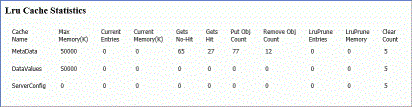
Entries on the LRU Cache Statistics page are organized by rows, one row per cache, as shown in the following image.
Understanding Cache Entries
Entries for the following caches appear on the Lru Cache Statistics page, by default.
This cache captures metadata values produced from calls to the WebFOCUS Reporting Server initiated automatically by the client whenever a user selects the Insight mode to run a chart. These calls include requests to the server for information, fonts, and metadata that are shared throughout all Insight Charts. Paths to the resources that place metadata in this cache and the amount of memory to be allocated to this cache are predefined, and the cache is therefore activated automatically as soon as a user chooses to work with a chart in Insight mode. The settings that configure this cache and its operations are pre-configured, and are not available to administrators. If you need to reconfigure or adapt this cache, please contact the Customer Support team.
This cache captures data values from queries in user-initiated procedures that create reports, charts, portals, dashboards, and other content. Paths to the resources that place data in this cache are defined in the Data Values Global Cache Paths (IBI_DATAVALUES_CACHE_ GLOBALPATHS) setting and in the Data Values User Cache Paths (IBI_DATAVALUES_CACHE_INCLUDEPATHS) setting, located on the Application Caches page of the Administration Console configuration tab.
This cache captures metadata values used by server operations that are not explicitly related to queries from user-initiated procedures. Paths to the resources that place metadata in this cache and the amount of memory to be allocated to this cache are pre-configured, and are not available to administrators. If you need to reconfigure or adapt this cache, please contact the Customer Support team.
Understanding Cache Statistics
The columns at the top of the page identify the statistics captured for each cache. With the exceptions of Current Entries and Current Memory, these statistics reflect cumulative activity through multiple sessions. They are cleared only when the caches close. The Current Entries and Current Memory statistics are cleared whenever a Clear Cache operation takes place.
For each cache, the following statistics are available:
The maximum amount of memory on the machine hosting the Application Server that is allocated to this cache. For the Data Values Cache, the value in this column is determined by the value assigned to the Data Values Max Cache Memory (MB) (IBI_DATAVALUES_CACHE_MAXMEG) setting for the DataValues row. The maximum amount of memory is pre-configured for the MetaData cache and the ServerConfig cache and is not available to administrators for reconfiguration. Note that the amount of memory allocated to these settings is expressed in megabytes in the Application Caches page setting, but the same amount is expressed in kilobytes in this statistic. Therefore, a value of 50 in the Data Values Max Cache Memory (MB) (IBI_DATAVALUES_CACHE_MAXMEG) setting appears as 50,000 in this entry. This value remains the same throughout a session unless an administrator changes the value in the Data Values Max Cache Memory (MB) (IBI_DATAVALUES_CACHE_MAXMEG) setting.
The number of data entries currently held in the cache. Each entry contains the IBFS path to the resource that contains the data retrieved by the query, followed by each individual data source value, the name of the user that ran the procedure that placed data in the cache, and time stamps for the time it was added to the cache and the most recent time it was retrieved for re-use. This value changes as entries are added to, removed from, or cleared from the cache.
The current amount of memory that is being used by the data values in the cache. The value in this statistic less the value in the Max Memory (K) statistic identifies the amount of memory available for any additional data. This value changes as data entries are added to, removed from, or cleared from the cache.
The number of Get objects that did not successfully retrieve metadata or data values from the cache. This number represents the number of procedures that ran but were unable to retrieve data from the cache because data from the query had not previously been added to it. This value increases whenever a Get object is unable to retrieve data or metadata from the cache. This value does not decrease, and is cumulative across multiple sessions. It returns to zero only when the cache itself is closed.
The number of Get objects that successfully retrieved values from the cache. This number represents the number of procedures that were run and were able to retrieve data that had previously been added to the cache. This value increases whenever a Get object retrieves data or metadata from the cache. This value does not decrease, and is cumulative across multiple sessions. It returns to zero only when the cache itself is closed.
The current number of Put Objects that loaded data values retrieved from a procedure into the cache. This value increases whenever a Put object adds data or metadata to the cache. This value does not decrease, and is cumulative across multiple sessions. It returns to zero only when the cache itself is closed.
The current number of Remove Objects that removed data values from the cache in response to the LRU Prune process. This value increases whenever a Remove object removes data or metadata from the cache. This value does not decrease, and is cumulative across multiple sessions. It returns to zero only when the cache itself is closed.
The number of Least Recently Used entries removed from the cache to make room for metadata or data that must be added to the cache in response to a query issued from a new procedure. Least Recently Used entries are the oldest entries in the cache that have not been requested by a Get object for reuse by a procedure. This value increases whenever data entries must be removed from the cache to clear memory space for new data or metadata from a Put object. This value does not decrease, and is cumulative across multiple sessions. It returns to zero only when the cache itself is closed.
The amount of memory freed when Least Recently Used entries were removed from the cache to make room for metadata or data source values that must be added in response to a query issued from a new procedure. Least Recently Used entries are the oldest entries in the cache that have not been requested by a Get object for reuse by a procedure. Note that this value is cumulative, that is, it represents the amount of memory freed by each LRU remove operation. It does not represent the current amount of free memory.
The number of Clear Cache events initiated by users during the current session. Every time a user clicks the Clear Cache command on the Administration Console menu bar, this value increases. Procedures that include a command to clear the cache also cause this value to increase. This value does not decrease, and is cumulative across multiple sessions. It returns to zero only when the cache itself is closed.
Understanding Cache Group Entries
Cache entries can be grouped by User ID or the path to the master file from which the data in the entry was retrieved. Both groupings give you an idea of the origin of data transferred to the cache, and help you assess how recently data in the cache was assigned to it or retrieved from it.
The Group by subsection can appear directly underneath the row for each active cache, as shown in the following image. This subsection opens when user activity causes values to be placed in it during the current session, and remains visible until a User clears the cache or an Application Server shutdown closes the cache.

This subsection displays additional summary cache statistics grouped by Scope, Path, or User. When grouped by Scope, statistics in this section identify summary statistics for all users and paths within the cache. When grouped by User, statistics in this section identify summary statistics for each individual User who added data or metadata to the cache. The section lists one row of statistics for each User. When grouped by Path, statistics in this section identify summary statistics for each individual resource from which data or metadata was added to the cache. The section lists one row of statistics for each Path.
Using these grouping options, you can identify the IBFS paths that were retrieved by queries in this session, and assess the statistics in this subsection by session, user, or query as represented by an IBFS path.
Each option identifies the following group statistics.
The number of metadata or data source entries currently held in the cache for each user or path, depending upon the selected Group By option. If the Group By option is set to Global, the value will match that of the whole cache.
The amount of memory occupied by the metadata or data source entries currently held in the cache for each session, user, or path, depending upon the selected Group By option. If the Group By option is set to Global, this value will match that of the whole cache.
The number of minutes that the oldest metadata or data source entry has been held in the cache for each user or path.
The number of minutes that have elapsed after the most recent call for data from the cache.
Caches begin to display statistics when they are initiated by system operations, and close their display of statistics when they are closed by an Application Server shutdown.
Statistics on the page are not logged or stored. With the exception of statistics in the Group By subsection and the Current Entries and Current Memory statistics, they are cumulative and persist from session to session. Current statistics serve as a snapshot of the current state of the caches. Cumulative statistics serve as an ongoing record of the activity that took place over the life of each cache.