Enabling Ad Hoc Reporting
A text area enables a user to enter an ad hoc report request. The request can include WebFOCUS report commands (for example, TABLE FILE filename) and Dialogue Manager commands and variables. When the user submits the request, it is assigned in its entirety to the variable associated with the text area and is passed to WebFOCUS.
A site may disable ad hoc reporting in the file IBIDIR.WFS, which is located by default as follows:
Windows:install_drive:\ibi\WEBFOCUS82\client\wfc\etc
UNIX: /ibi/WEBFOCUS82/client/wfc/etc
z/OS: /ibi/WEBFOCUS82/client/wfc/etc
If the following line is commented (the default), you can implement ad hoc reporting:
# <SET> IBIF_adhocfex(protect)
If the line is uncommented, you cannot implement ad hoc reporting. Uncommented, it prohibits the passing of the variable IBIF_adhocfex to the WebFOCUS Client from a browser.
The variable is generated internally. Managed Reporting uses it for every procedure.
Enable Ad Hoc Reporting
You can add optional attributes to the syntax shown.
<TEXTAREA NAME="IBIF_adhocfex" VALUE="value" ROWS=rows COLS=cols>
</TEXTAREA>
where:
Is a default request that displays in the text area. To display an empty text area, type:
VALUE=""
Is the number of rows in the text area.
Is the number of columns in the text area.
Enabling Ad Hoc Reporting
- Create a launch page
named ADHOC, which contains a text area that prompts for a report
request. This page must be accessible to the web server.
The sample launch page uses the Servlet.
Launch Page: ADHOC.HTM
<HTML>
<HEAD>
<TITLE> WebFOCUS Report </TITLE>
</HEAD>
<BODY>
<H4>Enter report request:</H4>
<FORM METHOD="get" ACTION="/ibi_apps/WFServlet"> <P ALIGN=LEFT NOWRAP><PRE> <TEXTAREA NAME="IBIF_adhocfex" VALUE="" ROWS=12 COLS=48 ALIGN=LEFT> </TEXTAREA> </PRE></P> <P> <INPUT NAME="submit" TYPE=SUBMIT VALUE="Run Report"> <INPUT NAME="reset" TYPE=RESET VALUE="Clear Form"> </P> </FORM>
</BODY>
</HTML>
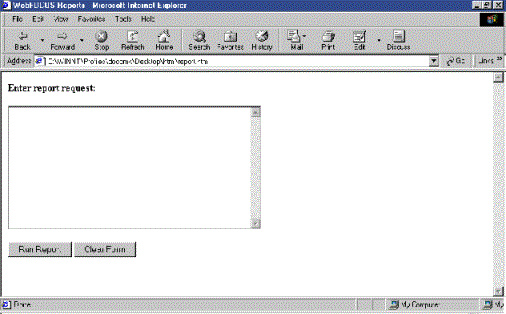
- Run the launch page,
which will look similar to this:
- Enter the following
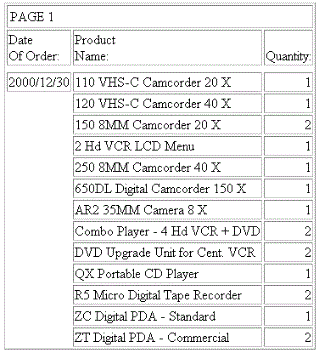
request in the text area:
TABLE FILE CENTORD
SUM QUANTITY BY HIGHEST 1 ORDER_DATE
BY PRODNAME
END
- Click Run
Report to receive the report.