Advanced Scheduling Tool Quick Access Toolbar
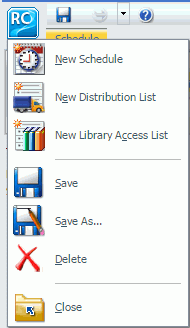
The Quick Access Toolbar, located at the top of the Advanced Scheduling tool, is always visible no matter which options are selected. The ReportCaster option provides access to the most commonly used functions. From the Quick Access Toolbar, you can select New Schedule, New Distribution List, New Library Access List, Save, Save As, Delete, Close, and Run. Help options are also available from the toolbar, as shown in the following image.
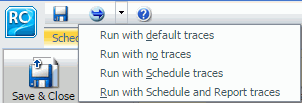
Additional Run options are available for selection from the Run drop-down list. If the schedule has been saved successfully, the Run options you can select include Run with default traces, Run with no traces, Run with Schedule traces, and Run with Schedule and Report traces, as shown in the following image.
Note:
- If you have the Session Traces privilege, you will have the Run with Traces options in the schedule tools. If you are not authorized to run with traces, these options will not display. For more information, see the ibi™ WebFOCUS® Security and Administration guide.
- Online help is available by clicking the online help icon
 .
.