Using JDBC Query - Process in Subsets and JDBC Update - Batch Updates
This sample shows how to use the Advanced tab options of JDBC Query and JDBC Update activities.
Install the PostgreSQL Database:
Run createTestTables.sql on the PostgreSQL database to create test tables. The script is located in the samples directory under the path TIBCO_HOME\bw\n.n\sample\palette\jdbc\Advanced
- Procedure
- In the samples directory, select and double-click tibco.bw.sample.palette.jdbc.Advanced. For more information, see Accessing Samples.
- In the Project Explorer view, expand the tibco.bw.sample.palette.jdbc.Advanced project.
- Fully expand
Module Descriptors under
tibco.bw.sample.palette.jdbc.Advanced and double-click
Module Properties. The JDBC properties defined for the application are defined in the dialog. Provide a valid username, password, and database URL to connect to your PostgreSQL database.
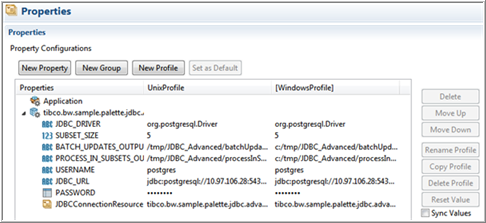
- Update the values under Module properties and save your project.
The values in Advanded.application properties are updated and the connection to the database is successful.
- Verify your JDBC connection.
- Fully expand the Resources directory.
- Double-click JDBCConnection_PostgreSQL.jdbcResource.
- In JDBC Driver, click Click here to set preferences.
- Set the JDBC driver folder directory preference and click Apply. Click OK.
- Click the Test Connection button to verify the connection.

- Click to save the project.
- Fully expand the Processes directory and double-click ProcessInSubsets.bwp and BatchUpdates.bwp.
- Click .
- At the left hand tree of Debug Configuration wizard, expand BusinessWorks Application and select BWApplication.
- Click the Applications tab and then click the Deselect All button if you have multiple applications. Select the checkbox next to tibco.bw.sample.palette.jdbc.Advanced.application.
- Click
Debug.
The sample runs in Debug mode.
- Click the
Terminate
 icon to stop the process.
Understanding the Configuration
This sample shows:
- JDBC Query - Process in Subsets: This activity allows users to process the result set in smaller subsets, rather than processing the entire result set at once. It uses the ProcessInSubsets process.
- JDBC Update - Batch Updates: This activity is configured to perform multiple statements in one batch. It uses the BatchUpdates process.
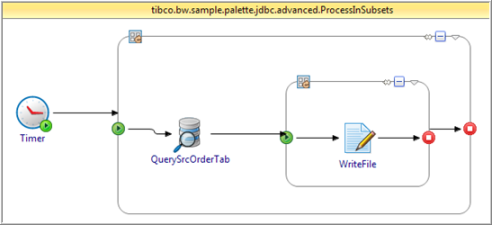
The ProcessInSubsets process is configured to process query in subsets.
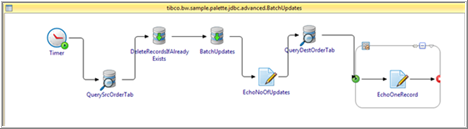
The BatchUpdates process is configured to perform multiple insert statements in one batch.
ProcessInSubsets runs as follows:
- QuerySrcOrderTab is a JDBC Query activity configured to retrieve subsets of the result set of SRC_ORDER_TABLE table
- Check the Process In Subsets field on the Advanced tab.
- Set the subsetSize input item to the number of records you want to process for each execution. In this sample, it is set as a module property named SUBSET_SIZE.
To retrieve subsets of the result set, you must use a Repeat group to iterate until the entire result set is processed. For this, both QuerySrcOrderTab and ProcessSubsets are grouped into processInSubsets Repeat group with the exit condition: $QuerySrcOrderTab/lastSubset = true().
BatchUpdates runs as follows:
- QuerySrcOrderTab is a JDBC Query activity to retrieve the entire result set of SRC_ORDER_TABLE table in one batch.
- The DeleteRecordsIfAlreadyExists activity deletes the records that are already in the database.
- BatchUpdates is a
JDBC Update activity configured to perform multiple insertions in one batch. It inserts all the records of the SRC_ORDER_TABLE table to the DEST_ORDER_TABLE table.
- Check the Batch Update field on the Advanced tab.
- Map the $QuerySrcOrderTab/Record to the Record input repeating element.
- QueryDestOrderTab retrieves the entire result set of DEST_ORDER_TABLE table at once.