Sending and Getting JMS Messages
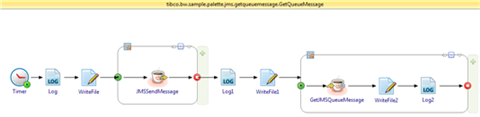
A process can send JMS messages and get JMS messages from a queue in a loop.
TIBCO Enterprise Message Service must be running.
- Procedure
- In the samples directory, select and double-click tibco.bw.sample.palette.jms.GetQueueMessage. For more information, see Accessing Samples.
- In the Project Explorer view, expand the tibco.bw.sample.palette.jms.GetQueueMessage project.
- Verify your TIBCO Enterprise Message Service connection.
- Fully expand the Resources directory.
- Double-click JMSConnectionResource.jmsConnResource.
- In the Basic Configuration dialog, click the Test Connection button to verify the connection.
- Fully expand the Processes directory and double-click GetQueueMessage.bwp.
- Click .
- At the left hand tree of Debug Configuration wizard, expand BusinessWorks Application and select BWApplication.
- Click the Applications tab and then click the Deselect All button if you have multiple applications. Select the checkbox next to tibco.bw.sample.palette.jms.GetQueueMessage.application.
- Click
Debug.
This runs the sample in Debug mode.
- Click the
Terminate
 icon to stop the process.
The Console displays messages similar to the following:
16:08:26.242 [PVM:In-Memory STWorkProcessor:1] INFO c.t.b.p.g.L.t.b.p.j.G.Log - Message=Sending 5 Queue Messages
16:08:26.292 [PVM:In-Memory STWorkProcessor:1] INFO c.t.b.p.g.L.t.b.p.j.G.Log1 - Message=Finished sending 5 Queue messages. Getting 5 Queue messages...
16:08:26.303 [PVM:In-Memory STWorkProcessor:3] INFO c.t.b.p.g.L.t.b.p.j.G.Log2 - Message=Received message number 1. Message = This is message number 1
16:08:26.307 [PVM:In-Memory STWorkProcessor:5] INFO c.t.b.p.g.L.t.b.p.j.G.Log2 - Message=Received message number 2. Message = This is message number 2
16:08:26.311 [PVM:In-Memory STWorkProcessor:1] INFO c.t.b.p.g.L.t.b.p.j.G.Log2 - Message=Received message number 3. Message = This is message number 3
16:08:26.315 [PVM:In-Memory STWorkProcessor:3] INFO c.t.b.p.g.L.t.b.p.j.G.Log2 - Message=Received message number 4. Message = This is message number 4
16:08:26.318 [PVM:In-Memory STWorkProcessor:5] INFO c.t.b.p.g.L.t.b.p.j.G.Log2 - Message=Received message number 5. Message = This is message number 5
Understanding the Configuration
The JMS Send Message activity sends the messages with the message style set to Queue.
The Get JMS Queue Message activity receives the JMS messages from a Queue in a loop. The activity is placed in a group and the group action is set to Repeat.
The condition loops five times and receives five messages.