Sending and Receiving Mail
A process sends an email to a user and another process receives the email, by either sending a response to the sender, or writing it to a log in the console.
This process contains Send Mail and Receive Mail activities.
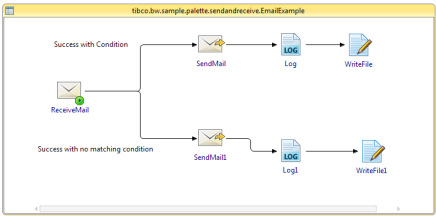
You must have the account settings for your mail server.
- Procedure
- In the samples directory, select and double-click tibco.bw.sample.palette.mail.SendAndReceive. For more information, see Accessing Samples.
- In the Project Explorer view, expand the tibco.bw.sample.palette.mail.SendAndReceive project.
- Set the default ApplicationProfile to match the OS you are running on. For more information, see Setting the Default Application Profile.
- Fully expand the Processes directory and double-click EmailExample.bwp and MailSendReceive.bwp.
- Click .
- At left hand tree of Debug Configuration wizard, expand BusinessWorks Application and select BWApplication.
- Click the Applications tab and then click the Deselect All button if you have multiple applications. Select the checkbox next to tibco.bw.sample.palette.mail.SendAndReceive.application.
- Click
Debug.
This runs the sample in the Debug mode.
- Click the
Terminate
 icon to stop the process.
The SendAndReceive.log output file is created in SendAndReceive folder at c:/tmp
Depending on your actions:
- If userA sends an email to the user configured in the Receive Incoming Email task with the subject "Send Response from BW", the mail account specified by the reply_email_address module property receives an email and the following message is visible in the console:
13:49:35.053 INFO [bwThread:In-Memory STWorkProcessor-2] c.t.b.p.g.L.t.b.s.p.m.S.Log
- Mail sent to user. 13:49:39.613 INFO [bwThread:In-Memory STWorkProcessor-3] c.t.b.p.g.L.t.b.s.p.m.S.Log
- Response sent to user1.
- If userA sends an email to the user configured in the Receive Incoming Email task with another subject, the console shows the following message:
13:49:35.053 INFO [bwThread:In-Memory STWorkProcessor-2] c.t.b.p.g.L.t.b.s.p.m.S.Log
- Mail sent to user. 13:49:39.613 INFO [bwThread:In-Memory STWorkProcessor-3] c.t.b.p.g.L.t.b.s.p.m.S.Log -No subject match
Troubleshooting
If the process does not receive the mail, verify the following whether:
- The email server and user information are correctly configured for your system.
- The reply_email_address module property refers to the mail account you are checking.
If the process after receiving the mail did not send a response, verify the following whether:
- The subject used in the email matches the incoming_email_subject module property. If it does not match, then find an appropriate message in the console.
- You have specified the Host correctly. If not, then it generates an error.