Using Java Invoke that Makes a REST call to Search Twitter
In this sample, Java Invoke makes a REST call to Twitter to search for a specified term. The application module contains the user-written code, user jars, and processes. There is no dependency on a Shared Module.
- Create new app on - https://apps.twitter.com/ and generate Access Token, Access Token Secret, Consumer Key, Consumer Secret for the app created and use it in the parameters for SearchTwitter Activity.
- To create a token:
- Login to https://apps.twitter.com/ with your Twitter account.
- Click Create New App.
- Provide Name and Description and create your Twitter application. Your application is successfully created.
- Go to API Keys Tab and click Create my access token. Your application access token is successfully generated.
- Click Test OAuth. You should see the OAuth Settings page which has the following tokens generated - Consumer key, Consumer secret, Access token, Access token secret.
- Procedure
- Browse the samples directory in File Explorer and select . Double-click to import the sample to your workspace. For more information, see Accessing Samples.
- In the Project Explorer view, expand the project.
- Fully expand the Processes directory and double-click RESTInvokeToTwitter.bwp.
- Click .
- At the left hand tree of Debug Configuration wizard, expand BusinessWorks Application and select BWApplication.
- Click the Applications tab and then click the Deselect All button if you have multiple applications. Select the checkbox next to .
- Click
Debug.
This runs the sample in Debug mode.
- Click the
Terminate
 icon to stop the process.
Understanding the Configuration
The project contains the following process:
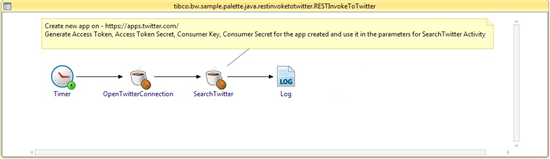
RESTInvokeToTwitter Process: This process has two Java Invoke activities: OpenTwitterConnection and SearchTwitter. The source code for these activities is located under src directory under com.example.TwitterConnection package in the same project. OpenTwitterConnection activity creates a TwitterConnection object which is then passed to SearchTwitter activity.
SearchTwitter activity requires the following 5 input parameters:
- SearchString
- AccessToken
- AccessTokenSecret
- ConsumerKey
- ConsumerSecret
AccessToken, AccessTokenSecret, ConsumerKey, and ConsumerSecret are required for authentication to the Twitter Account. The steps to generate these are mentioned in the Prerequisite section.
The Java invoke uses Twitter API v1.1 which requires this request to be authenticated using OAuth.
Troubleshooting
If you receive an error message such as:
401:Authentication credentials (https://dev.twitter.com/pages/auth) were missing or incorrect. Ensure that you have set valid consumer key/secret, access token/secret, and the system clock is in sync.
Then, ensure that you have generated Access Token, Access Token Secret, Consumer Key, and Consumer Secret as per the steps specified in Prerequisites section.