Storage Mode
In Publication Service, the adapter provides two storage modes for you to copy the columns from the source table to the publishing table. The storage mode you choose depends on your specific requirements.
Publish by Value
With Publish by Value, all specified columns in the source table are copied to the publishing table. Publishing by Value is fast, but does not support some data types, for example, Oracle LONG and LONG RAW.
When you use Publish by Value, the following restrictions apply on publishing tables:
| • | Publishing tables cannot contain columns with LONG data types. If you have a source table that contains a column with a LONG data type, that column cannot be specified for inclusion in the publishing table. This is because the trigger generated by the palette cannot copy the LONG column value through the :new construct. |
This is an Oracle restriction documented in the Oracle SQL Reference manual. The problem is not detected by Oracle during trigger creation. However, when the trigger fires and it attempts to copy the LONG column value to the publishing table, the database connection will hang for some time and then eventually terminate.
| • | LONG RAW data is not allowed in the publishing table. |
These restrictions do not apply to publishing tables when you use Publish by Reference, and LONG or LONG RAW are non-key types.
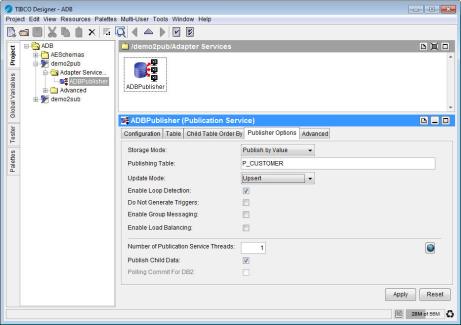
In the following example, the publishing table P_CUSTOMER is created for the source table, CUSTOMER. When CUSTOMER is updated, the new data is copied to P_CUSTOMER. The adapter will poll P_CUSTOMER and publish the new data.
|
Note |
In this example, loop detection is enabled. If a subscription exists that uses the same subject and |
Figure 291: Selecting Publish by Value as Storage Mode
Publish by Reference
With Publish by Reference, only key column values are copied to the publishing table. You can use this option to publish data directly from the source table without copying the data from the source table to a publishing table firstly. A trigger, a stored procedure, and a publishing table are created, but the publishing table contains the necessary adapter fields and only the key fields of the source table.
The advantage of Publish by Reference is that the data to be published is stored just once. Also, data types, such as Oracle LONG and LONG RAW are supported for Publish by Reference.
A key column or substitute key column is required when you use the Publish by Reference option, because the publishing table contains only key values. If no column is specified, the publication is not added.
|
Note |
When you use the Publish by Reference storage mode, note the following conditions:
|
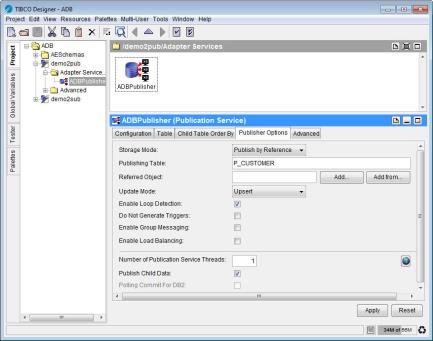
In the following example, the publisher adapter is configured to publish data from the P_CUSTOMER table with a key field CUSTID. The publishing table is created with the necessary fields and the CUSTID field. When a row in the P_CUSTOMER table is modified, the trigger fires, populates fields, and copies the CUSTID value to the publishing table. When the adapter polls the publishing table, it detects the new row and selects from the P_CUSTOMER table by using the CUSTID value found in the publishing table. Then the message is published.
Figure 292: Selecting Publish by Reference as Storage Mode