Run-time Connection Tab
The settings available in the Run-time Connection tab must be configured before you start the adapter at run time. After configuring these settings, click Test Connection to establish a connection to the database. When the dialog indicating successful connection is displayed, click OK. Click Apply to apply the changes before leaving this tab. See the following figure:
Figure 64: Adapter Instance: Run-time Connection Tab
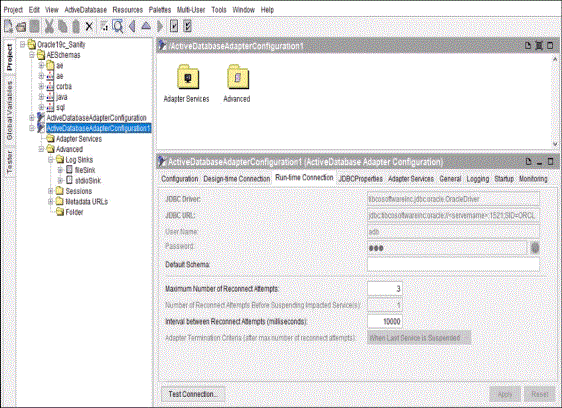
The following table lists and explains the fields on the Run-time Connection tab:
|
Field |
Description |
||||||||||||
|
JDBC Driver |
Specifies the name and URL of the JDBC driver used during runtime configuration. JDBC Drivers and URLs lists all the supported JDBC drivers and the associated URLs. For detailed parameter descriptions, see your JDBC driver documentation. |
||||||||||||
|
JDBC URL |
|||||||||||||
|
User Name |
This is the database user that the adapter at run time uses to connect to the database. This field is automatically populated when you select a template as described in Using Connection Settings Templates. It can be changed if the Use Design-time Connection For Run-time check box is cleared. |
||||||||||||
|
Password |
This is the password for the database user. This field is automatically populated when you select a template as described in Using Connection Settings Templates. It can be changed if the Use Design-time Connection For Run-time check box is cleared. |
||||||||||||
|
Default Schema |
Specifies the schema name for the current user. Usually the value is the same as the database name. For example, when using a Teradata database, the default schema must be the name of the database you connect to. But the schema name can be different for some specific databases. For example, when using Microsoft SQL Server, the default schema is The default schema cannot use global variables. For more information, see Default Schema. |
||||||||||||
|
Maximum Number of Reconnect Attempts |
The total number of reconnection attempts to be made after the adapter is suspended. When this number is reached, the runtime adapter or adapter service is terminated. See the following two examples:
To prevent data loss, it is best practice to configure the preregistered listeners for the Rendezvous Certified (RVCM) transport type. When a database connection is lost, reconnection attempts vary according to different adapter services:
Note: If you set the value for the |
||||||||||||
|
Number of Reconnect Attempts Before Suspending Impacted Service(s) |
Specifies the number of reconnection attempts to be made before suspending a service. This value is |
||||||||||||
|
Interval between Reconnect Attempts (milliseconds) |
Specifies the time interval (in milliseconds) between every two reconnection attempts. Note: If you set the value for the |
||||||||||||
|
Adapter Termination Criteria (after max number of reconnect attempts) |
The adapter and all of its services are stopped if any one of its services cannot re-establish a connection after the maximum number of reconnection attempts have been made. This option cannot be changed. |
||||||||||||
|
Test Connection |
This button is enabled if the Use Design-time Connection For Run-time check box is cleared. Otherwise, this button is unavailable. |