Changing Global Variables at Deployment
An application’s EAR file can contain global variables with values set at design-time. The global variables can be changed at deployment at the application level, service level, or service instance level.
Global variable values can be set at the application, service, and service instance levels. A variable value set at the service instance level overrides the same variable value set at the service level. Similarly, a variable value set at the service level overrides the same variable set at the application level.
Each service instance can use the same variable and assign it a different value. The instance variable can be any services settable variable defined at configuration.
-
If you change the default value of a global variable on deployment, that global variable is not changed by future deployments. That is, uploading a new EAR file does not change the values, even if the value of the global variable in the new EAR file is changed.
-
If you do not change the default value of a global variable on deployment, the global variable's value is overwritten with the one in the EAR file when the new version of the EAR file is uploaded.
-
Whenever the EAR file has the same value as the value in the TIBCO Administrator GUI, the value gets changed to whatever value is present in the EAR file on next deployment.
The rules for resolving global variable values are as follows.
-
If the variable value is set at the service instance level in the TIBCO Administrator GUI and the value is different than the variable value set in the EAR file or the variable is not deployment settable, the value set at the service instance level is written to the deployed service instance’s
.trafile.For example, for the application below,
MYVARIABLEis set to3in the EAR file.MYVARIABLEis changed for each service instance in the TIBCO Administrator GUI to a different value. After deployment, the three service instances will use the value assigned in the TIBCO Administrator GUI forMYVARIABLE.Application1 (MYVARIABLE 3)
Service1 (MYVARIABLE 3)
ServiceInstance1 (MYVARIABLE 4)
ServiceInstance2 (MYVARIABLE 5)
ServiceInstance3 (MYVARIABLE 6)
-
If the value at the service instance level is the same as the value inside the EAR file, but the value set at the service level in the TIBCO Administrator GUI is different, then the value set at the service level is written to deployed service instance
.trafile.For example, for the application below,
MYVARIABLEis set to 3 in the EAR file.MYVARIABLEis changed to4forService1and left unchanged for theServiceInstance1andServiceInstance2.MYVARIABLEis changed to5forServiceInstance3. After deployment,ServiceInstance1andServiceInstance2will use 4 forMYVARIABLE.ServiceInstance3will use5forMYVARIABLE.Application1 (MYVARIABLE 3)
Service1 (MYVARIABLE 4)
ServiceInstance1 (MYVARIABLE 3)
ServiceInstance2 (MYVARIABLE 3)
ServiceInstance3 (MYVARIABLE 5)
-
If the variable value set at the service instance level and the variable value set at the service level are the same as the value in the EAR file, but the value set at the application level is different, that variable is not written to the
.trafile. At runtime, the application gets the value at the application level as this value is written to the application’s repository.For example, for the application below,
MYVARIABLEis set to3in the EAR file.MYVARIABLEis changed to4forApplication1and is unchanged for all services and service instances. After deployment, allServiceInstanceswill use4forMYVARIABLE.Application1 (MYVARIABLE 4)
Service1 (MYVARIABLE 3)
ServiceInstance1 (MYVARIABLE 3)
ServiceInstance2 (MYVARIABLE 3)
ServiceInstance3 (MYVARIABLE 3)
Service2 (MYVARIABLE 3)
ServiceInstance11 (MYVARIABLE 3)
ServiceInstance22 (MYVARIABLE 3)
ServiceInstance33 (MYVARIABLE 3)
-
If the value of the variable at all the three levels, application, service and service instance, is identical to the one inside the EAR file, the behavior is the same as that described in the previous bullet. However, if the variable is not deployment settable, the default value will be written to the
.trafile. -
If there are no changes to the values of variables from the default values which are set in designer, the subsequent uploading of the EAR file will reset the variables default and configured values by new designer values of the new EAR file.
To Change Application Properties
- Procedure
-
In the TIBCO Administrator GUI, click Application Management.
-
Click Application > Configuration, where Application is the application created when you loaded the enterprise archive file. See Creating an Application.
-
In the Configuration Builder pane, select the level at which you want to change the variable, the Application name, service name or service instance name.
Click the Advanced tab to change values set for global variables. Use valid XML characters only. See Global Variables for descriptions.
The Reset to Defaults button restores all properties to the values defined in the enterprise archive file.
-
Click Save.
-
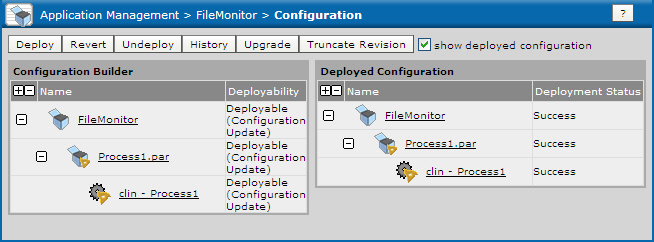
After you’ve made your changes, the Configuration Builder indicates that the deployment is out of date.
Figure 48: Changing Application Properties
-
Click Deploy.