Deploying an Application
When you create an application, you can use the Deploy on Save option to deploy the application when saving. The application then uses the global variables and other options set in the enterprise archive file. If you do not use the Deploy on Save option, you must explicitly deploy the application after changing deployment configuration options.
To Deploy an Application
- Procedure
-
Click Application Management.
-
Click Application > Configuration, where Application is the application created when you loaded the enterprise archive file. See Creating an Application.
-
Before deploying, you can change the deployment options. See Deployment Choices for details.
-
Click Deploy. The dialog similar to the following displays and informs you that all running processes with configuration changes in this application is stopped when you click OK to deploy. If the processes deploy successfully, they are restarted automatically if the corresponding checkbox was selected.
Figure 40: Deploying an Application
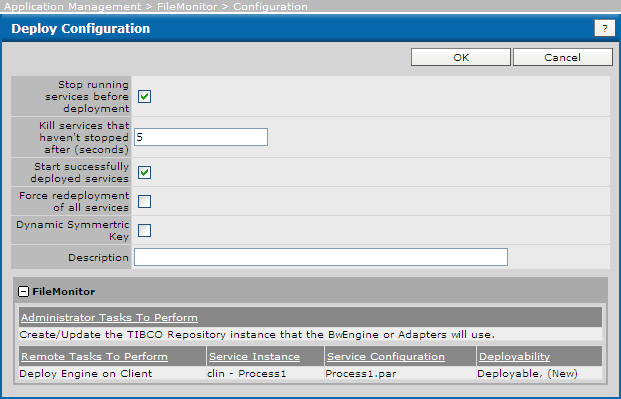
The dialog allows you to add a description and displays information about the application and each service.
-
Click OK if to deploy the application, or click Cancel to choose an advanced configuration, different archive file, or make other changes.