Setting Application Options
This section explains how to change certain options at the application level. Follow these steps:
- Procedure
-
In the left pane of TIBCO Administrator, choose Application Management > File Adapter > AdFiles_delimitedReader> Configuration.
-
In the Configuration Builder panel, click AdFiles_delimitedReader.
-
Click the Advanced tab and scroll down to the TIBCO BusinessWorks and Adapters Deployment Repository Instance panel. In Transport, select rv.
-
Change the Discovery Timeout to 15, and then click Save.
Figure 83: Setting Application Option
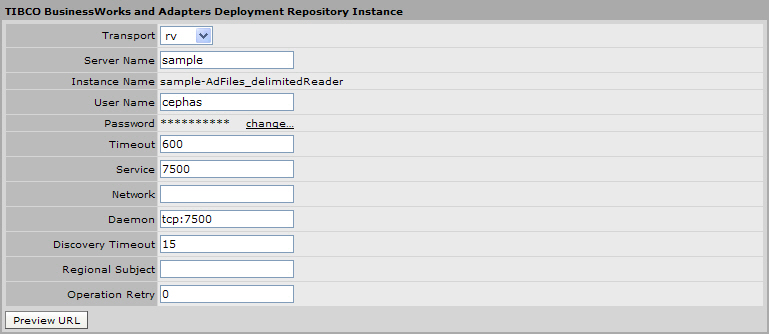
The Discovery Timeout property determines how long an application waits when initially trying to connect to the administration server. See Changing Global Variables at Deployment for a complete set of deployment configuration options.