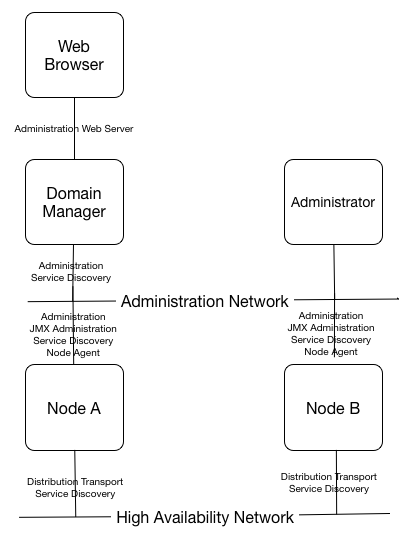
This section summarizes the equired network ports and how they are configured. In general, these network ports must be allowed through host firewalls for correct operation.
Table 7.1. Network ports
| Service | Protocol | Default Port Number | Configuration |
| Administration | SSL using IPv4 | Randomly assigned valid free port > 1024. | See Table 3.1, “Node installation options” |
| Administration Web Server - Domain Manager | SSL or TCP using IPv4 | Randomly assigned valid free port > 1024. | See Table 2.5, “ActiveSpaces® Transactions Administrator Web Server configuration” |
| Distribution Transport | SSL or TCP using IPv4, IPv6, or IPoSDP (Infiniband) | Attempts to find a free port starting at 5557 up to 5577. | See Table 6.4, “Distribution transport configuration” |
| JMX Administration | TCP using IPv4 | Randomly assigned valid free port > 1024. | Set when deploying applications using the deployment tool. |
| Node Agent - Domain Manager | SSL or TCP using IPv4 | Randomly assigned valid free port > 1024. | See Table 3.10, “Node agent configuration” |
| Service Discovery | UDP broadcast over IPv4 | 54321 | See the section called “Installation” |
Figure 7.1, “Network ports” shows how the required network ports are used to communicate between nodes and administration clients.