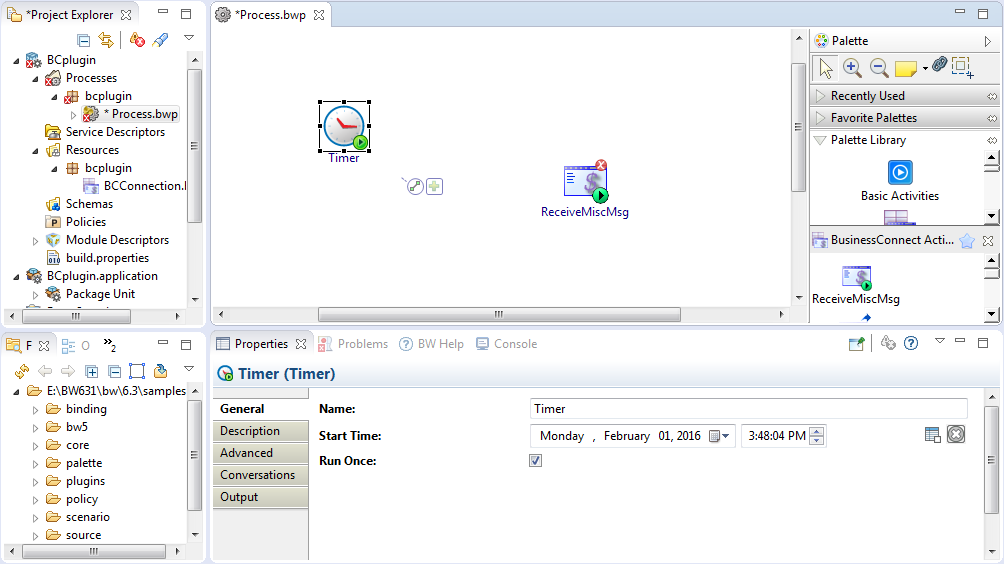
After creating a project, an empty process is created. You can add activities to the empty process to complete a task. For example, receive miscellaneous messages from TIBCO BusinessConnect.
In the Project Explorer view, click the created project and open the empty process from the
Processes folder.
Select an activity from the Palette view and drop it in the Process editor.
For example, select and drop the Timer activity from the General Activities palette and the ReceiveMiscMsg activity from the BusinessConnect Activities palette.
Drag the
icon to create a transition between the added activities.
The BusinessConnect Activities palette consists of several activities. Some are for sending or receiving business messages to/from BusinessConnect, and some are for sending/receiving miscellaneous messages such as errors to/from BusinessConnect. These activities provide the full integration between BusinessConnect and BusinessWorks processes. See
BusinessConnect Activities Palette for more details.
Note: A BC Connection shared resource is required when configuring the activities. See
Creating a BC Connection Shared Resource for more details on how to create the BC Connection shared resource.

 icon to create a transition between the added activities.