
Plug-in Overview
TIBCO ActiveMatrix BusinessWorks Plug-in for MDM provides a way for external applications to connect to the MDM system.
The following figure shows how the plug-in works with other products.
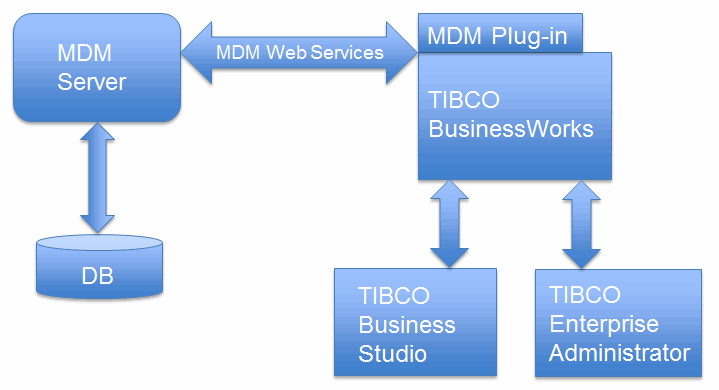
- TIBCO ActiveMatrix BusinessWorks is an easy-to-use integration product suite for enterprise, web, and mobile applications.
- TIBCO Business Studio is the Eclipse graphical user interface (GUI) used by TIBCO BusinessWorks and the plug-in to design business processes and the process engine to execute them.
- TIBCO Enterprise Administrator provides a centralized administrative interface to manage and monitor the plug-in applications deployed in an enterprise.
- TIBCO MDM is an enterprise application that allows you to ensure that your master data is consistent, complete, and accurate throughout your organization, enterprise systems, and partners. It provides a comprehensive approach to manage and synchronize master data within your organization. See TIBCO MDM documentation at https://docs.tibco.com/.
- TIBCO ActiveMatrix BusinessWorks Plug-in for MDM plugs into TIBCO ActiveMatrix BusinessWorks, which bridges TIBCO ActiveMatrix BusinessWorks with TIBCO MDM.
TIBCO ActiveMatrix BusinessWorks supports plug-ins that extend the palette functionality. After installing the plug-in, an MDM Palette and an MDM Shared Resource become available in TIBCO Business Studio. You can add the activities to the business processes you are designing, and integrate them into the process flow. At runtime, the plug-in activities are executed as part of the TIBCO ActiveMatrix BusinessWorks process execution.
By adding the plug-in activities to your business process, you can:
- Add, modify, item correct, query, delete, and search records. You can do CRUD operations on records and conduct index entity fuzzy queries with these activities.
- Upload record data to the data source, and import records to repositories.
- Query, reassign, approve, reject, and close work items generated by the MDM server.
- Get event information for a specified event ID, and wait for an event to complete.
Copyright © Cloud Software Group, Inc. All rights reserved.