TERR_Real
In the Spotfire
Custom Expressions dialog box, you can select the pre-defined expression
TERR_Real
from the
Function list. This expression function invokes the TERR engine to return a vector or a single column data frame of the data type
numeric
, which is converted to a Spotfire column of the corresponding Spotfire data type Real.
| Argument | Argument description |
|---|---|
| A TERR script. | The TERR script contains the following.
|
| Spotfire column names. | Passed as additional arguments, these are the data column names that
input1 to
inputN represent. All columns must be the same length.
|
| Returned by TERR | Converted in Spotfire |
|---|---|
A vector or a single column data frame of data type
numeric.
|
A column with the same number of rows as the input, and of the data type Real. |
TERR_Real example
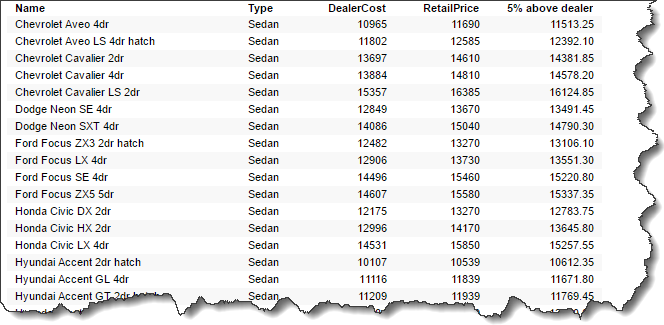
This example uses the TERR_PCA_Cars data sample from the Spotfire library. Select four columns (Name, Type, RetailPrice, and DealerCost), and then add a column that calculates a minimum of 5% profit above dealer cost.
TERR_Real("output <- input1*1.05",[DealerCost]))The resulting table in Spotfire shows the following.
max, and Spotfire contains the function
Max. ) You must overwrite this autocorrection manually to ensure that you use the TERR function case and name in your expression function.
See Embedding the Contents of a Script in an Expression Function for a detailed procedure for creating an expression function.