Copyright © Cloud Software Group, Inc. All Rights Reserved


Fulfillment Provisioning Modules : Product Order Processing

Product Order Processing
The Product Order Processing (POP) module processes all of the product orders attached to the service order. It navigates the UML process and activates the work orders in parallel or sequentially, depending on the product order flow.
POP delegates the work order activation to the target cartridge passing mapped parameters from Fulfillment Provisioning Catalog to the cartridge's technical level.
Figure 21. POP
Type
pop::POP
POP Execution
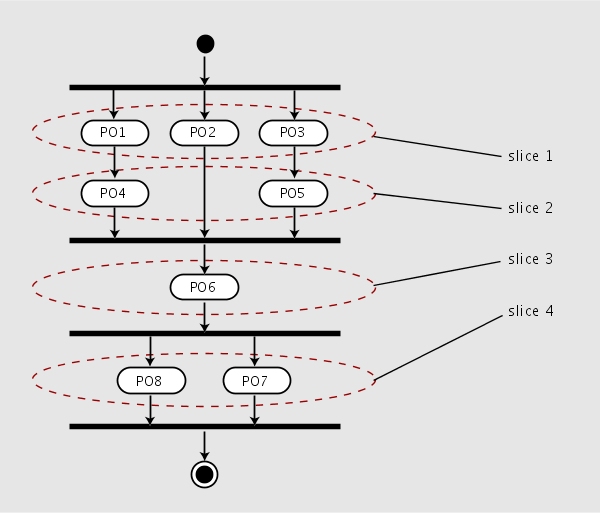
When POP receives a service order, it has already been enriched1 and sequenced. The sequencing defines which product orders are dependent on others within the service order. From these dependencies, POP derives a sequence of slices, representing product orders that can be executed in parallel. A slice represents a set of product orders that are not dependent on each other, and which can be executed at the same time. When one product order depends on another one, the two cannot be in the same slice. The following figure shows a set of product orders arranged in slices.
Figure 22. Product order slices
After the product orders are arranged into slices, POP executes the first slice. The product orders within the slice are executed in parallel and each one completes with a return status (pass, fail or retry). There are two possible outcomes from the execution of a slice:
You can set the onPOPError parameter of a service order to affect how the slices are executed.
Processing With onPOPError Set to stopAll
If all product orders execute successfully, POP goes on to execute the next slice. At first failure, the service order flows to one of the following alternate output ports:
Table 2. Output Ports
When the last slice is executed successfully, the service order is complete and flows out of POP's success port (normal).
Processing With onPOPError Set to stopDependent
When onPOPError is set to stopDependent, only product orders that have all their dependent ones successfully executed are processed. In other words, Product Orders sequenced after a failed Product Order are not processed. If any product orders fail, then the service order status is set to Failed.
Disabling Parallel Processing
In some cases, it may be necessary to disable parallel processing, forcing the product orders to execute sequentially. To do this, set the service order's sequentialSequencing attribute to true. Refer to the component documentation for this attribute.
Re-submission of Service Orders
When a service order is first submitted to POP, it begins with the first slice. When a service order is resubmitted, POP finds the first slice containing a product order Partial or Fail status and starts with that slice.
Processing With Asynchronous Cartridges
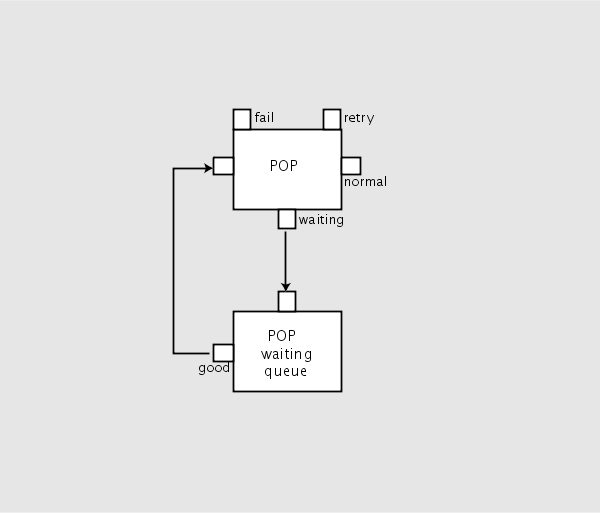
When POP invokes a work order on an asynchronous cartridge, there is no immediate result to evaluate. So POP sets the service order status to Waiting. The service order is then directed to the waiting port. This port is connected to a waiting queue.
Figure 23. POP uses a waiting queue to handle async cartridges
When the work order response arrives from the cartridge, the service order is requeued and POP resumes its execution. The decomposition and execution of Service Orders or Products Orders are the same for asynchronous or synchronous cartridges.
You do not need to put the POP waiting queue into your flows since POP creates and connects this queue automatically.
 
Execution Policy
The execution policy can either be Product Order Slicing or Dependency Tree. The way product orders are executed can be controlled on each service order basis by updating the following service order data set parameter:
pop::EXECUTION_POLICY
If the value of this parameter is set to Slicing, the execution is as usual, after each slice.
If the value of this parameter is set to Dependency Tree, product orders are launched at the earliest when all of their constraints are appropriate, irrespective of their slice numbers .
 
Slice Checkpoints Mechanism
POP can checkpoint service orders between slices by using the following service order data set parameter:
pop::POP_CHECKPOINT
If the value of this parameter is set to AfterSlice, POP checkpoints the service order after each slice. This applies only to the service orders executing without dependency tree.

1
Enriching data is to add new entries to a dataset.


Copyright © Cloud Software Group, Inc. All Rights Reserved