Disaster Recovery Concepts
The disaster recovery feature protects the following resources by replicating data from the active (primary) site to the standby (DR) site:
-
The FTL realm configuration, including configuration for all persistence clusters, stores, destinations, and so forth.
-
Application data (for example, messages and acknowledgments) stored in persistence clusters.
When a DR site is activated, the administrator can access a copy of the FTL realm configuration and make updates as needed. When applications fail over to the DR site, they can access the data stored in persistence clusters at the DR site.
Your enterprise must meet certain requirements to use the DR feature. See Prerequisites for Disaster Recovery.
The details of how to enable replication of the FTL realm configuration and how to activate a DR site differ depending on whether you are using Classic Disaster Recovery or Simplified Disaster Recovery.
Persistence cluster configuration for DR is mostly unchanged between the classic and simplified DR models. Note that you cannot use the default persistence cluster for DR. See Persistence Configuration for Disaster Recovery.
The disaster recovery feature supports both unplanned and planned failovers. In an unplanned failover, the primary site is disabled due to a disaster. As replication to the DR site is asynchronous, a tail end of application data could be lost. See Replication for Disaster Recovery for more details.
In a planned failover, the primary site is deactivated at a scheduled time. You can use FTL administration tools to ensure that no application data is lost and to execute the failover. A failback to the original primary site is a type of planned failover.
The following examples illustrate the operation of FTL both before and after an unplanned DR event.
Prepared for Disaster
Figure 61: Servers Providing Realm and Persistence Services Configured for Recovery
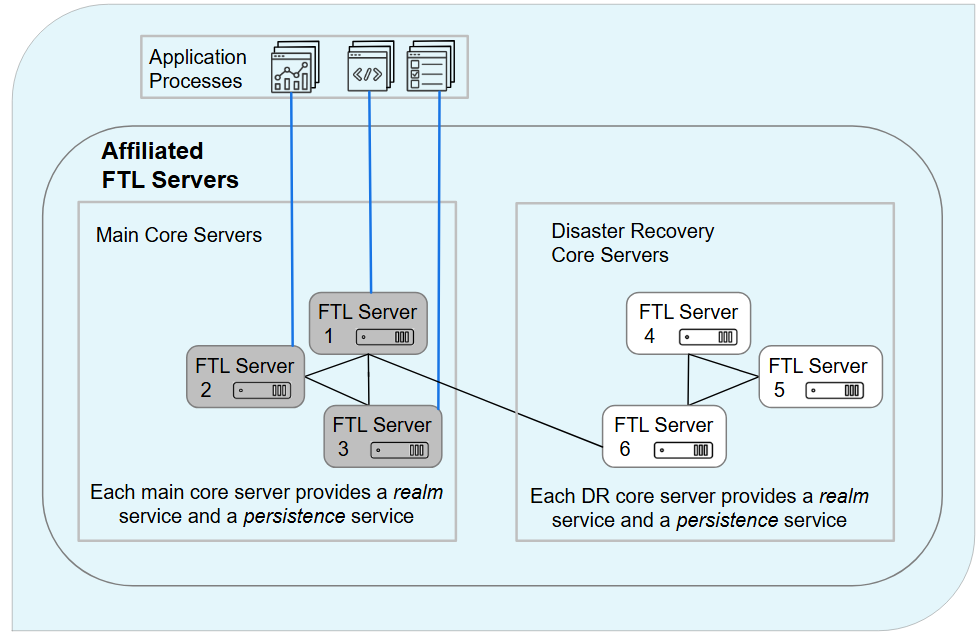
The diagram illustrates a set of FTL servers configured to prepare for recovery from a potential disaster, along with the services they provide and the application processes that they serve. Servers at the main site are on the left (gray). Components at the disaster recovery site are on the right (white).
At each site, each of three core servers explicitly provides a realm service and a persistence service. An application can connect to any local core server (blue lines). Realm services and persistence services synchronize to the state of the local cluster leader.
The leader communicates by using a WAN link, to synchronize the disaster recovery site with the latest realm definition and persistence data.
After Recovery
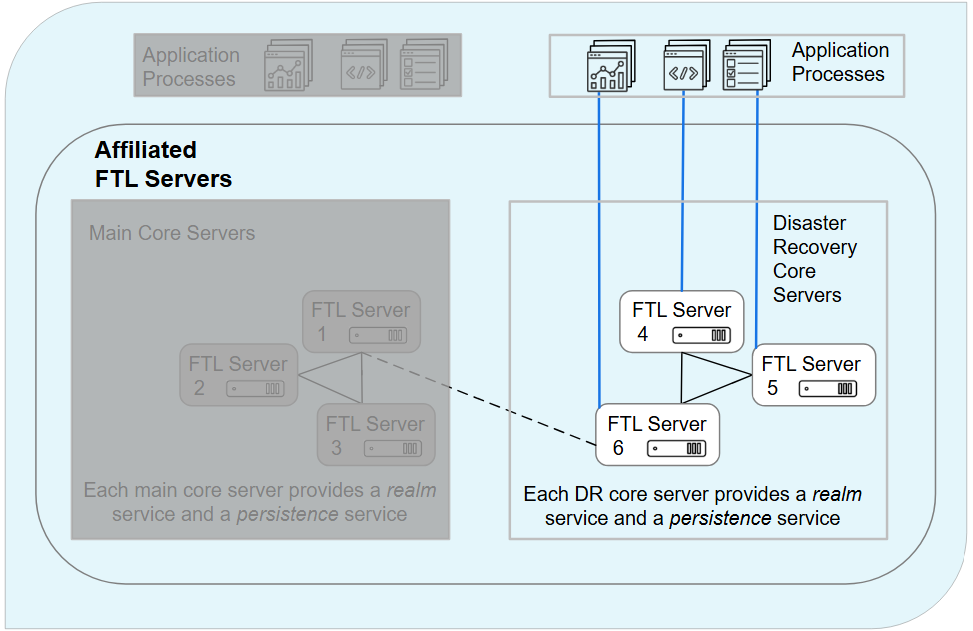
In this diagram, a disaster has disabled the main site.
Administrators have used FTL administrative commands to cut over to the disaster recovery site. This involves two steps. Note that the FTL administration tool (tibftladmin) can be used to perform both steps, or just the first step, depending on your preference.
-
The disaster recovery FTL servers have been promoted to primary FTL servers. This means that the FTL realm configuration can now be modified at the DR site.
-
The FTL realm configuration has been modified to update the primary set of each persistence cluster. This means that the persistence services at the DR site can now accept client connections.
At this point, administrators can prepare the original primary site for failback, or set up a new primary site.