User Access Profiles
User access profiles provide the ability to specify which application functionality is available to various types of users of the client application. They do this by specifying which user interface components (i.e., icons, buttons, and menu selections) are made available to the logged-in user.
|
Note |
User access profiles only define which user interface components are made available to the logged-in user — the ability to actually execute the functionality is determined by the level of security defined on the iProcess Objects Server. For instance, the user's access profile may grant access to the tool/menu selection for closing cases, however, if the user does not have system administrative privileges on the iProcess Objects Server, any attempt to close a case will be rejected. |
The user access profiles are defined using the UserAccessProfiles record in the ClientInstallDir\JSXAPPS\ipc\userAccessProfiles.xml file.
Each profile represents a type of application user and defines the user interface components available to users of that type. The following shows a collapsed view of the default user access profiles included in the iProcess Workspace (Browser):
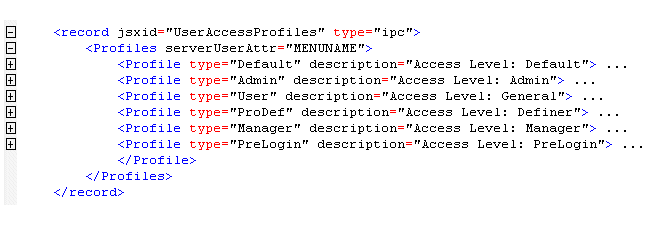
Each user's profile type is stored in the MENUNAME user attribute, the name of which is specified by the serverUserAttr attribute (for information about the MENUNAME user attribute, see the TIBCO iProcess Server Objects Programmer’s Guide or on-line help system). By default, the MENUNAME attribute is used because it is an inherent attribute of all iProcess users and requires no customization when the iProcess Workspace (Browser) is installed.
The “Default” profile type is assigned to application users that do not have their iProcess attribute set to one of the defined profile types. In this example, if a user logs in to the iProcess Workspace (Browser), and the value of their MENUNAME iProcess attribute is empty, or set to a value other than “Admin”, “User”, “ProDef”, or “Manager”, the access defined for the “Default” profile type is assigned. If the MENUNAME value is invalid, and the “Default” profile type has not been defined in userAccessProfiles.xml, access is automatically limited to viewing only the list of procedures.
There is also a special “PreLogin” user type specified in the userAccessProfiles.xml file that represents all users before they login, i.e., before the application knows their user name/type. The access profile for the “PreLogin” user type only contains the elements needed to specify how much error information will be shown to the user prior to logging in.
If you need additional user profile types, you must create a new user attribute and assign profile types to that user attribute (rather than assigning new types to the MENUNAME attribute). For information on how to create custom profiles by defining a new user attribute, see Creating Custom User Access Profiles.
Each user access profile (i.e., each <Profile/> element) specified in the userAccessProfiles.xml file contains the following attributes:
| • | The type attribute of each profile represents the user type and corresponds to the value that is stored in the iProcess attribute of the user. For example: |
<Profile type="Admin" description="Access Level: Admin">
Initially, profiles are defined for each of the possible MENUNAME values: “Admin”, “User”, “ProDef” and “Manager” (as well as a “Default” and “PreLogin” type, which are described above).
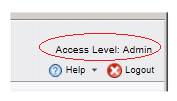
<Profile type="Admin" description="Access Level: Admin">
This example would cause the following to be displayed when a user with a MENUNAME of “Admin” is logged in:
Each <Profile/> element contains subordinate <property/> elements, each of which represents a specific function in the iProcess Workspace (Browser). The <property/> elements contain the following attributes:
| • | The name attribute identifies the function for which you can provide or deny access using the state attribute (see the next bullet item). |
<property name="Procedure" state="1">
For a complete list of the allowable name attributes (functions), see the table in the Access Profile ‘name’ Attributes section on Access Profile ‘name’ Attributes.
| • | The state attribute specifies whether or not the associated user type has access to the functionality identified by the name attribute (see the bullet item above), where “1” means allow access and “0” means deny access. |
<property name="Procedure" state="1">
If access to a function is not allowed, the applicable buttons and/or menu selections are not displayed.
Note that if a <property/> element for a particular function is not present in the userAccessProfiles.xml file, access to that function is not allowed by default.