Viewing a Single Record
- Procedure
- Click Browse and Search.
- From the Repository Name drop-down list, select the repository whose records you want to view.
- Click a record to view its details. The View Record page is displayed.
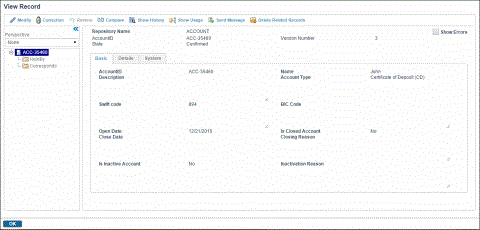
The View Record page consists of:
Repository information: This section of the View Record page displays the name of the repository in which the record exists. It also displays the Show Errors check box. If any errors exist, they are displayed in red.Attribute Group Information: This section lists all the attribute groups and the attributes contained by each group in separate tabs on the page. The attribute group display is subject to security access controls. If you have categorized attributes in a group, they are displayed in a separate tab. All attributes that do not fall under any group are displayed under the UNASSIGNED tab. To know more details about an attribute, point on the attribute name to see Attribute help.Other than the
UNASSIGNEDattributes, the following System Attributes are displayed in theSYSTEMAttribute tab:
Last Modified on: The date and time when the current version of the record was last modified.
Modified by: The user who modified the record.
Active: This option displays Yes or No options based on whether or not a record is deleted. A record is considered active if it is not deleted.
Created on: The date and time when the current version of the record was created. The creation date and time of a record refers to the current version of the record. If you want to view the creation date and time of the previous versions, go to the Record History page and click the previous version number.
Owner: The Event ID of the record.
Last Confirmed Version: The version of the record when it was last confirmed.
Version Number: The current version of the record.
State: The state can be either
confirmed,unconfirmed, ordraft. It is in thedraftstate when the record is created. When the record is involved in a workflow, but it is not yet confirmed by an Approver, it is in anunconfirmedstate, and when the approver approves the record or an Administrator saves the record, it is in aconfirmedstate.Checksum: Is an autogenerated unique value for the record.
Parent Version: Is the version of the parent record.
Owner Type: Is the Type of the event.
Relationships Information: To view the relationship hierarchy, expand the Relationship tree at the left side. It shows the forward, backward, and self relationships of a record. You can click each of the relationships displayed to navigate through the hierarchy of relationships.You can perform various activities on the View Record page. See, Actions on View Record.