 in the OpenSpirit tool bar to
open the preference settings window.
in the OpenSpirit tool bar to
open the preference settings window.The OpenSpirit extension's preference settings are used to control various
behaviors of the extension. Click on the Show/Edit
Settings button in the OpenSpirit tool bar to
open the preference settings window.
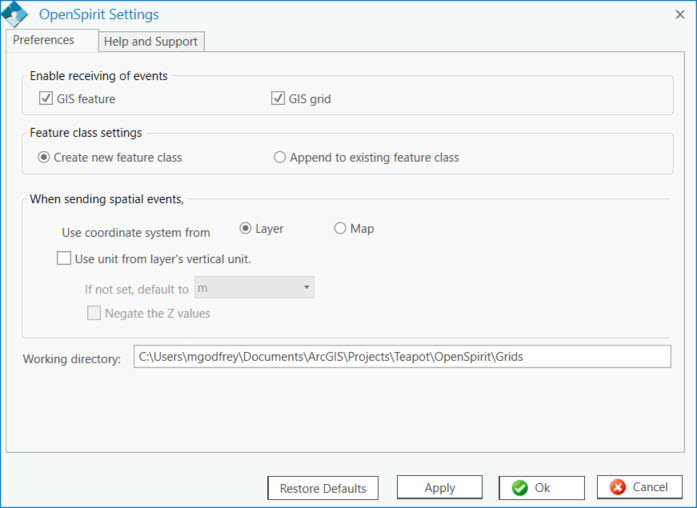
Each section of the preference settings window are described below. A Restore Defaults button is provided to restore the preference settings to the default values.
The enable receiving of events options are used to control which event types the OpenSpirit extension will receive when event listening is enabled.
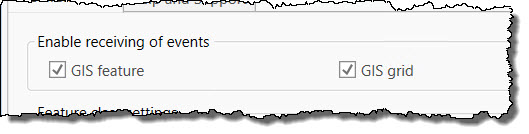
The default settings are to receive all event types. Uncheck any event type that you would like the OpenSpirit extension to ignore when event listening is enabled.
The feature class setting controls how features received in GIS feature selection events are added to the ArcGIS Pro contents tree.

Select the Create new feature class option if you would like a new feature layer to be created even if a layer with the same name has already been created in the contents tree. Choosing this option may result in having multiple feature layers with the same name if multiple events are received that contain layers with matching names. Select the Append to existing feature class option if you would like features to be added to previously received layers having the same name rather than creating a new layer for the event.
The sending spatial events settings control the OpenSpirit extension's behavior when sending GIS feature selection events and grid events.
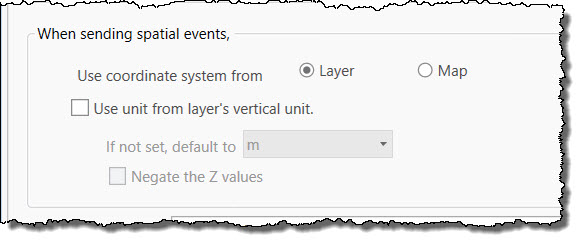
The Use coordinate system from option controls which coordinate system is used for events sent by the OpenSpirit extension. Select Layer to send GIS features and grids in their layer's coordinate system. No coordinate system conversion is performed during the send when using this option. Select Map to convert the features and grids from their layer coordinate system to the active Map's coordinate system before sending.
The Working directory shows where raster image files are created when receiving grid events.
