Creating a table alias (or self join) in Information Designer
You can create a duplicate reference to a database table from Information Designer. This duplicate is called a Table Alias, and references the very same data, only using an alias. This can be useful in certain cases, most often when in need of a self join within a table.
Procedure
-
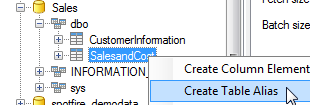
Right-click the table and select
Create Table Alias.
Example: Self joins using a table alias
A self join is a join from a table to itself. In Information Designer, this is implemented by using a table alias.
About this task
The following database table lists a number of employees at a company, and specifies who the manager of each employee is. Carla is the head of the department. Mike and Adrian report directly to Carla, whereas Sarah and Vincent report to Mike.
| ID | Name | Manager |
|---|---|---|
| 1 | Sarah | 2 |
| 2 | Mike | 3 |
| 3 | Carla | Null |
| 4 | Vincent | 2 |
| 5 | Adrian | 3 |
To produce a list where the ID stated in the Manager column is replaced by a name, we would need a self join in the table. The table needs to look up the ID column in itself.
| Name | Manager |
|---|---|
| Sarah | Mike |
| Mike | Carla |
| Carla | |
| Vincent | Mike |
| Adrian | Carla |