Change column names
The Change Column Names transformation is used to change the names of one or more of the columns in a data table.
See Transforming data for information about how to add a transformation to an analysis.
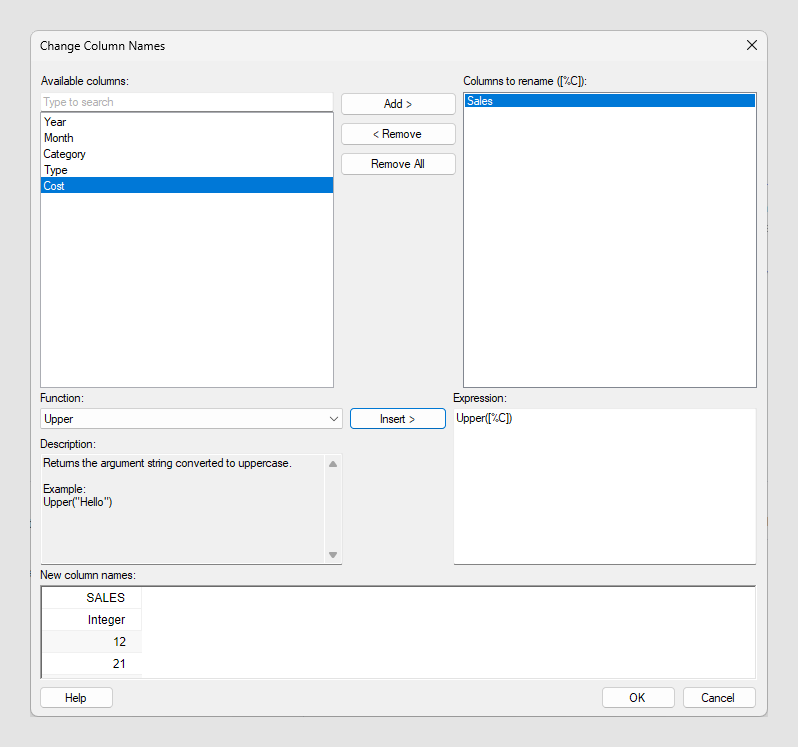
| Option | Description |
|---|---|
| Available columns | Shows all available columns. You can narrow down the list of available columns by typing a part of a name in the search field. You can also enter an expression in the field, using the rules described on Searching in Spotfire clients. Press Ctrl or Shift to select multiple columns. |
| Add > | Adds the selected columns to the Columns to rename list. |
| < Remove | Removes the selected columns from the Columns to rename list. |
| Remove All | Removes all columns from the Columns to rename list. |
| Columns to rename | Lists the columns you have selected to
rename and shows you the name ([%C]) that can be used to apply
the same function on all columns in the
Expression field.
|
| Function | Select a function by clicking on it in the list and then click on Insert, or double-click on the function to send it to the Expression field. |
| Description | Shows a brief description of the selected function. For more detailed descriptions, see the Text functions page. |
| Insert > | Inserts the selected function in the Expression field. |
| Expression | This is the text field in which you build your expression on how to rename columns. You can insert functions from the lists or enter text as in any standard text editor. Many of the functions require you to type either the name of the column you want to rename or the common name given by the Columns to rename list. |
| New column names | Shows the renamed columns. |