Library administration
The Spotfire system features a library. Using the Spotfire library, people can publish and share all their analysis material, data connections, information links, data sources, and so on. The Spotfire library contains a folder structure where you can set permissions on folder level.
On the menu bar, click to reach the tool.
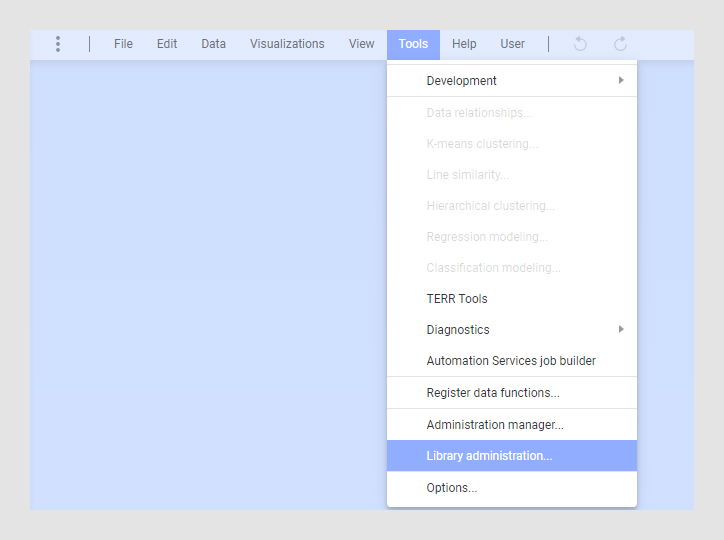
Using the Library administration tool, you can
- Structure the library and its contents.
- Copy and move files and folders.
- Create new folders and build folder structures.
- Set permissions for folders so that only certain users are allowed access to certain parts of the library.
- Import content into the library, or export parts of the library to file, as needed.
To access the Library administration tool, you must have enabled the license feature Library administration. Note that this license feature does not affect the actual permissions set for the various folders in the library, it only enables a user to open the Library administration tool.
To have full control over the library, you must be a member of the Library administrator group that is always present in the Spotfire system. Members of this group can override any permission levels in the library and have full control of the entire library. Members of this group are also the only ones allowed to create, delete and change permissions for top level folders in the library.
- Copying or moving items in the library
To move items in the library you must have Browse + Access + Modify permissions for both the source folder and the destination folder. If you want to move a folder, you must also have Browse + Access + Modify permissions for the entire underlying folder structure of the source folder. - Editing folder permissions
You can edit folder permissions using the Library Administration tool. - Exporting from the library
You can export contents from a library using the Library Administration tool. - Importing to the library
You can import previously exported library content to the library using the Library Administration tool. - Conflict resolution in the Spotfire library
Items and folders in the library are identified by two things: their name and a unique identifier (GUID). Several items can have the same name provided that they are not located in the same folder, but every item will always have a unique identifier. This identifier is used in external references to the item, such as a link to an analysis file that you can send to a colleague. If your colleague clicks the link, they can open the analysis file in Spotfire. - Icons in the library administration tool
In the Library Administration tool, the following icons can be seen. Click on a link in the table below to find out more about an element type.
- Copying or moving items in the library
To move items in the library you must have Browse + Access + Modify permissions for both the source folder and the destination folder. If you want to move a folder, you must also have Browse + Access + Modify permissions for the entire underlying folder structure of the source folder. - Editing folder permissions
You can edit folder permissions using the Library Administration tool. - Exporting from the library
You can export contents from a library using the Library Administration tool. - Importing to the library
You can import previously exported library content to the library using the Library Administration tool. - Conflict resolution in the Spotfire library
Items and folders in the library are identified by two things: their name and a unique identifier (GUID). Several items can have the same name provided that they are not located in the same folder, but every item will always have a unique identifier. This identifier is used in external references to the item, such as a link to an analysis file that you can send to a colleague. If your colleague clicks the link, they can open the analysis file in Spotfire. - Icons in the library administration tool
In the Library Administration tool, the following icons can be seen. Click on a link in the table below to find out more about an element type.