Sample Selector
This operator connects to a preceding Random Sampling operator and allows you to specify one of the sample data sets (training or testing) generated from that operator for use in succeeding operators.

Information at a Glance
|
Parameter |
Description |
|---|---|
| Category | Sample |
| Data source type | TIBCO® Data Virtualization |
| Send output to other operators | Yes |
| Data processing tool | TIBCO® DV, Apache Spark 3.2 or later |
Algorithm
This operator connects to a preceding Random Sampling operator and you can select the training or the testing data sets generated from that operator for use in succeeding operators.
Input
An input is a sample generating operator, such as the Random Sampling operator.
Configuration
| Parameter | Description |
|---|---|
| Notes | Notes or helpful information about this operator's parameter settings. When you enter content in the Notes field, a yellow asterisk appears on the operator. |
| Selected Sample | Select the samples as database tables or views from the preceding Random Sampling operator. |
Output
The data rows of the selected data sample table or view are displayed.
A table output that is used by a downstream operator. The column structure (schema) is generated after running this operator.
Example
The following example demonstrates the use of the Sample Selector operator to select the training and testing data sets generated by the Random Sampling operator.
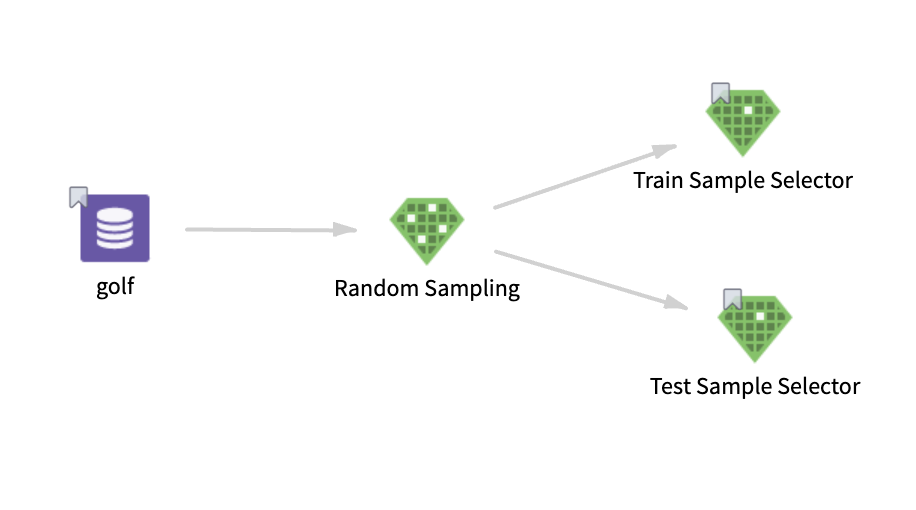
golf: This data set contains the following information:
- Multiple columns namely outlook, temperature, wind, humidity, and play.
- Multiple rows (14 rows).
Parameter Setting
The parameter settings for the golf data set is as follows:
-
Selected Sample: Sample 1 (80%)
Output
The following figure displays the output for the parameter settings for the golf data set.
.png "Sample Selector operator Output tab")