
Contents
TIBCO® Spotfire Data Streams 10.4.0 adds the following updates and new features:
Starting with release 10.4.0, TIBCO StreamBase® and TIBCO® Live Datamart are now combined and licensed together into two new product licenses:
- TIBCO® Streaming
-
TIBCO Streaming is the full set of streaming technologies, and includes TIBCO StreamBase®, TIBCO LiveView™, and the TIBCO StreamBase Studio™ development environment. See What is TIBCO Streaming for a complete list of included technologies.
- TIBCO Spotfire® Data Streams
-
TIBCO Spotfire Data Streams is a subset of the TIBCO® Streaming package, configured as an add-on for TIBCO Spotfire® users, and licensed for the sole purpose of serving live data to TIBCO Spotfire. See What is TIBCO Spotfire Data Streams for the contents of this package.
A summary of the license term changes for these new product packages is found on the License Considerations page.
Initial work has begun to separately brand the Welcome screens in StreamBase Studio and some of the documentation. Whichever new product you have licensed, you can expect to see unchanged former names and terminology throughout Studio menus and dialogs, and in the documentation. This branding work is expected to proceed over the next several releases.
The TIBCO StreamBase® and TIBCO® Live Datamart independent products still exist for licensees of those products. Version updates and maintenance releases for StreamBase and Live Datamart will be fulfilled with installers branded as TIBCO Streaming. However, your Licenses for those products are not automatically upgraded to a TIBCO Streaming license. Contact your TIBCO Sales Engineer for further information.
- New Manage Project Dependencies Menu Option
-
StreamBase Studio now provides a new right-click menu option for a selected application or fragment project, >. Invoke this option:
-
To add fragment dependencies for an application project.
-
To add fragment-to-fragment or fragment-to-Java dependencies for a fragment project.
This option presents an information dialog, and then it:
-
Opens the POM Editor for the selected project's
pom.xmlfile. -
Switches to the Dependencies tab of the POM Editor.
-
Opens the Add Dependency dialog.
See Add a Dependency for instructions on the application project case.
-
- Clusters View Context Menu Now Supports Multiple Operations
-
You can now stop, remove, and forcefully remove multiple running nodes using the context menu by Ctrl+clicking nodes in the Clusters view.
- New StreamBase Expression Language Function Added
-
A new StreamBase Expression Language Function was added, getResourceAbsolutePath(). This function returns the absolute file system path for a specified resource in a Studio project's src/main/resources folder.
- Support Added for Disabling the Transaction Isolation Override Warning
-
By default, attempting to override the transaction isolation of a parent module in a child module generates a typecheck warning, because transaction isolation cannot be overridden by child modules. This warning can now be optionally disabled, as described on the Typechecking preferences page.
- StreamBase Application Archive Wizard Enhanced
-
The StreamBase Application Archive Wizard was enhanced and now provides the options to:
-
Include debugging messages in the log output.
-
Save packaging steps logs to a directory.
-
Run tests during fragment and archive packaging.
-
- New Error Dialog Appears When Launching Authentication-Dependent Fragments
-
If Studio fails to connect to a fragment during a launch because the fragment has authentication requirements, a new error dialog notifies you that Studio does not currently support such attachments.
- Generated Unit Tests Enhanced
-
A (commented out) example of how to load a configuration file is now included in generated unit test cases.
- Google Protocol Buffer Adapters Introduced
-
This release includes the following adapter suite:
-
The TIBCO StreamBase® Input Adapter for Google Protocol Buffers parses the protobuf typed byte array based on a custom-formatted descriptor.
-
The TIBCO StreamBase® Output Protobuf Adapter converts the input tuple into a protobuf typed byte array.
See the Protobuf page for adapter details and the sample page for the adapter sample.
-
- New Web Input Response Adapter Added
-
The TIBCO StreamBase® Web Input Response Adapter allows a StreamBase application to respond to a REST call that was handled by a linked Web Input Adapter.
- New Operators Added to the WITSML Suite
-
Three new WITSML operators were added that allow for generic operations on any parent-child object structure such as logs, log rigs, rig wells, well, and so on. See The WITSML operator documentation for details regarding the new WITSML read, write, and delete operators.
In addition, the WITSML operator suite now includes an option to specify which WITSML version is used when performing operations against the server.
- New eFTL Adapter Properties Added
-
The eFTL Input Subscribe and Output Publish adapters now include new properties, including a Unique Id property that appends a unique ID to a client ID. See the links above for additional property details.
- New MQTT Adapter Properties Added
-
The MQTT adapters now include two new options to control MQTT connections: maxInFlight and automaticReconnect. For details, see:
- Change Data Capture Adapter Includes New Options
-
The TIBCO StreamBase® Database Change Data Capture Input adapter now includes options to disable the startup of the SQL Server agent, as well as to disable the adapter on a table, at startup, if not already enabled.
- H2O Operator Enhanced
-
The TIBCO StreamBase® Operator For H2O Model Evaluator was enhanced to include:
-
EasyPredictModelWrapper support for generated models
-
MOJO support
-
H2O library version update to 3.20.0.2
-
- Oracle JDK Version Updated
-
The Oracle JDK version bundled with StreamBase and Live Datamart is now JDK 1.8.0_u181.
- StreamBase Now Uses System-Installed JDK 8 By Default
-
Starting with TIBCO Streaming release 10.4.0, StreamBase Studio detects and prefers a system-installed Oracle JDK 8 over its own bundled JDK. Using a system-installed JDK allows you to take advantage of cryptography features of the JDK that TIBCO is not licensed to include with TIBCO Spotfire Data Streams, and allows you to manage your JDK installation independent of StreamBase. See Installing a JDK for details on this new feature.
- StreamBase Studio Now Based on Eclipse 4.9
-
StreamBase Studio, StreamBase Manager, and LiveView Desktop are now based on Eclipse 4.9 (2018-09). This version includes changes to the Eclipse workspace format.
StreamBase Studio silently updates the workspace format. However, TIBCO strongly recommends importing your projects from previous releases into a new, unused Studio 10.4 workspace rather than trying to reuse a previous release's workspace.
LiveView Desktop users may be prompted to upgrade their workspaces.
See the Eclipse documentation for additional details on Eclipse 4.9 capabilities.
- Maven Version Updated
-
The Maven version bundled with StreamBase is now 3.5.4.
- Additional RPM Installer Requirements Enforced for Linux Install
-
The RPM installer for the
streambase-server-*.rpmnow includes the RPM Requires clause that works on all supported Linux operating systems. Also, if you unpack the RPMs and use the client and server RPMs independently with yum install, the required dependencies are installed. - Jetty Upgraded
-
In StreamBase Studio, the Jetty web server version was upgraded to 9.3.25. The upgrade applies to, for example, the TIBCO StreamBase® Web Server Request adapter and the TIBCO StreamBase® Web Server Response adapter, as well as for developing your own applications that require Jetty.
- Command Target Added for Dynamic Variable
-
A new epadmin command target,
dynvar, was added to set and get dynamic variables. See this page for epadmin command guidance. - Command to Suspend Engines Added
-
A suspend command was added to the engine administration target to support stopping an engine in a suspended state for debugging. See this page for an overview of the engine lifecycle.
- Command Added to Restore Initial Node Authentication
-
A reset authentication command was added to restore the initial authentication characteristics of a node.
- Command Added to Generate and List HOCON Configuration Files
-
The epadmin generate and list commands were added to generate and list HOCON configuration files, respectively. See this page for details.
- Commands Added to operator Target
-
The epadmin operator target now has the following new commands to support operator properties:
epadmin get operator [--engine=
string] [--path=string] [--property=string] epadmin set operator --property=string--value=string[--engine=string] [--path=string] epadmin display operator [--engine=string] [--path=string] [--property=string] - display container Command Includes Detailed Output Option
-
The epadmin display container command now includes a --detailed option. When set to true, the command output includes container content details.
- display user Command now Displays Additional Security Details
-
The epadmin display user command now includes the following additional fields in its output. This information comes from the authentication realm with which the specified user is associated:
-
Authentication via Secure Communication Allowed
-
Password Always Required
-
Trusted Host Membership Required of Client
See this page for more information regarding security management.
-
- display cluster Command Now Displays Addresses of Distribution Instances on the Node
-
The epadmin display cluster command now displays addresses of all distribution instances on the node.
- display stream Command Now Includes Stream Option
-
The display stream command adds the --detailed option to display additional input and output stream information. Also, the command's --schema option is now deprecated.
- display adapter Command Now Includes New Field Name
-
For the epadmin display adapter command, the output has a new field named
Adapter, which contains the full output name of the adapter. - playback Command Now Includes Container Options
-
A new option was added to support starting playback on a specific container:
[--path=
string] container name to target the command. If unset, defaults to the default container. Default: none - export artifact Command Now Requires a File Parameter
-
The export artifact command now requires a file parameter, which specifies a client-side file for the exported data. The file is overwritten if it already exists.
- New Commands Added to operator Target
-
The epadmin operator target now comes with four new state management commands:
-
epadmin suspend operator [--engine=
string] [--path=string] -
epadmin resume operator [--engine=
string] [--path=string] -
epadmin stop operator [--engine=
string] [--path=string] -
epadmin start operator [--engine=
string] [--path=string]
-
- New Administration Target Command Added
-
This release adds administration target support for creating client-side output files via these commands:
-
export configuration
-
generate configuration
-
export logging
-
backup realm
-
export security
-
- TrustedHosts Configuration Enhanced
-
Multiple independent TrustedHosts configuration files are now supported within a node's security configuration (with one active at a time still enforced).
TrustedHosts configuration files configuration files now support IPv6 CIDR block notation.
- Clients Not Specifying Username Now Defaults to Operating System's Logged-in Username
-
If a StreamBase client connection does not specify the username, a default username is obtained by calling
System.getProperty("user.name"). This is used as a convenience, albeit a potentially unsafe one. For default security information, see this page.
- New Java API for Discovery and Publishing Services Added
-
The API was updated for service discovery and publishing. This API is used to support service discovery in existing Java APIs and also to allow applications to publish their own service records.
- API Updated for Notifications
-
New API methods were added to the StreamBase API to support quorum notification and partition notification:
-
remoteQuorumLost— provides notification when a quorum lost state occurs. -
partitionActiveandpartitionNotActive— provides notification when state changes occur for each partition; multiple PartitionNotifiers for each Partition are supported (for example, one Notifier for each Partition on each engine).
-
- Artifact Distribution Service Improved
-
The Artifact Distribution Service (ADS) now includes the following enhancements:
-
Improved handling of large model files by providing a file cache option in lieu of model storage via transactional memory.
-
Artifact replication across multiple nodes in the cluster. This ensures that the artifacts remain available in the cluster if nodes are removed from the cluster. Artifact replication is always enabled. You can use ADS to configure the number of replica nodes used (defaults to two) and the nodes used as replica nodes (defaults to all nodes in the cluster).
-
- System Properties for Refactoring Now Supports Simple Method Names
-
The
streambase.codegen.broken-method-namessystem property, used for refactoring all or individually generated methods, now supports simple (as well as fully qualified) method names. See this page for use-cases and details. - JVM Tuning Parameter Added
-
An
engine.shutdownTimerSecondsparameter was added, which you can apply to StreamBase, LiveView, and Java engines. - Default Availability Zone and Data Distribution Policy Added for Improved Fragment Launches
-
A default availability zone
default-cluster-wide-availability-zoneand an associated default data distribution policydefault-dynamic-data-distribution-policywere added to expedite fragment launches by saving configuration time. These are selected by default in:-
Distributed Router operator properties (availability zone)
-
EventFlow Editor's Memory Model settings (data distribution policy)
-
Query Table, Data Distribution tab (data distribution policy)
See this page for the default availability zone and data distribution policy settings.
-
This release includes the following changes in functionality:
- Simplified Docker Image Support
-
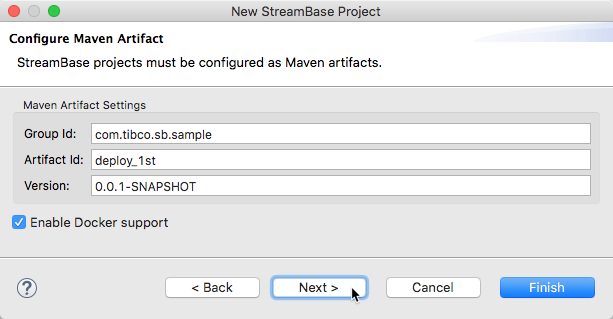
The >> wizard is more streamlined, with fewer decisions to make when creating a Docker image to contain your StreamBase or LiveView application. When creating a project for a StreamBase Application, a single check box now selects the option to create your application as a Docker image. See Creating and Running Docker Images for newly written instructions for this procedure.
- Docker Run Commands Now Require Explicit NODENAME Setting
-
As of release 10.4.0, when starting your Studio-generated Docker container with the docker run command, you must now explicitly specify a node name for the StreamBase Runtime node in your container, by using the
-e NODENAME=ornode.cluster--env NODENAME=options. The following shows a complete command:node.clusterdocker run -d --name firstapp -e NODENAME=A.cluster -p 2000:2000 sample/docker_1st
See Creating and Running Docker Images for updated Docker image creation instructions.
- Studio Configuration Directory Shared by Maintenance Releases
-
In previous releases, the StreamBase Studio Configuration Directory was named with a three-position version number, such as 10.2.0. This meant that every maintenance release, such as 10.2.1, got a separate configuration directory. For customers who added Eclipse plug-ins to Studio, this convention required them to reinstall those plug-ins with each maintenance release.
Starting with release 10.4.0, the configuration directory is named with a two-position version number such as 10.4. This means that all maintenance releases for each major.minor release can share the same Studio configuration settings, including Eclipse plug-ins added to Studio.
This change does not refer to the Studio workspace directory, whose default location naming syntax has not changed. TIBCO does still recommend using a new, empty workspace for each major.minor release, and importing your projects from the previous release to the new workspace.
- LiveView Web Now Added as Dependency for new LiveView Projects
-
Generation of LiveView projects using the Maven archetype now, by default, now includes the LiveView Web WAR file as a dependency. You can disable this by setting the archetype property
lvwebto false. - Node Not Running Error Message Improved
-
The
Node is not runningmessage that is returned when a node is started, but no target engines are available was improved to distinguish between the node that has not been started, compared to when there are no running engines. - Logging Behavior Changed
-
Logging Now Supports Transaction ID as a Pattern Element in Logs. The keyword
%transactionin a Logback configuration file places the current transaction ID, if any, into the log record for the current event. If no transaction is active,noneis inserted; if there is an active transaction, but the identifier cannot be determined,unavailableis inserted. See StreamBase Logback Extensions for further information.Additionally, when the default duplicate suppression filter is in place, the suppressed-message log event uses the same category and level as that of the suppressed messages. See Default Logging for default logging information.
Also note that duplicate message filtering is always in place. If you specify a filter, the filter is used. Otherwise the default is used.
Legacy log level integer settings used in StreamBase releases before 10.2.0 were removed in the Advanced tab of the EventFlow Fragment launch configuration.
Docker container logging is now supported.
- Round-Robin Data Mappers Now Support Dynamic Data Distribution Policies
-
Round-robin data mappers specified in StreamBase Runtime Application configuration files now support dynamic data distribution policies, in addition to static ones.
- HOCON Editor Improved
-
The HOCON Configuration File Editor now includes the option to search by HOCON property name to assist in locating the configuration file type to use.
- Web Input Adapter Changes
-
The TIBCO StreamBase® Web Input adapter's ResponseId field is renamed to SB_ResponseId. For more about the property, see Web Input Adapter.
Additionally, the adapter now handles HTTP metadata such as headers and cookies.
- epadmin Load Command Options Removed
-
This release removes the forcelocal option from the load configuration command. Providing a configuration file to the configuration target is always local to where the administration client is running, which may or may not be the same as the node.
Also removed from the command is the debug option. Use normal logging support to enable debug tracing in HOCON.
StreamBase 10.4.0 has the following deprecations.
- XML Normalizer Operator Deprecated
-
The XML Normalizer operator is now deprecated. Applications that use the operator continue to compile and run, but the operator no longer appears in the Operators and Adapters dialog. Documentation for the operator and its sample were removed.
- References to callcpp() Function Removed
-
StreamBase 10 does not support custom functions written in C++, but references to the callcpp() expression language function were still present in Studio function assistance. Those references were removed in this release.
- Deploy Parameter for mirrorclient Option Now Removed
-
The deploy parameter
mirrorclientfor Run Configurations is deprecated and removed in this release, including its documentation. - Command to Display Trusted Hosts Deprecated and Replaced
-
The epadmin display security --type hosts command is deprecated. Use epadmin display trusted instead.
- excludedProtocolPatterns Security Property Deprecated
-
The SecureCommunicationServerProfile and SecureCommunicationClientProfile root objects'
excludedProtocolPatternsproperty is now deprecated and still supported for backward compatabilty. - Supported External JDBC-compliant Databases Updated
-
The list of supported external JDBC-compliant databases was updated; the following databases are no longer supported:
Oracle 10g Microsoft SQL Server 2008 Sybase® ASE V12 Sybase IQ V12.7 Thomson Reuters Velocity Analytics 6.9
- API for Timestamps Changed
-
The Timestamp.INTERVAL_FORMAT public object was changed. Instead of com.ibm.icu.text.DecimalFormat, the API now uses java.text.DecimalFormat. If you are using the old INTERVAL_FORMAT object, you must change your import dependency to java.text.DecimalFormat.
If the ICU enhancement methods were used with the INTERVAL_FORMAT, you must find an alternative way of realizing similar functionalities, as the new API does not support the ICU enhancement methods. See this link for specific ICU enhancement methods.
This section describes known limitations as of the current release of the TIBCO SteamBase® component of TIBCO® Spotfire Data Streams. Each item includes a tracking number, description, and workarounds when possible.
Known limitations for using the EventFlow debugger are described separately, in the Limitations, Tips, and Tricks section of the Using the EventFlow Debugger page.
| SB‑45146 | Welcome launchbar shows a large red square. | |
| Description | The Welcome launchbar that appears in Studio's bottom right status bar is missing an icon, which the system replaces with a red square. On Windows, this red square can be confused with the Console view's red Terminate button. | |
| Workaround | None. | |
| SB‑44167 | iPhone connected to Mac can cause node launch failures. | |
| Description | Conditions: an iPhone is connected to a Mac with a USB-to-Lightning cable while Personal Hotspot is NOT enabled on the iPhone. Under these conditions, StreamBase Runtime nodes can fail to start. | |
| Workaround | Unplug the iPhone, or enable Personal Hotspot (whether or not you actually use Personal Hotspot). | |
| SB‑42478 | Cluster Monitor fails to start in the same cluster as monitored. | |
| Description | Attempting to start the Cluster Monitor in the same cluster as other applications can fail. | |
| Workaround | Run the Cluster Monitor feature in a separate cluster from the one containing the applications being monitored. | |
| SB‑42410 | Duplicate engine log files. | |
| Description | Duplicate engine log files exist in both the node directory's top level and in its logs subdirectory. The other user visible log files are now all located in the logs subdirectory.
|
|
| Workaround | None. The engine log files in the node directory's top level can be ignored. The same information is available in the engine
log files found in the logs subdirectory. The duplicate log files are expected to be removed in a future release.
|
|
| SB‑42324, SB‑30773, SB‑30846 | Inconsistent containerName behavior. | |
| Description | If you define a StreamBase container name with the containerName parameter of the sbengine HOCON configuration type, the runtime behavior is different for fragments run in Studio compared to epadmin launches. Studio places the EventFlow module in a container named default, following standards set in StreamBase 7.x, whereas epadmin honors the configuration-set container name.
|
|
| Workaround | None. | |
| SB‑42093 | Reloading the entire node configuration when attempting to configure the cluster monitor fails. | |
| Description | Attempting to reload a cluster monitor configuration embedded in a node deploy configuration file using the epadmin load configuration command quietly does nothing. | |
| Workaround | Create a separate configuration file with just the cluster monitor configuration and load and activate that configuration. | |
| SB‑41896 | Studio Support Wizard screen capture can fail on Mac. | |
| Description | The StreamBase Support Wizard screenshot feature preview may not display properly under certain multi-monitor and/or Retina display hardware conditions. | |
| Workaround | Use the Support Wizard to guide you to continue; the Support zip file will still contain the screenshot that you can verify in the archive prior to sending to TIBCO. For more information on the Support Wizard, see StreamBase Support Wizard for Troubleshooting. | |
| SB‑41099 | Calling Help via management API throws null pointer exception | |
| Description | Executing help commands using the DtmCommand.execute method in the management API fails with an exception.
|
|
| Workaround | None. This issue is expected to be resolved in a future release. | |
| SB‑35326 | Shutting down at debugger breakpoint causes engine to fail with an error. | |
| Description | Stopping a JVM with a breakpoint set in the debugger can cause the JVM to exit with an error that requires the node to be removed and reinstalled. | |
| Workaround | Ensure that no breakpoints are set in a debugger when shutting down a JVM. | |
| SB‑32239 | Bogus FATAL Invalid response trace seen when stopping a node.
|
|
| Description | When deploying fragments, a misleading fatal error message may be returned when terminating the fragment or the node on which
it is deployed. For example:MESSAGE: dtm : FATAL(RQ:A.dstest): Invalid response: <ready/> |
|
| Workaround | This message can be safely ignored. | |
| SB‑30948 | Trouble using the TERR operators on macOS. | |
| Description | On macOS, EventFlow modules that use the TERR operators with TERR versions before 4.4 fail to start even when using the Use Embedded TERR check box. This includes the TERR operator samples shipped with StreamBase. | |
| Workaround | If you can, update to TERR 4.4 or later, which is included with StreamBase 10.2.1 and later. If you must use a TERR version before 4.4, there are extra configuration steps on macOS, compared to Windows and Linux. These steps are detailed in the Operating System Configuration for TERR sections of the pages that describe the TERR Operator and the TERR Predict Operator. | |
| SB‑30898 | On Windows only, virtual network adapters slow fragment startup with StreamBase before 10.3.0. | |
| Description | If you have Oracle VM VirtualBox® or Microsoft Hyper-V installed, and one or more of your virtual machines has its virtual network adapter activated, this slows down the launch of EventFlow and LiveView fragments into a StreamBase Runtime node by several minutes. | |
| Workaround | Upgrade to StreamBase 10.3.0 or later, where this issue is corrected. If you must use an earlier release, temporarily disable the network adapter feature of your VirtualBox VMs as described in Windows and Virtual Network Interfaces. | |
| SB‑30270 | Failure to start Studio or Manager by double-clicking on macOS Sierra or High Sierra | |
| Description | MacOS releases 10.12 Sierra and 10.13 High Sierra have a security model that is stricter than previous releases. As part of
their security, these releases automatically block unsigned, downloaded application bundles with .app extension from being able to run. Unfortunately, this affects the application bundles for StreamBase Studio 10.x and StreamBase
Manager 10.x.
|
|
| Workaround | See the list of suggested workarounds in Starting StreamBase Studio on macOS Sierra. | |
| SB‑29050 | Error when debug stepping into or stepping over a Decision Table operator. | |
| Description | When using EventFlow debugging, stepping into or over a Decision Table operator is not supported. | |
| Workaround | Set your breakpoints upstream or downstream. Also, consider using the features of the Decision Table Analyzer to get a debug-like view of how the operator responds to different input tuples. | |
| SB‑28856 | Deleting decision table rows does not re-number rule IDs. | |
| Description | When using the Decision Table editor to delete and then add a new decision table rule, the rule ID does not renumber. For example, by deleting row 5 and adding a new row, the rule ID numbering is now 1...4, 6. | |
| Workaround | None. | |
| SB‑28669 | Error message: Grows beyond 64KB. | |
| Description | In rare cases, compiling small StreamBase applications can produce an error message containing the words Grows beyond 64KB.
|
|
| Workaround | Contact TIBCO StreamBase Technical Support for a workaround for this issue. | |
| SB‑28598 | Multi-container StreamBase applications cannot use the same ActiveSpaces metaspace. | |
| Description | StreamBase applications deployed with multiple containers receive metaspace already exists errors when attempting to connect to the same TIBCO ActiveSpaces metaspace from different containers.
|
|
| Workaround | None. | |
| SB‑28452 | Delta stream arc limitations in the EventFlow Debugger. | |
| Description | If a delta stream arc is a direct connection between a Query Table and an Output Stream, and if that arc has a Debugger breakpoint, the breakpoint is not hit at during debugging with the EventFlow Debugger. Similarly, while debugging, stepping over to try to reach that arc does not suspend on that arc. | |
| Workaround | Insert a no-op Map operator between the Query Table and the Output Stream. Then a breakpoint on the arc between the Query Table and the Map does work, and stepping over reaches that arc as well. | |
| SB‑26629 | RPM installation method issues on RHEL 7 | |
| Description | StreamBase and Live Datamart are supported on Red Hat Enterprise Linux version 7.x. The archive installer is the recommended
installation method. If you use the RPM installation method, RHEL 7 issues several warning messages during installation that
complain about file removal failures, and issues an overall warning that RHEL 7 "may not be compatible with this version of
StreamBase."
Despite these warnings, the installation does succeed. The only consequence is that |
|
| Workaround | Remove StreamBase directories manually to uninstall an RPM installation on RHEL 7. Otherwise, all StreamBase and Live Datamart processes run as expected on RHEL 7. | |
| SB‑26927 | Error message |
|
| Description | In compiling the updating expression for a dynamic variable where the expression references a named schema, if a field in
the tuple presented by the updating stream also has the same name as the named schema used in the expression, the field is
instead evaluated as a function. This raises the error |
|
| Workaround | The required migration step is to rename either the field or the named schema to eliminate the ambiguity. | |
| SB‑26237 | Constant definitions used as component properties are not used at runtime. | |
| Description | StreamBase Studio properly typechecks defined constants when used in operator properties, but at runtime substitutes their names instead of their values. | |
| Workaround | Do not use defined constants when specifying operator properties. | |
| SB‑26017 | Asynchronous timeouts for Gather operators in parallel applications can be inaccurate | |
| Description | High availability applications that include Gather operators may incorrectly compute timeout intervals because the operator relies on now() instead of calling out to the parallel scheduling service. | |
| Workaround | None | |
| SB‑22297 | Commented-out error input streams consume error tuples. | |
| Description | An error input stream, despite being disabled with the EventFlow comment-out feature, still catches errors thrown, but consumes any incoming errors and fails to pass them on. | |
| Workaround | To temporarily disable error streams, copy them to a placeholder module and remove them from the active module. | |
| SB‑21843 | In the TableAccessor API, ClassCastException is thrown if not using a Tuple from TableAccessor#createRow. | |
| Description | If methods in the com.streambase.sb.operator.TableAccessor interface that accept a Tuple are not provided a Tuple retrieved from TableAccessor#createRow, a ClassCastException may be thrown by the API.
|
|
| Workaround | Always use TableAccessor#createRow when using TableAccessor API methods.
|
|
| SB‑20449 | Display issues with years before 2 AD. | |
| Description | The timestamp data type can hold timestamp values in the range -(2^62) to (2^62)-1, and can successfully display any future date in the next 146 million years and any past date to around year 2 AD. However, the year value for dates earlier than 2 AD may not display correctly. | |
| Workaround | None. | |
| SB‑18294 | Union operator: sub-field order of tuple fields must match with strict options. | |
| Description | When using the Union operator with its Strict union or Declared schema options, the order of sub-fields of tuple fields must match exactly. This is in contrast with the default Loose union option, where strict sub-field ordering is no longer required. | |
| Workaround | None. | |
| SB‑16594 | Extract as Module feature copies items instead of importing them. | |
| Description | The Extract as Module feature makes a copy of the source module's definitions and named schemas, and places the copies in the newly created module. Best practice would be to import those features from the source module to the new module, and to copy all imports from the source to new modules. | |
| Workaround | After using Extract as Module, manually convert the copied definitions and named schemas to imports. | |
| SB‑14133 | On Linux, sb-config --cxx returns a setting for G++ newer than 4.5. | |
| Description | On Linux, in StreamBase samples that build C++ code, some of the example Makefiles show sb-config --cxx as the correct usage to determine the G++ compiler to use. On newer Linux distributions, this command returns the distribution's default G++ compiler, which may not be supported for building StreamBase client code, and sb-config does not honor the CC and CXX environment variables. | |
| Workaround | On such systems, install GCC and G++ 4.5, and edit the Makefiles to specify CXX=g++-4.5.
|
|
| SB‑13398 | Filter operators with very large predicate settings may result in a runtime EvalException error. | |
| Description | Filter operators with several output ports and complex expressions to evaluate for each port may result in a com.streambase.sb.runtime.exceptions.EvalException error when attempting to run the application that contains such a filter.
|
|
| Workaround | Add another Filter operator and split the predicate settings between the two Filter operators. | |
| SB‑13113 | Application output view does not display UTF-8 characters. | |
| Description | Both StreamBase Server and StreamBase Studio are fully capable of processing and displaying Unicode character sets, but neither is set to do so by default. | |
| Workaround | Follow the instructions in Unicode Support to configure StreamBase Server, Studio, and any StreamBase client applications to process the UTF-8 character set. | |
| SB‑10792 | The Query operator converts a JDBC data type differently when using explicit schemas than when using database data types. | |
| Description | When explicit schemas are used, the Query operator does not use database metadata to determine the mapping between JDBC data
types and StreamBase data types. The JDBC data type Types.TIME is normally converted to an interval timestamp since it has a time, but no date component. But when explicit schemas are
used, there is no database type information, so Types.TIME is converted to an absolute timestamp.
|
|
| Workaround | None. | |
| SB‑10486 | Hierarchical data restrictions. | |
| Description | Patterns by value do not support using the tuple data type for their on-value portion. Similarly, tuple subfields cannot be used as the index or primary key of a Query Table. | |
| Workaround | Design schemas so that the intended sort field or key is a top-level numeric or timestamp field, as described in StreamBase Pattern Matching Language. | |
| SB‑10363 | No StreamBase data type corresponding to Sybase timestamp. | |
| Description | When used with Sybase data sources, both EvenfFlow and StreamSQL fail to convert timestamps, resulting in typecheck errors.
This is because the Sybase timestamp is based on the Sybase varbinary data type.
|
|
| Workaround | In EventFlow or StreamSQL code that will be used for Sybase data sources, use the Sybase datetime data type instead of timestamp.
|
|
| SB‑6862 | Not all databases have native blob support. | |
| Description | For example, Microsoft SQL Server and Sybase do not have blob support. For these databases, you can write blobs into varbinary and possibly other types. But when blobs are read from a select statement, they are returned as strings, not blobs. | |
| Workaround | Add a Map operator and convert the string to a blob. | |
| SB‑5882 | Tuple dimensions do not reset counter when another dimension closes a window early. | |
| Description | A tuple-based dimension that closes due to other dimensions (for example, after another dimension times out) does not reset its counter. When this happens, the next window will close based on the total number of tuples received, resulting in a partially full dimension. | |
| Workaround | None. | |
| SB‑4559 | Join timeout is not asynchronous. | |
| Description | Join timeout in the Join operator is not asynchronous. That is, the Join operator does not remove a tuple from its buffer until the timeout has passed and another tuple arrives on the same input stream. Tuples received on one input stream do not affect the buffer of the other input stream. | |
| Workaround | None. | |
This section provides a list of errors corrected in release 10.4.0 of the TIBCO StreamBase® component of TIBCO® Spotfire Data Streams.
| Fixed in 10.4.0 | |
|---|---|
| Number | Resolution |
| TIBCO StreamBase® 10.4.0 incorporates all fixes resolved in the release 10.0 series through 10.4.0 and all fixes resolved in the release 7.7 series through 7.7.5. | |
| SB‑44922 | The Query operator was incorrectly failing to return all rows when a query was executed, and when the rows only differed in tuple sub-field values. This was resolved. |
| SB‑44907 | Studio inadvertently swapped the cluster and node names in the service name, when launching a Java fragment. This was fixed. |
| SB‑44748 | This release fixes an issue that caused the Diameter adapter message types CEA and CER to incorrectly report the Auth_Application_Id list, when a vendor was not linked.
|
| SB‑44740 | This release fixes premature failover when one engine of a multi-engine application is stopped. |
| SB‑44739 | The WITSML Trajectory Write operator was not inserting trajectory stations due to lack of UID being passed. The operator now properly uses the UID field. |
| SB‑44726 | When deploying an application, the epadmin install node command failed if a substitution variable value had multiple spaces:epadmin install node nodename=A.X application=myapplication.zip substitutions="MYNODE=My First Node" Unable to deploy application myapplication.zip: Error: invalid character "N" in variable name This issue was resolved. |
| SB‑44718 | In Studio, right-clicking on a package and selecting > would incorrectly select the top-level package for the application. This was fixed. |
| SB‑44635 | If an orphaned node directory exists during a fragment launch, a subsequent launch would fail with an error in a (node install) line in the Console view.
A node directory is the directory used to store the state information for a node used a fragment. Such a directory can become orphaned if the processes managing somehow die or are terminated abnormally, and therefore the node directory is not cleaned up as it normally would be. The problem is now fixed. A subsequent launch detects the orphaned directory and prompts whether it should be removed. When confirmed, the orphaned node directory is removed and the launch continues successfully. |
| SB‑44589 | When there is an exception during the start of the LiveView fragment, the dialog displayed after the launch is started did not dismiss itself. That problem is now fixed. The dialog now dismisses itself and the output from the failed launch is displayed in a separate dialog. |
| SB‑44575 | An issue prevented epadmin logging commands from working when a node was stopped. This was fixed. |
| SB‑44458 | This release fixes an exception error from the eFTL adapter that could occur when the adapter tried to subscribe when not connected to the server. The adapter no longer reports an exception if not connected when trying to subscribe. It now reports an error status message that you are not connected and must connect first. |
| SB‑44327 | In some circumstances, running the display partition command on a node failed with an NPE after an application was deployed. This was fixed. |
| SB‑44310 | The Web Input and Web Output adapters can now set a defined context path. |
| SB‑44306 | The epadmin enqueue stream command Help incorrectly reported input as a required parameter. This was fixed; input is now listed as optional.
|
| SB‑44240 | An issue caused the H2O adapter to fail loading an unsupervised classification model. This was fixed. |
| SB‑43910 | This release fixes an issue that prevented the HOCON editor from automatically generating sample EventFlowDeployment configurations. |
| SB‑43061 | The TIBCO BusinessEvents Fraud Detection sample was upgraded. The sample no longer requires you to convert it from StreamBase 7 to StreamBase 10 format. |
| SB‑42408 | Using dynamic partitioning for the Artifact Distribution Service (ADS) caused duplicate key errors when loading artifacts, if the artifacts were not replicated to all nodes in a cluster. This was fixed; ADS now supports artifact replication. |
| SB‑42407 | The Artifact Distribution Service (ADS) could incorrectly report existing artifacts as missing and create duplicate artifacts after a node is added or removed from a cluster, if high availability is not configured. This was fixed; ADS now supports artifact replication. |
| CQS‑4583 | In some cases, the StreamBase HOCON editor's auto-complete function would fail to suggest the appropriate HOCON property. This was fixed. |